
Claude Code router setups: running Claude Code on other models
Claude Code talks to one API format, and anything that speaks that format can answer it. Routers, gateways and local servers use that to swap in other models. The configuration takes minutes; knowing what breaks on the way takes longer.
TL;DR
- A Claude Code router is a local or hosted server that accepts Claude Code’s Anthropic-format requests and forwards them to another provider or model; Claude Code reaches it through
ANTHROPIC_BASE_URL.- Five setups cover most needs: native cloud flags for Claude on Bedrock or Vertex, a local server such as Ollama or vLLM, a hosted router, the open-source Claude Code Router app, or a self-hosted gateway such as LiteLLM or Bifrost.
- Anthropic does not support routing Claude Code to non-Claude models, and the substitute model has to handle Claude Code’s tool calls; Claude-only server tools such as web search disappear.
- Most failures are silent: a router that drops
cache_controlbills every turn as uncached input, and switching models mid-session empties the prompt cache.- For one developer, a local server is enough; for a team, a self-hosted gateway such as Bifrost adds per-developer keys, budgets, model aliases and session pinning.
A Claude Code router is a server that sits where Claude Code expects Anthropic’s API and answers with whichever model it is configured to use: Claude on a cloud account, GPT or Gemini, or an open-weight model on a local GPU. Claude Code only needs a base URL and a credential to talk to one, so the configuration is short. What takes longer is knowing which of Claude Code’s features survive the translation, and that depends on the router. This guide explains how Claude Code chooses its endpoint and model, compares the five common setups, walks through each configuration from the projects’ own documentation, and lists what breaks when the model on the other end is not Claude.
What a Claude Code router does
A Claude Code router accepts requests in the Anthropic Messages format, rewrites the model name if needed, translates the request into the target provider’s format, and streams the answer back in the format Claude Code expects. “Router”, “proxy” and “LLM gateway” describe the same position in the request path; they differ in how much policy they add.
Anthropic documents this position directly. Its LLM gateway page says any gateway exposing a supported API format works, and lists what a gateway provides: credentials held server-side, usage attributed by developer or team, budgets and rate limits in one place, audit logging, and provider switching without touching developer machines. The same page draws the line that matters for this guide: Anthropic “doesn’t support routing Claude Code to non-Claude models through any gateway.”
That leaves two distinct jobs a router can do:
- Same model, different account. Claude Code keeps talking to Claude, but through Amazon Bedrock, Google Cloud’s Agent Platform (the renamed Vertex AI), Microsoft Foundry or a shared organization key. Anthropic supports this.
- Different model. Claude Code’s requests are answered by GPT, Gemini, DeepSeek, Qwen or a local model. This works with several tools but is unsupported by Anthropic and depends on the model’s tool calling.
The Frontier Wire’s ranking of AI gateways for Claude Code, Codex CLI and Cursor compares gateways for the first job across three clients. This piece is the configuration companion: how to wire each option and what to check after.
How Claude Code chooses an endpoint and a model
Claude Code reads two sets of settings. Endpoint variables decide where a request goes; model variables decide which model name is sent. Both can be set in the shell or, more reliably, in the env block of ~/.claude/settings.json, which Anthropic’s gateway connection guide recommends because it also reaches background agents.
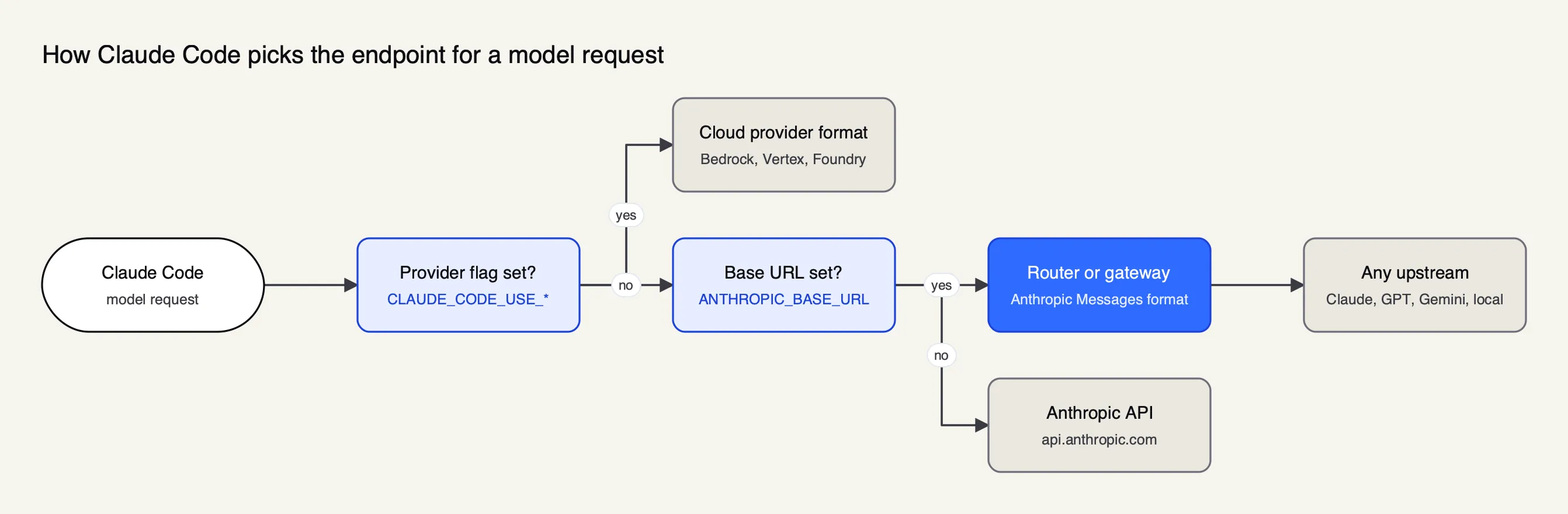 Figure 1: A provider flag outranks ANTHROPIC_BASE_URL, so a leftover CLAUDE_CODE_USE_BEDROCK sends traffic around the router.
The endpoint variables are documented in the environment variables reference and the gateway pages:
| Variable | What it does | Used for |
|---|---|---|
ANTHROPIC_BASE_URL | Sends Anthropic Messages requests to this address instead of api.anthropic.com | Every router, gateway and local server in this guide |
ANTHROPIC_AUTH_TOKEN | Sends the credential as Authorization: Bearer | Most routers; takes precedence over a saved claude.ai login |
ANTHROPIC_API_KEY | Sends the credential as x-api-key | Gateways that read that header |
apiKeyHelper (setting) | Runs a command that prints a rotating credential | Vault- or SSO-issued gateway keys |
CLAUDE_CODE_USE_BEDROCK, CLAUDE_CODE_USE_VERTEX | Switch to the cloud provider’s own format | Claude on Bedrock or Agent Platform, directly or through a gateway |
ANTHROPIC_CUSTOM_HEADERS | Adds headers such as a tenant or routing key | Gateways that route on a header |
The model variables work on top of whichever endpoint is active. ANTHROPIC_MODEL or claude --model sets the session model. ANTHROPIC_DEFAULT_OPUS_MODEL, ANTHROPIC_DEFAULT_SONNET_MODEL and ANTHROPIC_DEFAULT_HAIKU_MODEL decide what the opus, sonnet and haiku aliases resolve to, and CLAUDE_CODE_SUBAGENT_MODEL sets the default for subagents, according to Anthropic’s model configuration page. Those alias variables are how a router takes over every tier at once: point all three at a router-side name, and Claude Code’s planning, coding and background tasks all land where the router sends them.
Two details trip people up. The model configuration page notes that ANTHROPIC_BASE_URL “changes where requests are sent, not which model answers them”, so a base URL alone still asks for Claude by name. And the gateway connection guide says a gateway credential takes precedence over a saved claude.ai login, which moves billing from the subscription to whoever owns the key behind the router.
Five ways to point Claude Code at other models
The five setups below differ in where the router runs, which models it can reach, and how much team control it adds. The table summarises what each project documents; the sections after it give the configuration.
| Setup | Where it runs | Models it reaches | Team controls | Anthropic support |
|---|---|---|---|---|
| Native cloud flags | Nowhere: Claude Code calls the cloud API | Claude on Bedrock, Agent Platform, Foundry | Cloud IAM and billing | Supported |
| Local Anthropic-compatible server (Ollama, vLLM) | Developer machine or GPU host | Open-weight models, Ollama cloud models | None built in | Unsupported for non-Claude models |
| Hosted router (OpenRouter) | Vendor cloud | Claude and a large catalog of other models | Organization budgets and usage dashboard | Unsupported for non-Claude models |
| Claude Code Router app | Developer machine or Docker | Any provider it has a preset or custom endpoint for | Local client keys and quotas | Unsupported for non-Claude models |
| Self-hosted gateway (LiteLLM, Bifrost) | Your servers | Every provider configured on the gateway | Per-developer keys, budgets, routing, logs | Supported for Claude upstreams |
The first row needs no router at all. Setting CLAUDE_CODE_USE_BEDROCK=1 with AWS credentials, or CLAUDE_CODE_USE_VERTEX=1 with a project and region, makes Claude Code call the cloud provider in its own format. For teams that only want Claude on a different account, that is the simplest route; The Frontier Wire’s guide to failover across Bedrock, Vertex AI and Azure OpenAI covers what a gateway adds on top. The other four rows are where model substitution happens.
Claude Code with Ollama and local models
Running Claude Code on a local model needs a local server that speaks the Anthropic Messages API, a model with reliable tool calling, and a context window large enough for a repository. Ollama and vLLM both implement the format directly, so no separate router is required for a single developer.
Ollama. The Ollama Claude Code page offers a one-line launcher, ollama launch claude, which picks a model and starts Claude Code against the local server. The manual setup is three variables:
export ANTHROPIC_AUTH_TOKEN=ollama
export ANTHROPIC_API_KEY=""
export ANTHROPIC_BASE_URL=http://localhost:11434
claude --model qwen3.5
The token is a placeholder; the local server does not validate keys. Ollama recommends setting the context length to 64k or higher for larger repositories, and asks for a model that supports tools. Its Anthropic compatibility reference is candid about the gaps. Messages, streaming, tool calling and basic extended thinking are supported, but the token-counting endpoint, tool_choice, prompt caching, citations and PDF documents are listed as not supported, and budget_tokens for thinking is accepted but not enforced. Ollama can also serve hosted “cloud” models through the same endpoint, with an OLLAMA_API_KEY and https://ollama.com as the base URL.
vLLM. For a GPU server shared by a team, vLLM’s Claude Code integration page states that vLLM implements the Anthropic Messages API, so Claude Code can point at it with ANTHROPIC_BASE_URL. The model has to be served with tool calling enabled, for example:
vllm serve openai/gpt-oss-120b --served-model-name my-model \
  --enable-auto-tool-choice --tool-call-parser openai
Claude Code is then started with all three alias variables set to my-model, so every tier lands on the one served model. vLLM’s page also warns that a per-request hash Claude Code once injected into the system prompt defeated prefix caching; vLLM versions after 0.17.1 handle it, and older versions need CLAUDE_CODE_ATTRIBUTION_HEADER=0.
Which open-weight model to serve is its own question; The Frontier Wire’s ranking of open-weight models compares the current options, and the guide to routing between vLLM, Ollama and cloud LLMs covers putting a gateway in front of several local servers at once. Bifrost publishes provider guides for both Ollama and vLLM, which is the path when local models need to sit behind the same keys as hosted ones.
Claude Code with OpenRouter
OpenRouter is a hosted router with an Anthropic-compatible endpoint, so Claude Code connects to it like any other gateway. Its Claude Code guide sets four variables: ANTHROPIC_BASE_URL to https://openrouter.ai/api, an OpenRouter key in ANTHROPIC_AUTH_TOKEN, an explicitly empty ANTHROPIC_API_KEY, and optionally CLAUDE_CODE_ENABLE_GATEWAY_MODEL_DISCOVERY=1 to populate the /model picker. A developer previously signed in with Anthropic should run /logout once so the cached login does not conflict.
OpenRouter’s documentation describes what it adds as failover between providers that serve Anthropic models, organizational budget controls, and a usage dashboard. It also sets a clear boundary. The guide opens with a warning that the integration “is only guaranteed to work with the Anthropic first-party provider” and recommends making Anthropic the top-priority provider. Model overrides use the same alias variables as everywhere else, and the guide notes that Claude Code “is optimized for Anthropic models and may not work correctly with other providers.”
For teams weighing a hosted router against a self-hosted one, The Frontier Wire’s comparison of gateway types explains what changes when token traffic leaves your network, and the cost-control guide covers how budgets and rate limits work at either kind.
The Claude Code Router project
Claude Code Router, often shortened to CCR, is the open-source project most people mean when they search for a Claude Code router. Its README describes it as “a local model gateway and control plane for coding agents” that gives Claude Code, Codex, OpenCode and several other agents one stable local endpoint. The project is MIT-licensed.
CCR runs in three forms: a desktop app for macOS, Windows and Linux, an npm CLI that needs Node.js 22 or newer (npm install -g @musistudio/claude-code-router, then ccr ui), and a Docker image. The local gateway listens on http://127.0.0.1:3456 by default, with a management UI on port 3458 for the CLI and Docker builds. Setup follows the same order in each: add a provider and its key, start the server, then apply an agent profile that writes Claude Code’s settings for the selected model.
The README lists support for OpenAI Chat and Responses, Anthropic Messages, Gemini, OpenRouter, DeepSeek, SiliconFlow, Moonshot, Kimi Code, Mistral, Z.AI, Bailian and custom compatible endpoints. Its routing layer adds conditions on headers and bodies, rewrites, retries, credential pools and ordered fallback models, and its logs show the resolved provider, model, tokens, latency and estimated cost per request. It also adds capabilities to models that lack them, such as web search and MCP tools through its ToolHub.
CCR is built for a developer’s own machine. It issues local client keys with request and token limits, but central identity, organization-wide budgets and a shared audit trail are outside what its README describes, which is where a self-hosted gateway takes over.
Claude Code with LiteLLM
LiteLLM is an open-source Python proxy that translates Anthropic-format requests to more than a hundred providers. Its non-Anthropic models tutorial is the most detailed public walkthrough of the model-substitution case.
The setup has three parts. A config.yaml lists each model under a model_name that Claude Code will send, mapped to a provider model and key. The proxy starts with litellm --config config.yaml on port 4000 and serves the Anthropic format on /v1/messages. Claude Code then points at it:
export ANTHROPIC_BASE_URL="http://0.0.0.0:4000"
export ANTHROPIC_AUTH_TOKEN="$LITELLM_MASTER_KEY"
claude --model gemini-3.8-flash
The tutorial recommends issuing virtual keys scoped to specific models instead of handing developers the master key. It also documents a quirk of Claude Code’s model picker: with gateway model discovery on, Claude Code calls /v1/models at startup but keeps only IDs containing claude or anthropic, so a non-Anthropic model needs a Claude-flavoured name to appear, with a display_name to show a readable label. LiteLLM’s Claude Code quickstart covers the Claude-on-Claude case, including a pass-through /anthropic endpoint and an apiKeyHelper that mints per-user JWTs. The Frontier Wire’s survey of LiteLLM alternatives compares it with the other self-hosted gateways.
Configuring Bifrost as the Claude Code gateway
Bifrost is an open-source AI gateway written in Go and published under Apache 2.0 by Maxim AI, and it serves here as the worked example of a team-grade setup because its documentation covers every step of the Claude Code path: credentials, model aliasing, session pinning and verification. It puts 25+ providers and 10,000+ models behind one OpenAI-compatible API, and its published benchmark reports 11 µs of added overhead per request at 5,000 RPS on an AWS t3.xlarge. The gateway runs as a single binary, in Docker or on Kubernetes from the GitHub repository.
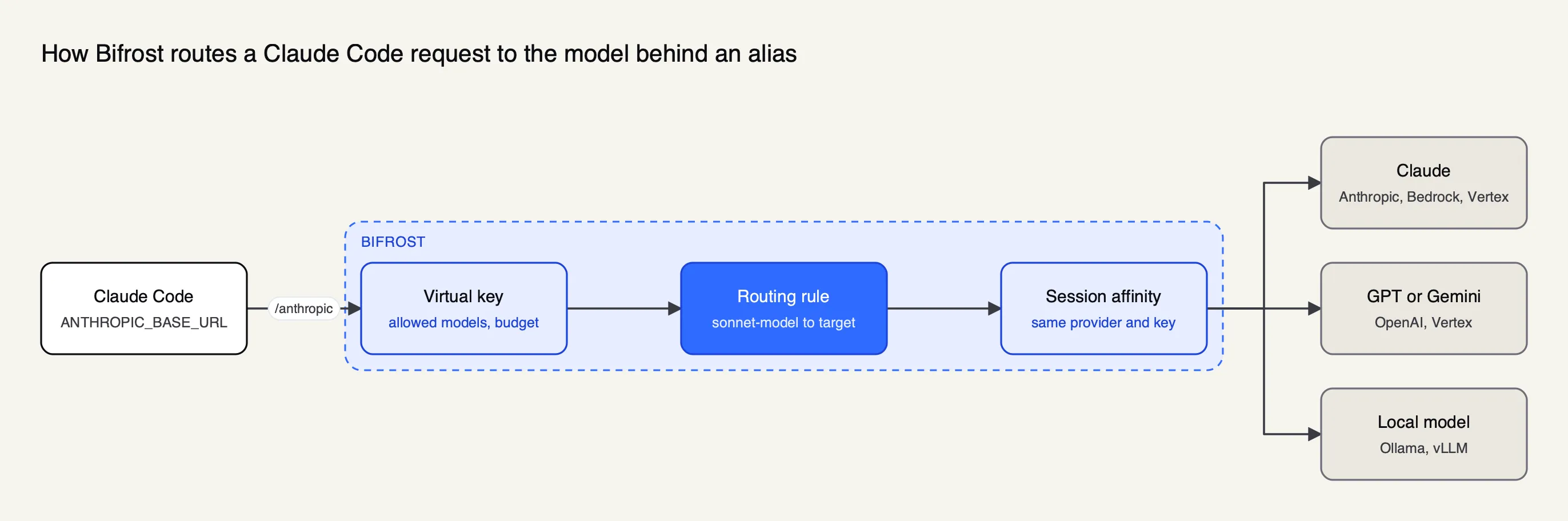 Figure 2: The developer machine only knows the alias; which model answers is a gateway setting that can change per team.
Connect. The Bifrost Claude Code guide points ANTHROPIC_BASE_URL at the gateway’s /anthropic path and puts a virtual key in ANTHROPIC_AUTH_TOKEN, so no Anthropic login is needed:
{
  "env": {
    "ANTHROPIC_BASE_URL": "https://bifrost.example.com/anthropic",
    "ANTHROPIC_AUTH_TOKEN": "sk-bf-your-virtual-key"
  }
}
A virtual key carries the developer’s allowed providers and models, a budget and rate limits; the guide notes that a new key with no provider configuration denies everything, so a 403 usually means the key does not allow that model. Teams that want to keep billing on Claude subscriptions can instead sign in with /login and send the virtual key in an x-bf-vk header, which keeps the gateway’s governance and logs while the subscription pays. The Bifrost CLI can also launch Claude Code with the URL, credential and model set for one session, without editing settings files.
Choose models. There are two documented ways to send Claude Code somewhere else. Provider-qualified pinning sets the alias variables to names such as bedrock/global.anthropic.claude-sonnet-4-6, vertex/gemini-3.1-pro or openai/gpt-5.5, and /model openai/gpt-5.5 switches mid-session. Dynamic aliasing goes further: Claude Code sends a fixed label such as sonnet-model, and a routing rule in the gateway rewrites it to any configured model, optionally only when the user-agent starts with claude-cli. The aliasing documentation describes both mechanisms; the dynamic form lets one team’s sonnet-model resolve to Claude on Bedrock while another’s resolves to a cheaper model, with no change on laptops. Step-by-step guides cover Claude Code with OpenAI models and Claude Code with Gemini models.
Keep sessions on one cache. Claude Code sends x-claude-code-session-id on every request, and Bifrost’s session affinity uses it with no configuration to keep a session on the provider and key that served it. Subagents send their parent’s session ID, so a run with parallel subagents stays on one provider and keeps hitting the prompt cache it warmed. When a provider returns errors, retries and fallbacks rotate keys and then move to the next provider in the chain.
Verify. Run /status in Claude Code and confirm the Anthropic base URL line ends in /anthropic and the credential line names ANTHROPIC_AUTH_TOKEN or apiKeyHelper; then check the gateway’s request log for the expected key, provider and model. The guide’s compatibility notes match Anthropic’s: any substitute model must support the tool calling Claude Code relies on, and Claude-specific server tools such as web search, computer use and citations exist only on Claude models. A longer enterprise guide to running Claude Code on non-Anthropic models and a bring-your-own-model setup guide for engineering teams cover rollout at scale.
Enterprise tier. SSO sign-in through the Bifrost CLI, identity-provider tokens as credentials, clustering and audit logs are part of Bifrost Enterprise; virtual keys, aliasing, session affinity and fallbacks are in the open-source build.
What breaks when the model is not Claude
Claude Code is written against Claude’s API, so a non-Claude model behind a router has to reproduce more than text completion. Anthropic’s gateway compatibility guide lists what Claude Code sends and what happens when it is stripped, and most failures fall into four groups.
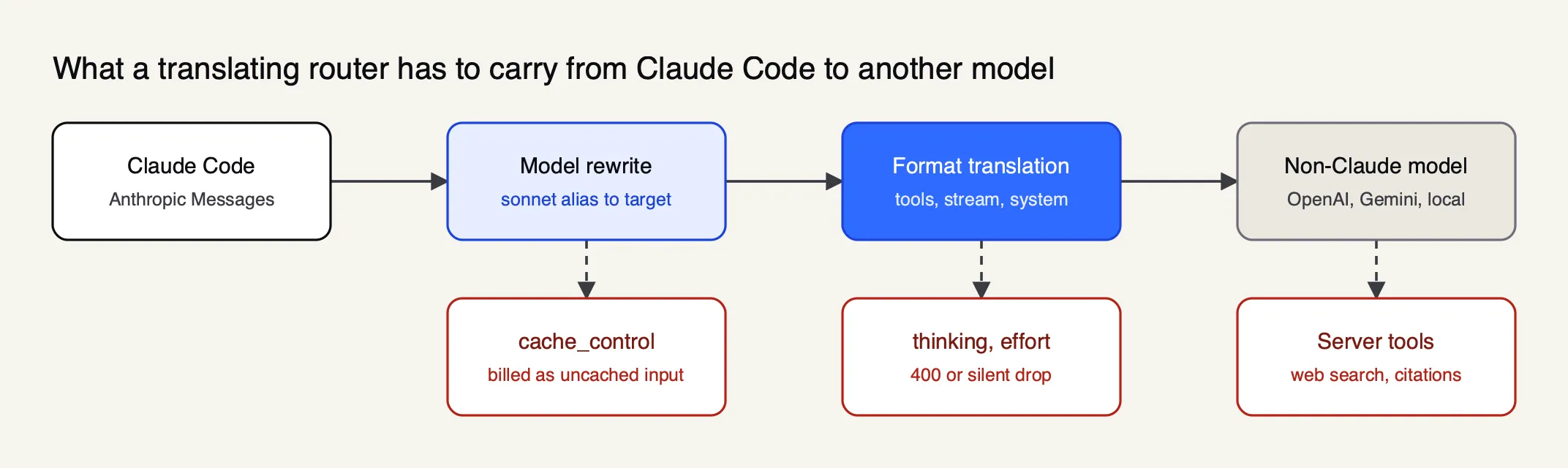 Figure 3: Only some of these losses raise an error; a dropped cache marker shows up only on the bill.
Tool calling. Every file read, edit and shell command is a tool call, so a model that emits malformed tool arguments fails at the first edit. vLLM’s page says Claude Code “requires a model with strong tool calling capabilities,” and Ollama limits compatibility to models that support tools. Streaming matters too: Bifrost’s guide warns that an upstream which does not stream function-call arguments correctly delivers tool calls with empty arguments, and recommends testing the same task on a known-good Claude model to separate model problems from router problems.
Claude-only features. Server-side tools such as web search, computer use and citations run on Anthropic’s side and are missing on other models. Remote Control and voice dictation also depend on a claude.ai identity, and the gateway connection guide says both are unavailable while a gateway credential is active.
Request fields the upstream rejects. For a model name it does not recognize, such as a router alias, Claude Code assumes a current Claude model and sends adaptive reasoning, effort and context-management fields. The compatibility guide says an upstream that rejects them returns a 400; Claude Code retries without a rejected thinking field, and CLAUDE_CODE_DISABLE_EXPERIMENTAL_BETAS=1 removes the pre-release fields entirely. Claude Code also assumes a 200K context window for unrecognized IDs, which can trigger compaction too late on a smaller local model.
Capability declarations that do nothing. The ANTHROPIC_DEFAULT_*_MODEL_SUPPORTED_CAPABILITIES variables tell Claude Code which features a pinned model supports, but the compatibility guide states they apply only to the Bedrock, Vertex, Foundry and Mantle configurations and “have no effect behind an ANTHROPIC_BASE_URL gateway.” Behind a router, the documented fix is a modelOverrides entry that maps a real Claude model ID to the router’s alias.
Prompt caching and cost behind a router
Prompt caching is where a router most often changes the bill without anyone noticing. Claude Code attaches cache_control markers to its system prompt and messages; the compatibility guide says a gateway that drops them or converts block-form content to plain strings causes no error, and the conversation “bills as uncached input on every turn.”
Three rules follow from the primary documentation:
- Forward the markers. The router must pass
cache_controlunchanged and keep thesystemarray in its original order, so the attribution block Claude Code prepends stays where Anthropic’s endpoint strips it. If the router must reshape system content,CLAUDE_CODE_ATTRIBUTION_HEADER=0removes the block at the client. - Stay on one provider. Provider caches are per provider and usually per key, so a router that load-balances turns across accounts loses the cache on every hop. Session pinning, as in Bifrost’s affinity feature, or a fixed provider order avoids it.
- Switch models deliberately. Anthropic’s prompt caching page says each model has its own cache, so a
/modelswitch makes the next request read the whole conversation with no cache hits. Claude Code asks for confirmation while the cache is still warm.
Local servers change the arithmetic rather than removing it. Ollama does not implement Anthropic-style prompt caching, and vLLM relies on its own automatic prefix caching, which works only when the prompt prefix is stable. Where the model is hosted, routing cheaper models into Claude Code’s background and subagent slots is the main saving; an analysis of how to reduce Claude Code token costs works through the numbers, and the Claude Code resource hub collects related setups.
Locking down a router for a team
A router on one laptop is a convenience; the same router for fifty developers is infrastructure, and Anthropic’s rollout guidance treats it that way. Four settings from the Claude Code documentation turn a personal setup into a governed one.
| Control | Setting | Effect |
|---|---|---|
| Pin the destination | Managed settings allowedProviders: ["customEndpoint"] plus the gateway’s ANTHROPIC_BASE_URL in the same file | Claude Code refuses sessions pointed anywhere else, including Anthropic directly (v2.1.285 or later) |
| Rotate credentials | apiKeyHelper with CLAUDE_CODE_API_KEY_HELPER_TTL_MS | No long-lived key in settings; the helper is re-run on expiry and after a 401 |
| Keep keys out of Git | User or .claude/settings.local.json, never .claude/settings.json | Project settings are committed and shared with everyone who clones the repository |
| Close side channels | CLAUDE_CODE_DISABLE_NONESSENTIAL_TRAFFIC=1 | Stops update checks and telemetry outside the gateway path; also disables auto-updates |
Managed settings also carry the model allowlist (availableModels, enforceAvailableModels), which limits what developers can select in /model regardless of what the router serves. Pairing that client-side list with per-key model allowlists on the gateway gives two independent checks. Bifrost’s walkthrough for integrating Claude Code with the gateway shows the gateway side of the same rollout.
Choosing a setup
The right Claude Code router depends on who is using it and which models it must reach. The table maps common situations to the setup the documentation supports best.
| Situation | Setup | Why |
|---|---|---|
| One developer, Claude on a company AWS or GCP account | Native CLAUDE_CODE_USE_BEDROCK or CLAUDE_CODE_USE_VERTEX | Supported by Anthropic, no extra service |
| One developer, offline or private code, local GPU | Ollama or vLLM directly | Anthropic format built in; nothing between Claude Code and the model |
| One developer trying many hosted models | Claude Code Router or OpenRouter | Presets, fallbacks and a model picker with little setup |
| A team on Claude, needing per-developer keys and budgets | Self-hosted gateway: Bifrost or LiteLLM | Central identity, spend limits, logs, Claude on any cloud |
| A team mixing Claude with cheaper or local models | Self-hosted gateway with aliasing and session pinning | Model choice becomes a gateway rule, and caches survive long runs |
For the team rows, The Frontier Wire’s ranked comparison of AI gateways for coding agents weighs Bifrost, LiteLLM, Kong AI Gateway, Vercel AI Gateway and OpenRouter on per-developer budgets, prompt-cache continuity and deployment.
Limits of this guide
Every configuration here is taken from the projects’ own documentation, read in October 2026; The Frontier Wire did not benchmark model quality, tool-call accuracy or latency for any combination. Claude Code changes quickly, and several behaviours described above carry minimum version numbers, so check /status and the release notes after an upgrade.
The guide also does not rank substitute models for coding. A model that scores well on a chat benchmark can still fail Claude Code’s tool loop, so the practical test is a representative task run on the target model and on a Claude model through the same router. If the Claude run succeeds and the other fails, the problem is the model, not the Claude Code router.
Sources
- Claude Code docs: Other LLM gateways
- Claude Code docs: Connect Claude Code to an LLM gateway
- Claude Code docs: Gateway compatibility guide
- Claude Code docs: Model configuration
- Claude Code docs: Environment variables
- Claude Code docs: Prompt caching
- Ollama docs: Claude Code
- Ollama docs: Anthropic compatibility
- vLLM docs: Claude Code integration
- LiteLLM docs: Use Claude Code with non-Anthropic models
- LiteLLM docs: Claude Code quickstart
- Bifrost docs: Claude Code
- Bifrost docs: Aliasing models
- Bifrost docs: Session affinity
Questions readers ask
What is Claude Code Router?
Claude Code Router is an open-source, MIT-licensed project that runs a local model gateway on port 3456. Claude Code and other coding agents send requests to it, and it forwards them to the provider and model selected by its routing rules, with retries, fallbacks and request logs. It ships as a desktop app, an npm CLI and a Docker image.
Can Claude Code use models other than Claude?
Yes, through any server that accepts the Anthropic Messages format, such as LiteLLM, Bifrost, Ollama or vLLM. Anthropic's documentation states that it does not support routing Claude Code to non-Claude models through any gateway, so the setup works but is unsupported. The substitute model must handle Claude Code's tool calls reliably, and Claude-only server tools such as web search will not be available.
How do I use Claude Code with a local model?
Run a local server that speaks the Anthropic Messages API, such as Ollama or vLLM, set ANTHROPIC_BASE_URL to its address and ANTHROPIC_AUTH_TOKEN to any placeholder value, then start Claude Code with the local model name. Pick a model with strong tool calling. Ollama recommends a context length of 64k tokens or more for larger repositories.
Does Claude Code work with OpenRouter?
Yes. OpenRouter exposes an Anthropic-compatible endpoint at openrouter.ai/api; Claude Code reaches it with ANTHROPIC_BASE_URL, an OpenRouter key in ANTHROPIC_AUTH_TOKEN and an empty ANTHROPIC_API_KEY. OpenRouter's own documentation says the integration is guaranteed only with Anthropic's first-party provider and recommends setting Anthropic as the top-priority provider.
Does prompt caching work when Claude Code goes through a proxy?
It works only if the proxy forwards Claude Code's cache_control markers unchanged and the upstream supports caching. Anthropic's gateway guide notes that a proxy which strips them produces no error; the conversation is simply billed as uncached input on every turn. Ollama lists prompt caching as unsupported, and switching models mid-session always starts a new cache.