
Codex vs Claude Code: how the two coding agents compare in 2026
OpenAI's Codex and Anthropic's Claude Code now cover the same ground, from terminal to IDE to cloud sessions. They still differ on defaults that matter: who sandboxes what, how plans meter usage, what is open source and how an administrator locks a fleet down.
TL;DR
- Codex vs Claude Code is now a comparison of two full agent platforms: both run in a terminal, IDEs, a desktop app and cloud sessions, both read AGENTS.md, and both speak MCP.
- Codex sandboxes commands by default with network off; Claude Code asks before each new tool by default and leaves its OS sandbox off until it is enabled.
- The Codex CLI is open source under Apache 2.0 and runs on ChatGPT’s Free tier; Claude Code is proprietary and starts with the $20 Pro plan.
- On API keys, GPT-6.1 Sol and Sonnet 5.5 list at the same token prices; Claude Code’s default, Opus 5.5, costs twice as much per token.
- Teams that run both agents can govern them in one place with an AI gateway such as Bifrost, which accepts each agent’s native API format.
OpenAI’s Codex and Anthropic’s Claude Code are agentic coding tools: programs that read a repository, plan changes, edit files and run commands in a loop with a large language model. The question of Codex vs Claude Code used to be a choice between two terminal tools with different models behind them. In October 2026 it is a choice between two platforms that cover the CLI, the IDE, a desktop app, cloud sessions, code review and CI, and that differ mainly in defaults, pricing and administration. This comparison is built from each vendor’s current documentation and pricing pages, read on the publication date.
How the two agents were compared
A coding agent is judged here on the eight criteria below, which are the questions a team asks before standardizing on one. Each is answered from OpenAI’s and Anthropic’s own pages; no claim depends on a hands-on benchmark run by this publication, and none was run.
| Criterion | What it covers | Why it matters |
|---|---|---|
| Models | Default and recommended models, context window | Sets quality, speed and the cost of every turn |
| Pricing | Subscription tiers, usage metering, API-key billing | Decides who can use it and how spend grows |
| Sandbox | OS-level isolation of commands, network defaults | Limits what a wrong or hijacked action can touch |
| Permissions | Approval modes and rule syntax | Decides how often a developer is interrupted |
| Instructions | Project files the agent reads before working | Carries team conventions into every session |
| Extensions | MCP, plugins, skills, subagents, hooks | Connects the agent to internal tools |
| Surfaces | CLI, IDE, desktop, cloud, CI | Where the agent can run and who can start it |
| Enterprise controls | Managed policy, audit, analytics, gateway support | Whether a security team can approve a rollout |
Codex vs Claude Code at a glance
The short version is that the two products have converged on features and diverged on defaults. Codex ships with a sandbox switched on and an open-source CLI; Claude Code ships with per-tool approval prompts and a larger set of permission modes. The table summarizes the differences documented below.
| Codex (OpenAI) | Claude Code (Anthropic) | |
|---|---|---|
| Recommended model | GPT-6.1 Sol for complex work; GPT-6 Luna for focused tasks | Opus 5.5 by default; Sonnet, Haiku and Fable by alias |
| Context window | 1,050,000 tokens on GPT-6.1 Sol | 1M tokens by default on Opus 4.7 and later |
| Entry plan with the agent | ChatGPT Free (GPT-6 Luna, desktop app, rollout) | Claude Pro, $20 a month ($17 annual) |
| Team plan | Business, $20 per user a month annual | Team, $20 per standard seat a month annual |
| Command sandbox | On by default; network off | Off by default; enabled with /sandbox |
| Default approvals | Auto preset: edits and commands in workspace run | Prompts on first use of each tool |
| Project instructions | AGENTS.md (32 KiB default cap) | CLAUDE.md, or AGENTS.md in its place |
| MCP transports | STDIO and streamable HTTP, OAuth | HTTP (recommended) and stdio, OAuth |
| Source | CLI open source, Apache 2.0, Rust | Proprietary, Anthropic commercial terms |
| Fleet policy | requirements.toml, Agent Security console | managed-settings.json, MDM or claude.ai console |
Models and context windows
Codex runs on OpenAI’s GPT-6 family and Claude Code on Anthropic’s Claude family, and neither vendor supports swapping in the other’s models through its own sign-in. OpenAI recommends GPT-6.1 Sol for complex coding; Anthropic sets Opus 5.5 as Claude Code’s default for every paid plan and the API.
OpenAI’s Codex models page recommends GPT-6.1 Sol “for complex coding and agentic workflows” and GPT-6 Luna “for focused, repeatable tasks”, with GPT-6 Astra as the most capable and most expensive option. The same page records a transition worth noting for anyone reading older comparisons: GPT-5.5 retired from Codex for ChatGPT sign-ins on October 14, 2026, while API-key sessions were unaffected. The GPT-6.1 Sol model page lists a 1,050,000-token context window and 128,000 maximum output tokens.
Claude Code selects models by alias. Anthropic’s model configuration docs define opus, sonnet, haiku, fable and best, plus opusplan, which plans with Opus and executes with Sonnet. The default setting resolves to Opus 5.5 on Pro, Max, Team, Enterprise and the Anthropic API, and Fable 5.1, Anthropic’s model for the longest-running tasks, is never the default; choosing it on a subscription triggers a consent prompt because it bills usage credits. Opus 4.7 and later, Sonnet 5 and later and Haiku 5.5 run with a 1M-token window by default.
Both agents expose a reasoning dial. Codex sets reasoning effort per model with /model, and offers an Ultra mode that splits a large task across subagents. Claude Code has effort levels and extended thinking, and an organization can cap effort centrally. For a background on why that dial changes the bill as much as the model choice, see the publication’s analysis of the cost problem in the reasoning-model era.
Codex vs Claude Code pricing
Both agents come bundled with a chat subscription, and both can instead run on an API key billed per token. At $20 a month the entry plans cost the same; the gap opens at the free tier, where only Codex is available, and at the top, where usage metering differs.
Subscription plans
| Tier | ChatGPT (Codex) | Claude (Claude Code) |
|---|---|---|
| Free | $0, GPT-6 Luna in the desktop app, subject to rollout | $0, Claude Code not included |
| Low-cost | Go, $8 a month, GPT-6 Luna | No equivalent |
| Individual | Plus, $20 a month | Pro, $20 monthly or $17 a month annual |
| Heavy use | Pro, $100, $200 or $500 a month | Max 5x at $100 or Max 20x at $200 a month |
| Team | Business, $20 per user a month annual ($25 monthly) | Team, $20 standard seat or $100 premium seat a month annual |
| Enterprise | Contact sales; flexible credit pricing | $20 per seat a month annual plus usage at API rates, 20-seat minimum |
Sources: OpenAI’s Codex pricing page and Anthropic’s Claude pricing page, both read on October 15, 2026.
Metering works differently. OpenAI publishes ranges rather than limits: on Plus and Standard Business, GPT-6.1 Sol allows roughly 15 to 160 local messages per five-hour window, and GPT-6 Luna 350 to 3,000, with weekly limits possible on top; Pro plans have no five-hour limit at present. Fast mode draws on included usage at 2.5 times the Standard rate. Anthropic describes Max as five or twenty times Pro’s usage, and Max also carries $100 or $200 a month in API credits.
API-key billing
Running either agent on an API key moves billing to per-token rates, which is the usual setup for CI and shared machines. OpenAI’s API pricing lists GPT-6.1 Sol at $2.00 input and $10.00 output per million tokens for prompts up to 272K tokens, and $4.00 and $15.00 above that, with cached input at $0.10. Anthropic lists Sonnet 5.5 at $2 and $10, Opus 5.5 at $4 and $20, and Fable 5.1 at $10 and $50, with discounted rates for cache reads.
| Model (API key) | Input / 1M tokens | Output / 1M tokens | Cached input / 1M |
|---|---|---|---|
| GPT-6.1 Sol (≤272K prompt) | $2.00 | $10.00 | $0.10 |
| GPT-6 Luna (≤272K prompt) | $0.10 | $0.50 | $0.01 |
| Opus 5.5 | $4.00 | $20.00 | $0.20 |
| Sonnet 5.5 | $2.00 | $10.00 | $0.10 |
| Haiku 5.5 (≤100K prompt) | $0.10 | $0.50 | $0.01 |
Anthropic also publishes a real-world figure: across enterprise deployments, the Claude Code costs page reports an average of about $13 per developer per active day and $150 to $250 per developer per month, with 90% of users below $30 per active day. OpenAI does not publish an equivalent per-developer average for Codex. Neither number transfers cleanly to another team, because agentic sessions spend most of their tokens re-reading context, which is why cache hit rates matter as much as list prices. The publication’s guide to LLM cost management at the gateway covers the budget mechanics.
Codex sandbox and Claude Code permissions
The two agents put the safety boundary in different places by default. Codex starts every local session inside an OS-enforced sandbox with network access off; Claude Code starts with permission prompts and an optional sandbox for shell commands. Both can be configured to match the other.
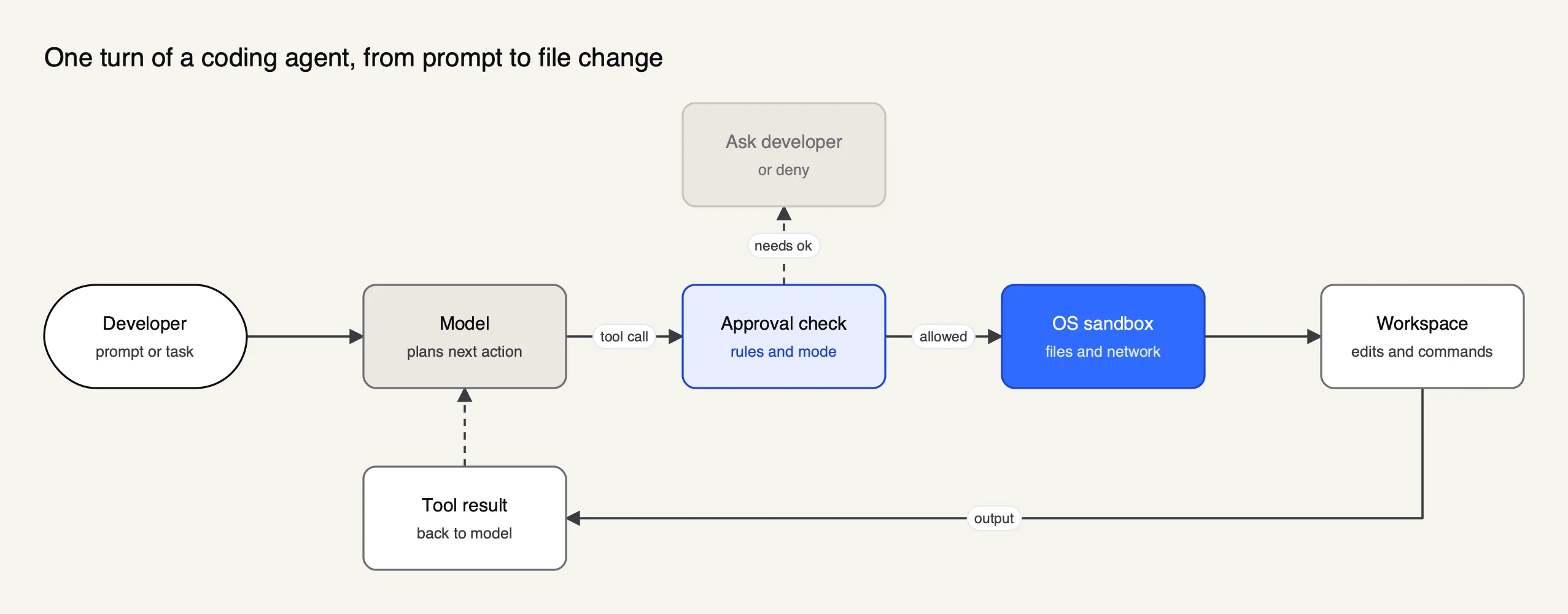
Figure 1: Both agents run the same loop; they differ in where the approval check and the sandbox sit by default.
How Codex isolates commands
OpenAI’s approvals and security page describes two layers: a sandbox mode, which decides what Codex can technically do, and an approval policy, which decides when it must ask. In the CLI and IDE extension the default workspace-write mode limits writes to the active workspace and keeps the network off. The Auto preset lets Codex read, edit and run commands in the working directory without asking, and asks before writing outside it or using the network. The sandbox uses Seatbelt on macOS, bubblewrap on Linux and WSL2, and a native Windows sandbox in PowerShell, according to OpenAI’s sandboxing page.
When network access is enabled, an optional proxy restricts outbound traffic to allow-listed domains, with deny rules taking precedence. Codex also asks before MCP or app tool calls that advertise a destructive annotation. On GPT-6 Astra, an asynchronous safety monitor can pause a task it judges unsafe; in the CLI a paused task ends rather than resuming.
How Claude Code approves actions
Claude Code’s permissions docs define six modes. The default prompts on the first use of each tool; acceptEdits auto-accepts file edits in the working directory; plan explores read-only; auto lets a background classifier approve actions that match the request; dontAsk denies anything that would prompt; and bypassPermissions skips prompts and is meant only for containers and VMs. Rules can allow or deny by tool and argument, such as a specific Bash command pattern or a file path.
The sandboxed Bash tool is off by default and turned on with /sandbox or sandbox.enabled. Once on, shell commands can write only to the working directory and temp space, and reach the network only through a local proxy whose allowed-domain list starts empty. Anthropic’s docs are explicit about the boundary: the sandbox covers shell commands, while file tools, MCP servers and hooks run outside it, and native Windows runs commands unsandboxed unless Claude Code runs in WSL2. Reads are broad by default, including credential files, until denyRead rules narrow them.
The practical difference is the out-of-the-box posture. A new Codex user is sandboxed and rarely prompted; a new Claude Code user is prompted often and not sandboxed. Both end in the same place once a team writes its policy, which is the subject of the next two sections.
AGENTS.md and project instructions
Both agents read a markdown file of project conventions before working, and the files are now largely interchangeable. Codex reads AGENTS.md; Claude Code reads CLAUDE.md and will read a repository’s AGENTS.md in its place.
OpenAI’s AGENTS.md guide describes an instruction chain: a global file in ~/.codex, then one file per directory from the repository root down to the working directory, concatenated so that closer files override earlier ones. Codex stops adding files at 32 KiB by default, set by project_doc_max_bytes, and an AGENTS.override.md file takes precedence at any level.
Anthropic’s memory docs describe CLAUDE.md files at managed-policy, user, project and local scope, and an auto-memory feature that lets Claude record learnings across sessions. The support for AGENTS.md means a team that keeps one instructions file can serve both agents from it, which matters for organizations that let developers pick either tool.
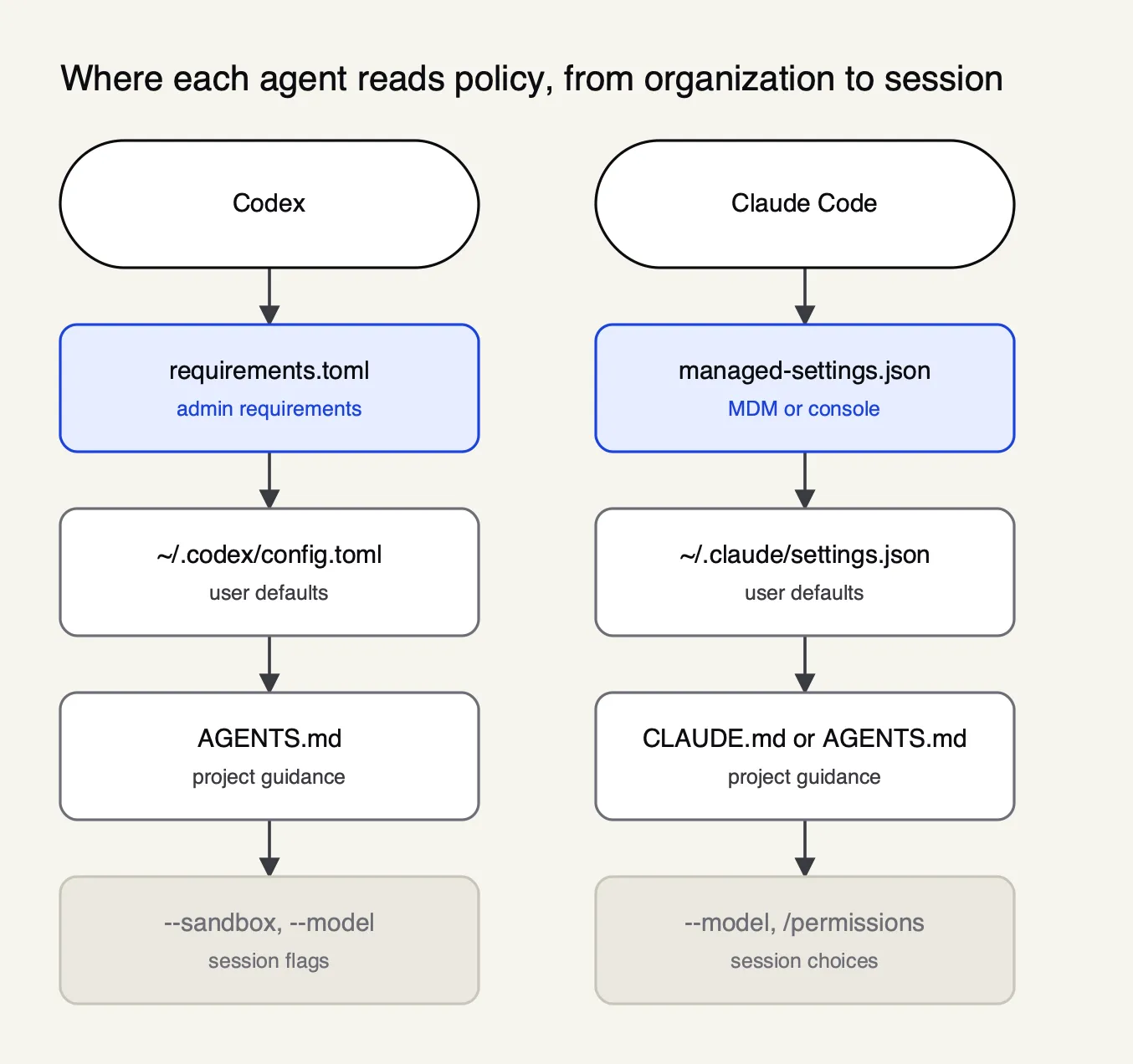
Figure 2: Managed policy wins in both agents; project instruction files shape behavior but do not grant permissions.
Claude Code MCP and Codex MCP support
Both agents connect to external tools through the Model Context Protocol and both support local and remote servers with OAuth. The differences are in configuration format and in how each vendor packages tools for its wider product.
Codex supports STDIO servers and streamable HTTP servers with bearer tokens or OAuth, including Client ID Metadata Documents and Dynamic Client Registration, according to OpenAI’s MCP page. Servers live in config.toml, and the ChatGPT desktop app, CLI and IDE extension share that configuration. Codex reads each server’s instructions field and uses it as server-wide guidance. One change to note: Codex no longer runs as an MCP server itself; OpenAI removed that mode in favour of its app-server protocol.
Claude Code adds servers with claude mcp add, recommends HTTP for remote servers, supports stdio for local ones, and lets administrators control servers through managed MCP settings, per Anthropic’s MCP docs. Reviewed connectors from the Anthropic Directory can be added the same way. Both agents layer plugins, skills, subagents and hooks on top of MCP, so the extension models are now similar in shape. For a ranked view of which servers to connect, see the publication’s guide to MCP servers for coding agents.
Tool definitions consume context in both agents, which is why gateway-side tool filtering and code-execution approaches to MCP have appeared. A write-up on how an MCP gateway cuts token costs in Claude Code and Codex CLI walks through one such approach.
Codex cloud, Claude Code on the web and other surfaces
Both vendors now run their agent in five places: a terminal CLI, IDE extensions, a desktop app, cloud sessions that continue after the laptop closes, and CI. The CLI is the most complete surface for each, and the cloud products differ in where code runs.
| Surface | Codex | Claude Code |
|---|---|---|
| Terminal | Codex CLI; codex exec for scripts | claude CLI; -p for scripts; Agent SDK |
| IDE | VS Code, Cursor, Windsurf; Xcode and JetBrains via their own integrations | VS Code, Cursor, JetBrains |
| Desktop | ChatGPT desktop app (macOS, Windows) | Claude desktop app, Code tab |
| Cloud | Codex Cloud: per-task workspaces from published environments | Cloud sessions in Anthropic-managed VMs, or self-hosted runners on Team and Enterprise |
| CI and review | GitHub Action, automatic code review | GitHub Actions, GitLab CI/CD, Code Review |
| Chat | Slack | Slack, Claude Tag |
Codex Cloud starts from a published environment: Codex inspects the chosen GitHub repositories, installs dependencies and tests the setup, and each task then gets its own workspace, per OpenAI’s Codex Cloud page. Claude Code’s cloud sessions run in isolated Anthropic-managed VMs and are available on Pro, Max and Team plans and on Enterprise premium seats; Team and Enterprise customers can route them to self-hosted environments inside their own network, according to Anthropic’s platforms page.
Source availability differs. OpenAI’s open-source page lists the Codex CLI, SDK and app server in the openai/codex repository under Apache 2.0, while the IDE extension and Codex Cloud are closed; the repository accepts issues but not external pull requests. Claude Code’s repository carries Anthropic’s commercial terms rather than an open-source licence, although its sandbox is built on the open-source @anthropic-ai/sandbox-runtime package.
Enterprise controls and governance
Both agents can be centrally managed, audited and billed. Codex is administered through the ChatGPT workspace’s Agent Security console and a requirements.toml file; Claude Code through a managed-settings.json file delivered by MDM or the claude.ai console, and optionally a self-hosted gateway that enforces policy by identity-provider group.
OpenAI’s managed configuration docs separate requirements, which users cannot override, from defaults, which they can. Requirements can pin approval policies, sandbox modes, network rules and MCP hooks. Enterprise and Edu plans add SCIM, enterprise key management, role-based access control, data residency and audit records through the Compliance API, while the Analytics API exports aggregated usage.
Anthropic’s managed settings docs place a policy file at a system path on each OS, where it overrides user and project settings; administrators can disable bypass and auto modes, deny file reads and restrict models with availableModels. Claude Code exports metrics and events over OpenTelemetry, and Anthropic’s Enterprise plan lists audit logs, a Compliance API, IP allowlisting and admin-set spend limits. Anthropic also ships a self-hosted gateway, Claude apps gateway, inside the claude binary.
Both vendors document support for third-party gateways, with different conditions. Codex accepts any gateway that implements the Responses API faithfully, including streaming events and the tool-call loop, per OpenAI’s gateway compatibility requirements. Claude Code accepts any gateway that exposes a supported API format, but Anthropic’s gateway docs state that it does not support routing Claude Code to non-Claude models through any gateway. A managed allowedProviders setting can pin Claude Code to the organization’s gateway URL only.
Running Codex and Claude Code through an AI gateway
An AI gateway is a proxy between coding agents and model providers that issues developer credentials, enforces budgets and logs every request. For a team that runs both Codex and Claude Code, a gateway is the one place where the two agents’ spend, access and audit trail can be managed together, since each vendor’s admin console covers only its own agent.
Bifrost is used here as the worked example because its documentation covers both agents with tested setup pages and because it is open source and self-hostable, so every claim below can be checked against its docs and code. Bifrost is an open-source AI gateway written in Go and published on GitHub under Apache 2.0; it reaches 25+ providers and 10,000+ models through one OpenAI-compatible API. Bifrost’s published benchmark reports 11 µs of added overhead per request at 5,000 RPS on an AWS t3.xlarge, documented on its benchmarking page.
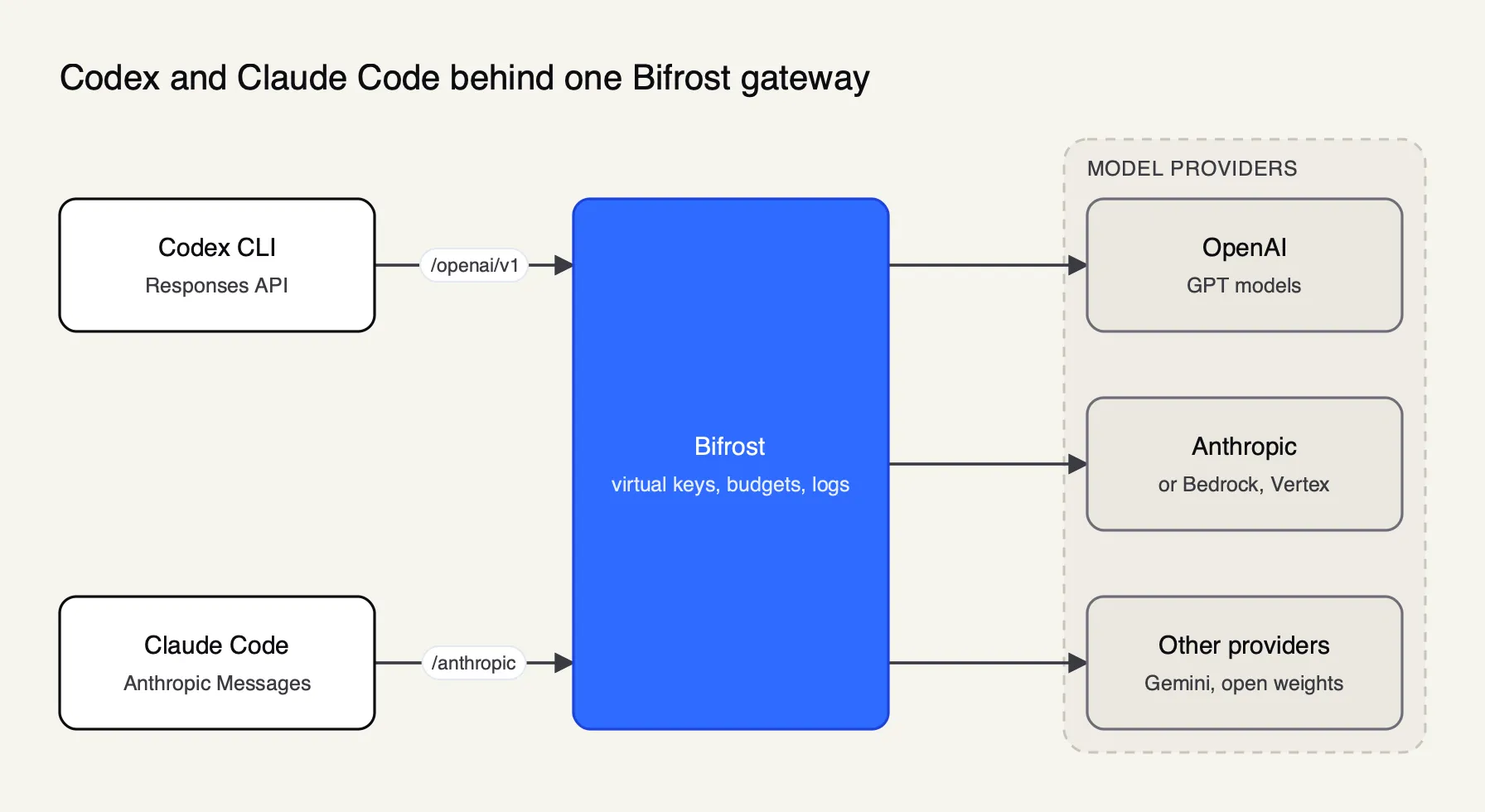
Figure 3: Each agent keeps its own wire format; the gateway gives both the same keys, budgets and request log.
Each agent connects in its native format, as Figure 3 shows:
- Codex is configured as a named custom provider in
config.tomlwithwire_api = "responses"and a base URL on the gateway’s/openai/v1path, per Bifrost’s Codex CLI page. Thebifrost run codexcommand launches Codex with a temporaryCODEX_HOMEthat keeps the user’s MCP servers and project trust settings but replaces the model routing. - Claude Code points
ANTHROPIC_BASE_URLat the gateway’s/anthropicpath and sends a virtual key asANTHROPIC_AUTH_TOKEN, per the Claude Code integration docs. A developer can also keep a claude.ai subscription login and add the virtual key as a header, so billing stays on the subscription while the gateway logs the traffic. - Virtual keys carry each developer’s or team’s allowed models, budgets with reset windows and token or request rate limits, so one revoked key offboards one person from both agents.
- Session affinity keeps an agent session on the provider and key that served its first turn, so the provider’s prompt cache stays warm. Bifrost’s session affinity docs state that Claude Code, Codex CLI and OpenCode get this with no configuration because Bifrost adopts the session header they already send.
- Logs capture inputs, outputs, tokens, cost and latency for every request through the built-in observability plugin.
Model choice is where the vendors’ positions matter. Through a gateway, Codex can be pointed at a non-OpenAI model and Claude Code at a non-Anthropic one; Bifrost’s docs show /model openai/gpt-5.5 inside Claude Code and a walk-through of running Codex CLI with Claude, Gemini or Llama. A model that answers chat well can still mishandle an agent’s tool calls, so teams treat a cross-vendor model in either agent as something to validate on their own tasks. Anthropic’s position is stricter: its docs state it does not support Claude Code on non-Claude models.
Enterprise tier. SSO sign-in with user-scoped inference, access profiles and audit logs are part of Bifrost Enterprise; virtual keys, budgets, routing and logging are in the open-source gateway.
For deeper setup material, Bifrost’s own Claude Code integration guide and Codex CLI integration guide cover each agent, and its CLI agents resource page lists the other supported coding agents.
A survey of gateways for governing Claude Code and Codex CLI and a guide to secure enterprise rollouts of both agents take the governance question further. The Frontier Wire’s own comparison of AI gateways for Claude Code, Codex CLI and Cursor ranks five options on the same criteria.
Using Codex and Claude Code together
Many teams no longer pick one. OpenAI publishes a Claude Code plugin that calls Codex from inside a Claude Code session, and both agents share the AGENTS.md convention, so running them side by side is a supported pattern rather than a workaround.
The codex-plugin-cc repository, published by OpenAI under Apache 2.0, adds /codex:review for a read-only review, /codex:adversarial-review for a steerable challenge review, and commands that delegate a task to Codex or hand a session over. Usage counts against the user’s Codex limits, and the plugin works with any ChatGPT subscription, including Free, or an OpenAI API key.
The common pattern is one agent to write and the other to review, on the reasoning that two model families are less likely to share the same blind spot. Agent benchmarks support testing combinations rather than trusting one headline score: the Terminal-Bench leaderboard ranks a model and an agent together, so the same model can score differently in Codex and in Claude Code.
Which coding agent fits which team
The criteria table leads to a split verdict rather than a single winner. Codex is the stronger default for teams that want isolation without configuration, a free or $8 entry point and an open-source CLI they can audit. Claude Code is the stronger default for teams that want the most granular permission rules, Opus 5.5 by default, self-hosted cloud runners and a vendor-built gateway.
| If the team needs | Lean toward | Reason from the documentation |
|---|---|---|
| Sandboxing on by default | Codex | Workspace-write sandbox with network off from the first run |
| An open-source, auditable CLI | Codex | Apache 2.0 CLI and SDK in openai/codex |
| A no-cost or low-cost tier for occasional users | Codex | Free and Go plans include GPT-6 Luna, subject to rollout |
| Fine-grained per-tool rules and modes | Claude Code | Six permission modes and argument-level allow and deny rules |
| Cloud sessions inside the company network | Claude Code | Self-hosted environments on Team and Enterprise |
| Lowest list price per token on the API | Tie | GPT-6.1 Sol and Sonnet 5.5 both list at $2 and $10 |
| One policy across both agents | Either, behind a gateway | Shared keys, budgets and logs in one place |
For individuals, the Codex vs Claude Code decision is mostly a model decision: run the same three tasks from your own backlog through GPT-6.1 Sol in Codex and Opus 5.5 in Claude Code, at the same $20 tier, and compare the diffs. For organizations, the decision is about control. Both vendors now document managed policy, audit export and gateway support, so the deciding factors are which sandbox posture the security team prefers and whether developers are allowed to choose. Teams that allow both should standardize the shared layer, AGENTS.md for conventions and one gateway for credentials, budgets and logs, so that the choice of agent stays a developer preference rather than a governance gap. What would change this verdict is pricing: both companies changed plan structures and default models within the last quarter, and the comparison should be rerun when they do again.
Sources
- OpenAI: Codex pricing
- OpenAI: Codex models
- OpenAI: GPT-6.1 Sol model page
- OpenAI: API pricing
- OpenAI: Codex agent approvals and security
- OpenAI: Codex sandboxing
- OpenAI: Custom instructions with AGENTS.md
- OpenAI: Codex and the Model Context Protocol
- OpenAI: Codex open-source components
- OpenAI: Codex managed configuration
- OpenAI: Codex gateway compatibility requirements
- OpenAI: codex-plugin-cc repository
- Anthropic: Claude pricing
- Claude Code docs: Model configuration
- Claude Code docs: Manage costs effectively
- Claude Code docs: Configure permissions
- Claude Code docs: Configure the sandboxed Bash tool
- Claude Code docs: How Claude remembers your project
- Claude Code docs: Connect Claude Code to tools via MCP
- Claude Code docs: Platforms and integrations
- Claude Code docs: Managed settings
- Claude Code docs: Run Claude Code through a gateway
- Bifrost docs: Codex CLI
- Bifrost docs: Claude Code
- Bifrost docs: Session affinity
- Terminal-Bench leaderboard
Questions readers ask
Which is cheaper, Claude Code or Codex?
At the entry tier they cost the same, since ChatGPT Plus and Claude Pro are both $20 a month billed monthly and both include their coding agent. Codex also runs on ChatGPT Free and Go with a smaller model, while Claude's Free plan excludes Claude Code. On API keys, GPT-6.1 Sol and Sonnet 5.5 list at the same $2 input and $10 output per million tokens; Opus 5.5, Claude Code's default, lists at $4 and $20.
Is Claude Code or Codex free?
Codex has a free path. OpenAI's pricing page lists GPT-6 Luna in the ChatGPT desktop app on the Free plan, subject to rollout, and the Codex CLI itself is open source under Apache 2.0. Claude Code is not included in Claude's Free plan; it starts with Pro. Both can also be run with an API key, which is billed per token rather than free.
Which is better, Codex Plus or Claude Pro?
They are priced the same at $20 a month and both apply usage limits that reset over time. ChatGPT Plus gives Codex in the CLI, IDE, web and iOS plus cloud code review and Slack. Claude Pro gives Claude Code in the CLI, desktop, IDEs and cloud sessions, with Opus 5.5 as the default model. The better plan is the one whose model handles your codebase and whose limits match how many hours a day you run the agent.
Can Codex and Claude Code be used together?
Yes. OpenAI publishes an Apache 2.0 plugin, codex-plugin-cc, that adds Codex commands to Claude Code for read-only reviews and delegated tasks, billed against the user's Codex limits. Teams that run both agents can also put them behind one AI gateway so both share developer keys, budgets and a single request log.
Is there a better coding AI than Claude?
No single agent wins every task. Agent benchmarks such as Terminal-Bench score a model and an agent together, and the leaderboard moves with every model release. The practical test is a pilot on your own repositories, measuring merged changes, review time and cost per task for each agent, rather than a vendor's headline score.