
Top 5 AI gateways for routing between vLLM, Ollama and cloud LLMs in 2026
Most teams now run some models on their own GPUs and rent the rest. Five self-hostable gateways that route between vLLM, Ollama and hosted APIs, compared on how they reach local servers, how they decide where a request goes, and what happens when a local box falls over.
TL;DR
- An LLM router gives applications one OpenAI-compatible endpoint and decides, per request, whether a vLLM pool, an Ollama server or a hosted model answers it.
- The top pick is Bifrost: native vLLM and Ollama providers, weighted keys across local servers, rule-based and complexity-based routing, and fallbacks to hosted models in the open-source build.
- LiteLLM has the widest list of local runtimes, Agent Router is the strongest fit for vLLM fleets on Kubernetes, APISIX gives free priority failover, and Kong’s multi-target routing sits in its paid tier.
- vLLM and Ollama fail differently under load: Ollama queues and then returns 503, while vLLM batches many requests per GPU. Routing and failover rules should reflect that.
- vLLM’s built-in API key does not protect every endpoint, so a gateway in front of a self-hosted server is also an access control, not only a convenience.
An LLM router is the layer that decides which model answers a request. In a hybrid stack that decision has three kinds of destination: a vLLM pool on rented or owned GPUs, one or more Ollama servers running small models, and hosted APIs for the frontier models nobody wants to run themselves. Applications should not know which one they hit. They send OpenAI-format requests to one address, and the router applies the rules: restricted data stays local, cheap tasks go to small models, hard tasks go out, and a failed local server does not take the feature down. This comparison ranks five self-hostable gateways on that job. The criteria are published first, and the at-a-glance table follows, so a reader who weights them differently can re-rank the list.
What an LLM router does in a hybrid stack
An LLM router accepts requests in one API format, picks a backend for each request using weights, rules, classifiers or live health signals, translates the request if the backend speaks a different format, and retries or fails over when the backend errors. In a hybrid deployment it also enforces which traffic may leave the network.
Four jobs come up in every hybrid design.
- One endpoint. vLLM and Ollama both speak the OpenAI format, but each server has its own address, model names and authentication. The router hides that behind one base URL and one set of model names.
- Placement. Something has to decide that a document with customer records goes to the local pool and a long reasoning task goes to a hosted model. That decision belongs in configuration, not in every application.
- Load spreading. A vLLM deployment is often several servers holding the same model. The router spreads requests across them and stops sending to one that is failing.
- Failover. Local hardware fails: a GPU runs out of memory, a node reboots, a queue fills. The router retries or moves the request to another backend, often a hosted model, according to rules the platform team sets.
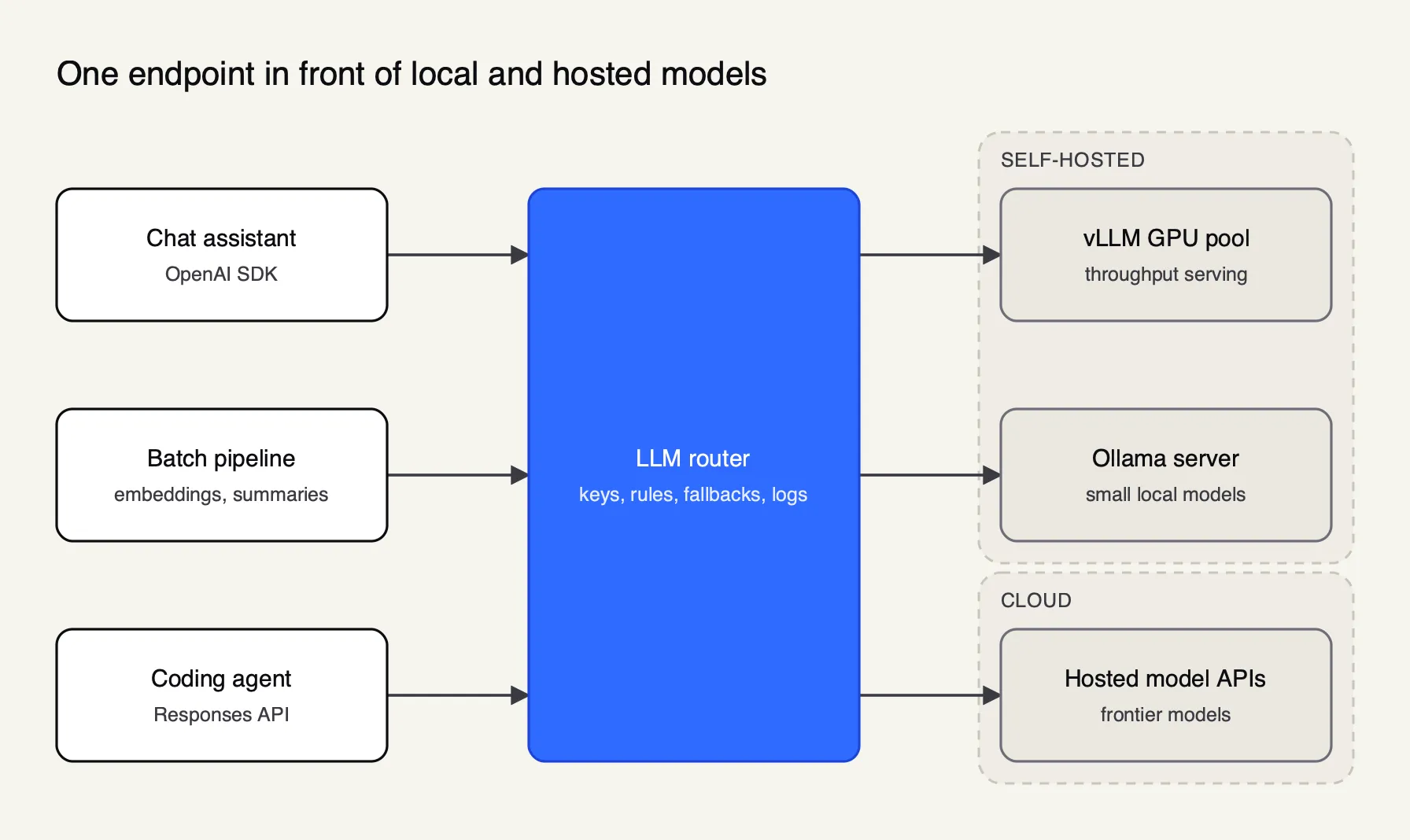 Figure 1: Applications keep one base URL; the router decides which backend serves each request.
The broader case for a gateway in front of every model call, including the cost of running one, is covered in the explainer on running an AI gateway in front of every model call. For the full field of gateways, managed ones included, see the ten best AI gateways in 2026.
The company behind Bifrost publishes a longer primer on what an LLM router is and how model routing works, useful for the vocabulary of weights, rules and classifiers used below.
Ollama vs vLLM behind a router
Ollama and vLLM both expose OpenAI-compatible APIs, so a router can reach either. They behave very differently under load, and those differences decide how a router should weight them, which errors should trigger failover, and whether the router must add authentication in front of them.
vLLM is a serving engine built for throughput on GPU servers. Its PagedAttention paper, presented at SOSP 2023, manages the key-value cache in pages so more requests fit in one batch, and reports two to four times the throughput of FasterTransformer and Orca at the same latency. Ollama is built to make local models easy to run. Its OpenAI compatibility layer serves /v1/chat/completions with streaming, tools, JSON mode and image input on port 11434.
| Property | Ollama | vLLM |
|---|---|---|
| Primary design goal | Simple local model management | High-throughput serving on GPUs |
| OpenAI-compatible APIs | Chat completions, completions, embeddings, models | Completions, chat, Responses, embeddings, transcriptions, translations |
| Default concurrency | OLLAMA_NUM_PARALLEL defaults to 1 request per model | Batches many requests per GPU (PagedAttention) |
| Behaviour when saturated | Queues up to OLLAMA_MAX_QUEUE (default 512), then returns 503 | Keeps accepting work; the visible effect is rising latency |
| Models loaded at once | Up to 3 per GPU by default, loaded on demand | Set by the model passed to vllm serve |
| Authentication | Client must send a key, which Ollama ignores | --api-key protects /v1, /v2 and /inference paths only |
The concurrency figures come from the Ollama FAQ, which also notes that memory use scales with OLLAMA_NUM_PARALLEL multiplied by the context length. Two consequences follow for routing.
First, an Ollama server under load fails fast with a 503 once its queue is full. That is a clean failover signal, and every gateway in this list can retry 5xx errors on another backend. A vLLM server under load slows down instead, so latency-aware or load-aware routing matters more than error-based failover.
Second, vLLM’s own documentation warns that the --api-key flag does not cover every endpoint, and that /invocations exposes the same inference capability without authentication. It recommends deploying behind a reverse proxy. A gateway that holds the only route to the vLLM servers, with the servers firewalled from everything else, closes that gap. A separate roundup of gateways for self-hosted vLLM, SGLang and Ollama models looks at the same runtimes from the serving side.
Evaluation criteria
The criteria favour teams running their own inference alongside hosted models. Native support for local runtimes and routing controls in the free edition come first, because those are the reason to deploy a router here at all.
| Criterion | What was checked | Why it matters in a hybrid stack |
|---|---|---|
| Local backends | Native vLLM and Ollama providers, or generic OpenAI-compatible targets | Native providers handle model names, endpoints and quirks for you |
| Routing controls | Weights, rules on headers or teams, prompt classifiers, load-aware selection | Placement policy should live in configuration |
| Failover | Retries, backoff, fallback chains across local and hosted backends | Local hardware fails more often than hosted APIs |
| Free edition coverage | Which routing and failover features need a paid licence | Decides what a small team can run without a contract |
| Footprint | Databases, caches, Kubernetes or etcd required | Every dependency is another thing to run next to the GPUs |
| Governance | Per-team keys, budgets, model allow lists | Stops one team saturating shared GPUs or the hosted budget |
Every claim below comes from each project’s own documentation as read on 10 October 2026.
The five gateways at a glance
| Rank | Gateway | vLLM and Ollama | Routing controls | Failover to hosted models | Paid tier needed for routing | Footprint |
|---|---|---|---|---|---|---|
| 1 | Bifrost | Native providers for both, plus SGLang | Weights, CEL rules, complexity tiers | Fallback chains with per-provider retries | No (adaptive load balancing is paid) | One binary, SQLite by default |
| 2 | LiteLLM | hosted_vllm/ and ollama_chat/ providers, plus LM Studio, llamafile and others | Six strategies, auto routing in beta | Fallbacks, cooldowns, context-window fallbacks | No | Python proxy, PostgreSQL, Redis at scale |
| 3 | Agent Router | OpenAI-schema backends; InferencePool for vLLM fleets | Header rules, endpoint picker on GPU metrics | Priority-based provider fallback | No | Kubernetes 1.32+ with Envoy Gateway |
| 4 | Apache APISIX | openai-compatible provider with custom endpoint | Weighted round robin, hashing, semantic, priority | Fallback on 429, 5xx, health and token limits | No | APISIX with etcd, or file mode |
| 5 | Kong AI Gateway | Native Ollama and vLLM providers | Seven balancing algorithms in AI Proxy Advanced | Retries and cross-provider fallback | Yes: AI Proxy Advanced | DB-less node or PostgreSQL |
The ranking rewards native local providers, routing and failover in the free edition, and a small footprint. A team already running Envoy Gateway on Kubernetes would reasonably move Agent Router up, and a team already standardised on Kong would weigh consolidation over the licence question.
1. Bifrost
Bifrost is an open-source AI gateway written in Go by Maxim AI and published on GitHub under Apache 2.0. It exposes 25+ providers and 10,000+ models through one OpenAI-compatible API, and it treats self-hosted runtimes as first-class providers rather than generic URLs. It gets the longest entry here because its documentation covers every criterion in the table with a specific mechanism.
Local backends. The vLLM provider uses vLLM’s OpenAI-compatible endpoints, sends Responses API calls to vLLM’s native /v1/responses route, and covers chat, completions, embeddings, rerank and transcription. A per-key or per-alias switch routes chat and Responses traffic through vLLM’s Anthropic-compatible /v1/messages endpoint instead. Anthropic’s server-side tools, such as web search, are stripped from requests bound for vLLM, because a self-hosted server cannot run them. The Ollama provider covers chat, Responses (converted to chat), completions, embeddings and model listing, with the API key left blank for local servers. SGLang is a third self-hosted provider.
Setup walkthroughs exist for each runtime: vLLM on Bifrost, Ollama on Bifrost and SGLang on Bifrost cover endpoints, model naming and streaming.
Spreading load across servers. Each vLLM or Ollama server is configured as a provider key with its own URL and a weight. Weighted key selection picks a key in proportion to its weight and moves to the next available key if the chosen one fails, so two vLLM servers at weight 0.5 split traffic evenly. Keys also carry model allow and deny lists, including regular expressions.
Placement rules. Routing rules are CEL expressions evaluated before provider selection, scoped from virtual key to team, customer and global. They can read headers, team names, budget and rate-limit usage. A rule such as team_name == "claims" can pin a team to the local pool, and budget_used > 85 can push traffic to a cheaper local model as a budget fills. The complexity router adds a complexity_tier variable: it embeds the latest user message, matches it against 150 built-in reference phrases (50 each for simple, medium and complex), and only runs when a rule references the tier. Session-aware routing keeps the tier from dropping within a Claude Code or Codex session, which helps provider prompt caches.
Failover. Retries and fallbacks separate per-key failures (401, 402, 403, 429), which rotate to another key, from transient 5xx and network errors, which retry the same key with exponential backoff and jitter. When a provider’s retries are exhausted, the request moves down a fallback list such as vllm/... then openai/..., and each fallback gets its own retry budget. The response names the provider that served it.
Performance. Bifrost’s published benchmark reports 11 µs of added overhead per request at 5,000 RPS on an AWS t3.xlarge, as described in the benchmarking docs. The published benchmark results set out the test setup and figures in full.
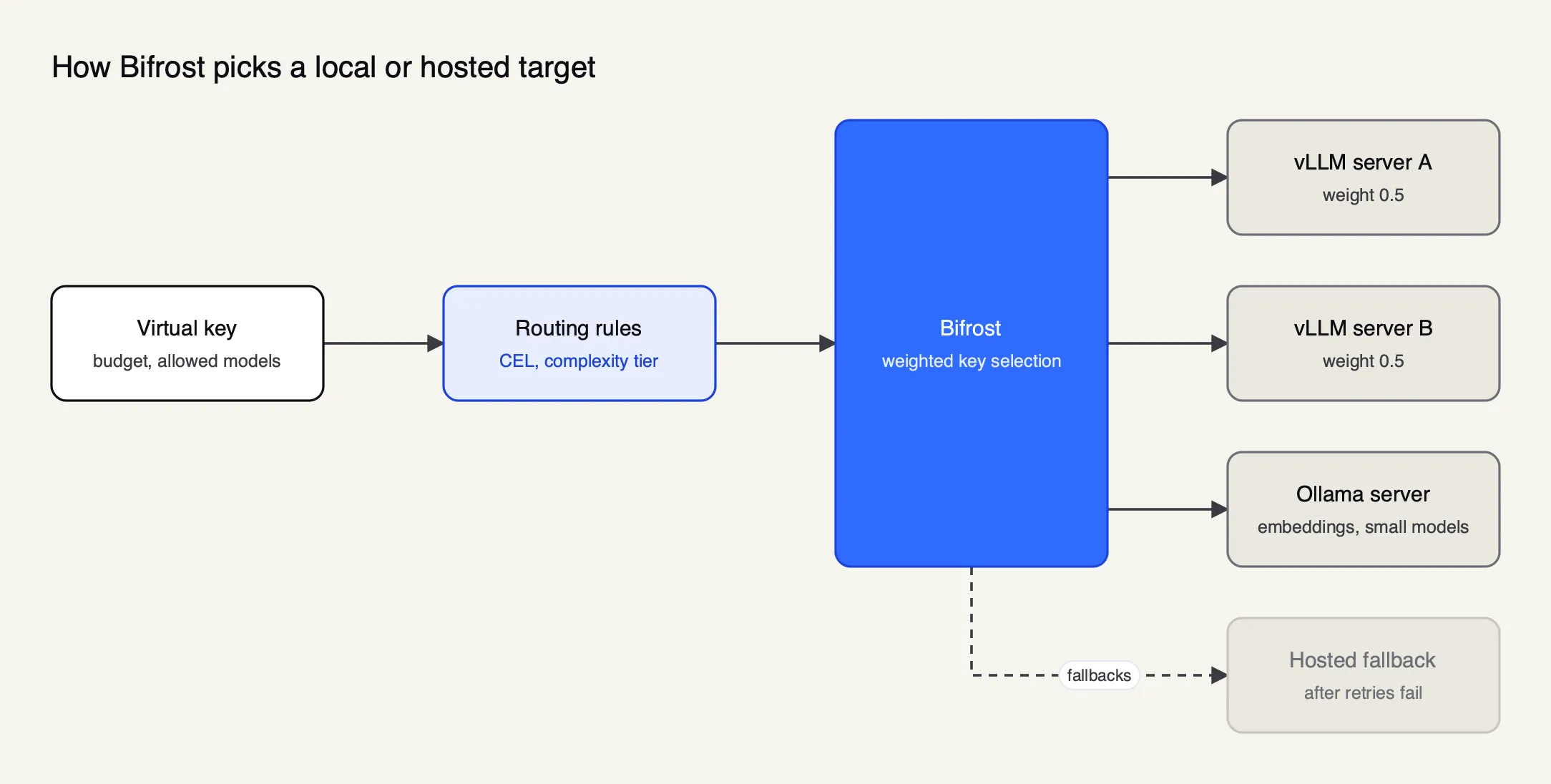 Figure 2: Each self-hosted server is a provider key with its own URL and weight, so spreading load and failing over use the same mechanism as cloud keys.
Enterprise tier. Adaptive load balancing, which scores providers and keys on live error rates and latency, is part of Bifrost Enterprise, along with clustering, circuit breaking, guardrails, RBAC, audit logs and in-VPC and air-gapped deployment. More on Bifrost is on the product page.
Best for: teams that want vLLM, Ollama and hosted providers behind one self-hosted gateway, with placement rules and fallback chains in the free edition.
2. LiteLLM
LiteLLM is a widely adopted open-source project with a Python SDK and a proxy server. Its provider list is the longest here for local runtimes: besides vLLM and Ollama it documents LM Studio, llamafile, Lemonade, Docker Model Runner, Triton Inference Server and Xinference.
Local backends. The vLLM page uses the hosted_vllm/ prefix for vLLM’s OpenAI-compatible server (the older vllm/ prefix is deprecated) and lists chat, embeddings, completions, rerank and audio transcription. The Ollama page supports ollama/ and ollama_chat/, recommends the latter, and covers streaming, JSON mode and tool calls.
Routing controls. The router offers weighted pick (the default and recommended strategy), rate-limit aware, latency-based, least-busy, lowest-cost and custom strategies. Usage-based routing tracks tokens per minute in Redis across instances, and the docs warn that this adds latency. Auto routing, in beta since v1.94, classifies requests with heuristics, an LLM classifier or keyword rules into tiers such as simple, medium, complex and reasoning, then routes each tier to a model or pool.
Failover. Fallbacks move a request from one model group to another after retries, with separate lists for context-window errors and content-policy errors, and a cooldown that removes a deployment after repeated failures in a minute. The same page warns that encrypted reasoning items from one deployment cannot be decrypted by a fallback on another provider, which applies to any gateway.
Footprint. The production guide names PostgreSQL as the supported database, Redis when running more than one instance, and 1 vCPU with 4 GiB of memory per worker. The Frontier Wire review of LiteLLM alternatives covers its operational trade-offs in more depth, and Bifrost’s own LiteLLM alternative page sets out the vendor’s side of that comparison.
Best for: teams with many different local runtimes, or Python-heavy platforms, that accept a database-backed proxy.
3. Agent Router
Agent Router is the new name of Envoy AI Gateway. It is now an Agentic AI Foundation project under Apache 2.0, with the same code and maintainers, and its CRDs, Helm charts and images keep their Envoy names. It is the one gateway here designed around fleets of self-hosted inference servers on Kubernetes.
Local backends. Its documentation describes a two-tier pattern. A tier-one gateway handles authentication, top-level routing and global rate limits across hosted and self-hosted backends. A tier-two gateway sits in front of the model-serving cluster. Self-hosted servers are reached through the OpenAI schema, which vLLM and Ollama’s /v1 endpoints both speak.
Routing controls. The distinctive feature is InferencePool support, built on the Kubernetes Gateway API Inference Extension. An endpoint picker chooses a specific vLLM replica from live metrics such as KV-cache usage, queued requests and loaded LoRA adapters, rather than spreading requests evenly. For vLLM fleets with uneven request lengths, that is a better signal than round robin.
Failover. Provider fallback lists several backends on one route with priorities, and moves traffic to the next one on network errors, 5xx responses or failed health checks.
Footprint. The prerequisites call for Kubernetes 1.32 or later with Envoy Gateway, kubectl and Helm. An aigw run command starts a standalone router on a laptop for development.
Best for: platform teams running vLLM replicas on Kubernetes who want routing decisions informed by GPU and cache state.
4. Apache APISIX
Apache APISIX is an Apache Software Foundation API gateway written in Lua on OpenResty. Its AI plugins are free, and its multi-backend plugin gives priority failover and health checks without a paid tier.
Local backends. The ai-proxy-multi plugin supports OpenAI, DeepSeek, Azure OpenAI, Anthropic, OpenRouter, Gemini, Vertex AI, Bedrock and an openai-compatible provider whose endpoint is set with override. vLLM and Ollama servers are configured through that generic provider, so model names and paths are yours to manage.
Routing controls. The balancer supports weighted round robin, consistent hashing and a semantic algorithm that picks an instance by prompt similarity. Instances carry priorities, so a local pool can be tried first and a hosted model only when it is exhausted.
Failover. A fallback_strategy moves a request to the next instance on 429 or 5xx responses, on failed health checks, or when an instance’s token quota is used up. Extra status codes can be added. Access logs record token usage, model and time to first response.
Footprint. Traditional and decoupled deployments use etcd as the configuration store. A standalone mode reads a full YAML or JSON configuration from disk and needs no etcd.
Best for: teams that already run APISIX, or want a foundation-governed gateway with free priority failover between local and hosted models.
5. Kong AI Gateway
Kong Gateway is a widely deployed API gateway, and its AI plugins name Ollama and vLLM as supported providers. The split between the free and paid plugins decides whether Kong can act as a router at all.
Local backends. The open-source AI Proxy plugin lists Ollama, vLLM and Llama among its providers. It proxies to one configured model per plugin instance, so it standardises the API in front of a local server but does not choose between servers.
Routing controls. AI Proxy Advanced adds multiple targets with seven balancing algorithms: round robin, consistent hashing, least connections, lowest latency, lowest usage by tokens or cost, semantic routing, and priority groups for tiered failover. The semantic features need Redis or Valkey with vector search.
Failover. The balancer supports retries, timeouts and failover to other targets when one is unavailable. From version 3.10, fallback works across providers with different formats. Client errors do not trigger failover unless failover_criteria is extended.
Licence. AI Proxy Advanced is documented as available only in Kong’s AI Gateway Enterprise offering, so routing between a local pool and hosted models needs a paid licence.
Best for: organisations already standardised on Kong that want local and hosted models under their existing API gateway and licence.
Routing patterns for local and cloud models
Four placement patterns cover most hybrid deployments, and they combine well. Data rules come first because they are compliance decisions, cost and quality rules come second, and failover covers whatever the local fleet cannot serve.
- Data residency. Requests from certain teams, keys or headers never leave the network. The router pins them to local backends and refuses to fall back to a hosted model. This is the pattern for regulated documents, source code under export rules, or customer records.
- Cost tiering. A classifier or rule sends simple requests (extraction, classification, short rewrites) to a small local model and complex ones to a frontier model. Both Bifrost and LiteLLM ship a classifier for this; elsewhere it means writing header-based rules.
- Overflow. The local pool serves traffic up to its capacity, and the router sends the excess to a hosted model of similar quality. Ollama’s 503 on a full queue is a natural overflow signal; vLLM needs latency or load signals instead.
- Local first, hosted on failure. The default for most internal tools: try the local model, fall back to a hosted one on errors or timeouts, and log which backend served the request so finance sees the hosted share.
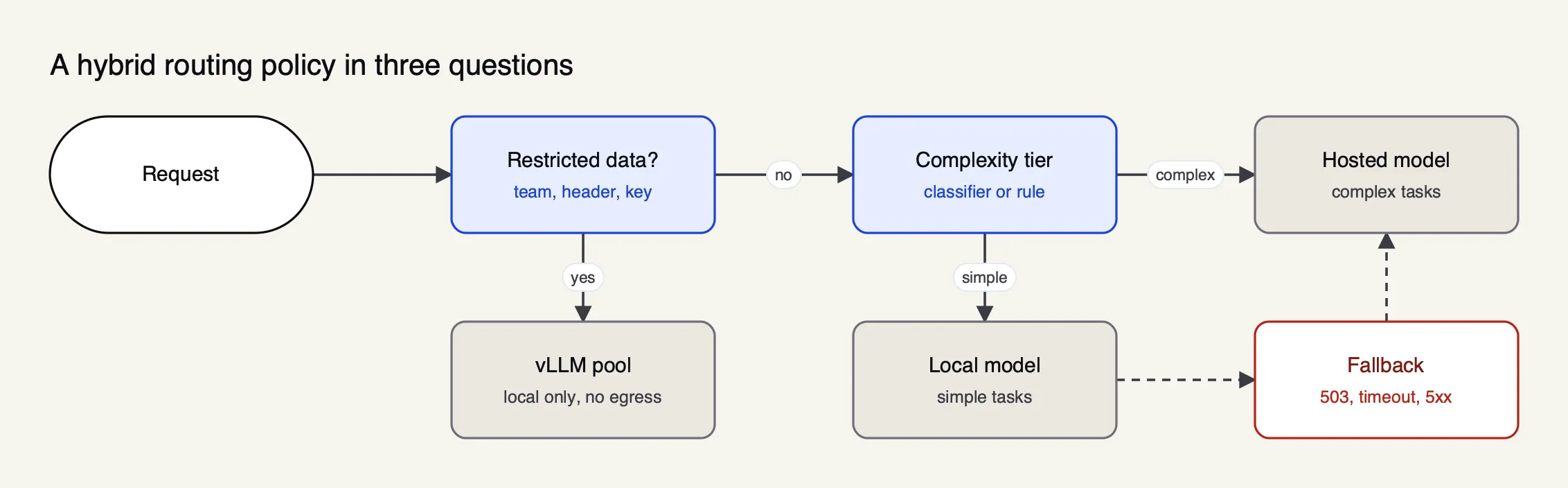 Figure 3: Data rules come first, cost rules second, and failover covers whatever the local fleet cannot serve.
Per-team budgets and keys make these patterns enforceable, so one team cannot saturate the shared GPUs or spend the hosted budget. The Frontier Wire guide to LLM cost control at the gateway covers budgets and rate limits in detail, and a Bifrost post on LLM cost optimization at the gateway shows how routing and caching combine to cut spend.
Failover between self-hosted and hosted models
Failing over from a local model to a hosted one is not the same as failing over between two copies of the same hosted model. The fallback answers with a different model family, a different context window and sometimes different tool-calling behaviour, so the rules need more care than a simple retry.
| Situation | What the local server does | What the router should do |
|---|---|---|
| Ollama queue full | Returns 503 after OLLAMA_MAX_QUEUE requests are waiting | Retry another Ollama or vLLM server, then fall back |
| vLLM saturated | Accepts the request; latency rises | Route by load or latency; set a timeout that triggers fallback |
| Server down or rebooting | Connection refused | Retry with backoff, then move to the next backend |
| Prompt too long for local model | Returns a 400-class error | Send to a model with a longer context, not a blind retry |
| Restricted data | Any error | Never fall back to a hosted model; return the error |
Three practical rules follow. Keep fallback chains within a model’s capability class, so a tool-calling agent does not fall back to a model that cannot call tools. Mark restricted traffic so the router refuses hosted fallbacks for it, rather than relying on every application to set the right flags. And expect stateful features to break across a fallback: LiteLLM’s documentation notes that encrypted reasoning produced by one provider cannot be read by another, and prompt caches are per provider. The general patterns for provider failover, including hosted-to-hosted, are in the explainer on LLM failover and load balancing. For a configuration-level example, see the walkthrough on enabling automatic fallback when a primary provider fails.
How to choose an LLM router
The right router depends mostly on what already runs next to the GPUs.
- No gateway yet, a few vLLM and Ollama servers plus hosted APIs: Bifrost, which runs as one process and has native providers, rules and fallbacks in the free edition.
- Many different local runtimes, Python platform team: LiteLLM, accepting PostgreSQL and Redis.
- vLLM replicas on Kubernetes, uneven request sizes: Agent Router, for GPU-aware endpoint picking.
- Existing APISIX estate: APISIX with
ai-proxy-multi, configuring local servers as OpenAI-compatible instances. - Existing Kong estate with an enterprise contract: Kong AI Proxy Advanced.
A useful test before committing is to replay a day of real traffic through the shortlist with one local server deliberately stopped, and check three things: that restricted requests never left the network, that the hosted share matches the policy, and that latency stayed acceptable while the server was down. Teams that also need to keep the whole stack inside a private network should read the comparison of gateways for air-gapped and in-VPC deployments. The comparison of open-source AI gateways covers licences and project health, and the wider AI gateway ranking includes managed services.
Limits of this comparison
No gateway was installed or load-tested for this article; every statement comes from documentation read on 10 October 2026. Routing features move quickly: LiteLLM’s auto routing is in beta, Kong’s plugin pages now point readers to an AI Gateway 2.0 policy model, and Agent Router’s rename means older guides still use the Envoy AI Gateway name. SGLang, TensorRT-LLM and other runtimes were not compared in depth. Managed gateways were excluded because the comparison assumes inference servers on a private network. A team whose local fleet is a single laptop running Ollama needs far less than this list describes; a team running dozens of vLLM replicas should test endpoint picking on its own traffic before deciding.
Sources
- vLLM docs: OpenAI-compatible server
- Efficient Memory Management for Large Language Model Serving with PagedAttention (Kwon et al., SOSP 2023)
- Ollama docs: OpenAI compatibility
- Ollama docs: FAQ (concurrency settings)
- Kubernetes Gateway API Inference Extension
- Bifrost source repository (GitHub, Apache 2.0)
- Bifrost docs: vLLM provider
- Bifrost docs: Ollama provider
- Bifrost docs: retries and fallbacks
- Bifrost docs: routing rules
- Bifrost docs: complexity router
- Bifrost docs: benchmarking
- LiteLLM docs: vLLM provider
- LiteLLM docs: Ollama provider
- LiteLLM docs: router and routing strategies
- LiteLLM docs: auto routing (beta)
- LiteLLM docs: fallbacks
- Kong docs: AI Proxy plugin
- Kong docs: AI Proxy Advanced plugin
- Apache APISIX docs: ai-proxy-multi plugin
Questions readers ask
What are LLM routers?
An LLM router is a service that receives model requests from applications and decides which model or server answers each one. It exposes one API, usually OpenAI-compatible, and chooses a backend using fixed weights, rules about the request or caller, a classifier that scores the prompt, or live health and load signals. Most AI gateways include a router alongside keys, budgets and logging.
What is LLM-based routing and how does it work?
LLM-based routing uses a model to choose the model. A classifier, either an embedding comparison against labelled example prompts or a small chat model asked for a tier, reads the incoming request and labels it simple, medium or complex. A routing rule then sends simple requests to a cheap or local model and complex ones to a frontier model. The classifier adds a little latency to each request it runs on.
Is vLLM faster than Ollama?
For many concurrent users on a GPU server, generally yes. vLLM was built for high-throughput serving, and its PagedAttention paper reports two to four times the throughput of earlier serving systems at the same latency. Ollama is designed for simple local use and, by its FAQ, processes one request per model at a time unless you raise OLLAMA_NUM_PARALLEL. On a laptop with one user the gap matters much less.
Can Ollama be used as an OpenAI-compatible API?
Yes. Ollama serves an OpenAI-compatible API under /v1 on its default port 11434, including chat completions with streaming, tools, JSON mode and image input. OpenAI client libraries work if you point the base URL at the Ollama server; the client still needs an API key value, which Ollama ignores. That compatibility is what lets most gateways treat an Ollama box as one more provider.
Do LLMs work without Internet?
A self-hosted model served by vLLM or Ollama runs entirely on local hardware once the weights are downloaded, so it works without an Internet connection. Hosted models such as those from OpenAI, Anthropic or Google always need network access to the provider. A router in front of both can keep restricted traffic on the local models and send only permitted requests out.