
Top 5 AI gateways for air-gapped and in-VPC LLM deployments in 2026
An on-premise LLM stack is only as private as the gateway in front of it. Five self-hosted AI gateways, read at the level of what each one fetches from the internet, how it installs without a connection, and how it routes to vLLM, Ollama and private cloud endpoints.
TL;DR
- An on-premise LLM gateway runs inside a private network, in front of local inference servers such as vLLM and Ollama, and handles keys, routing, failover and logs without sending prompts outside the network.
- The deciding question for an air-gapped site is what a gateway fetches from the internet at startup and at runtime, and whether each of those fetches can be replaced with a local file.
- Bifrost ranks first: it publishes an air-gapped guide that lists each outbound call, runs as one Go binary with SQLite by default, and routes natively to vLLM and Ollama.
- LiteLLM, Kong AI Gateway, Apache APISIX and Agent Router (formerly Envoy AI Gateway) complete the list, each suited to a different existing stack.
- In-VPC deployments are easier than true air gaps, because the gateway can still reach Bedrock or Azure OpenAI over private endpoints.
Running an on-premise LLM means the prompts, the outputs and the model weights never leave infrastructure the organization controls. The model server is only half of that setup. As soon as more than one team uses the models, something has to issue credentials, decide which team may call which model, retry failed requests, move traffic to a second server when the first is busy, and keep a record of who asked what. That component is an AI gateway, and in a private deployment it has to meet a stricter test than in the cloud: it must install without internet access and must not call home once it runs. This comparison ranks five self-hosted gateways against that test, with the criteria published before the ranking so a reader with different priorities can re-weight them.
What an on-premise LLM gateway does
An on-premise LLM gateway is a self-hosted proxy that gives applications one API for every model the organization runs, and applies access control, routing, retries and logging inside the private network. Applications send OpenAI-format requests to the gateway; the gateway forwards them to local inference servers or to private cloud endpoints.
Local inference servers already speak the same protocol. vLLM ships an OpenAI-compatible HTTP server, and Ollama exposes OpenAI-compatible endpoints alongside its native API. That compatibility is what lets a gateway treat a GPU box in the basement and a hosted model the same way. What the inference server does not provide is everything around the call: per-team keys, budgets, rate limits, fallbacks between servers, and a log that an auditor can read. The general case for putting a gateway in front of every model call is covered in the Frontier Wire explainer on what an AI gateway does and what it costs to run.
The term “air gap” has a precise meaning. The NIST glossary, quoting CNSSI 4009-2022, defines it as an interface between two systems that are not connected physically and where any logical connection is not automated, so data crosses only manually and under human control. For a gateway, that definition turns every outbound dependency into an operational task. Container images, Helm charts, licence files, pricing tables and tool catalogs all have to be carried across the gap and refreshed on a schedule.
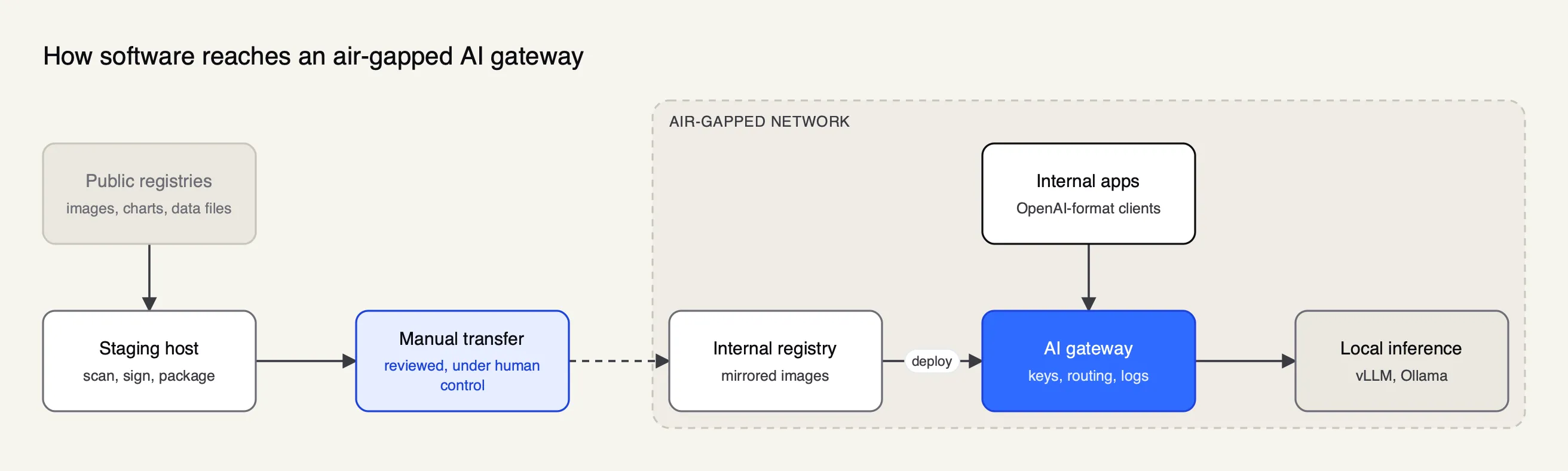 Figure 1: Every runtime dependency has to travel through the reviewed transfer step, so a gateway’s outbound calls decide how much has to be bundled.
Air-gapped vs in-VPC deployment
The two deployment modes share a goal, keeping prompts off the public internet, but they differ in what the gateway may reach. An air-gapped network has no automated route outside it. An in-VPC deployment runs in a private cloud network that can still reach chosen services over private endpoints.
| Air-gapped | In-VPC | |
|---|---|---|
| Network boundary | No automated connection to outside networks | Private cloud network; egress limited to private endpoints and approved routes |
| Models available | Only models served inside the network (vLLM, Ollama, other OpenAI-compatible servers) | Local models plus hosted models reached privately, such as Amazon Bedrock or Azure OpenAI |
| Software updates | Manual transfer of images, charts and data files | Pulled from a private registry or a mirrored public one |
| Gateway data files (pricing, catalogs) | Must load from local files | Can sync through an egress proxy or load locally |
| Licence checks | Must work from a local file | Same, unless the vendor allows an online check through approved egress |
Regulated sectors account for most of this demand, and gateway vendors now publish requirements by sector. Bifrost’s maker, for example, has pages for government and public sector AI deployments, AI gateways in financial services and banking and healthcare and life sciences workloads.
In-VPC is the more common case. Cloud providers make it practical: Amazon Bedrock supports interface VPC endpoints through AWS PrivateLink, which let instances reach Bedrock without an internet gateway, NAT device or public IP address, and Azure AI services accept private endpoints over Azure Private Link that give the resource an address inside the virtual network.
A gateway in that network can therefore fail over from a local vLLM server to a hosted model without any request touching the public internet. The mechanics of that failover are covered in the Frontier Wire guide to LLM failover and load balancing and in the companion list of gateways for failover across Bedrock, Vertex AI and Azure OpenAI.
Two vendor-written roundups cover the same ground from Bifrost’s side: one on air-gapped and on-prem AI gateways for regulated industries and one on open-source gateway platforms for in-VPC teams.
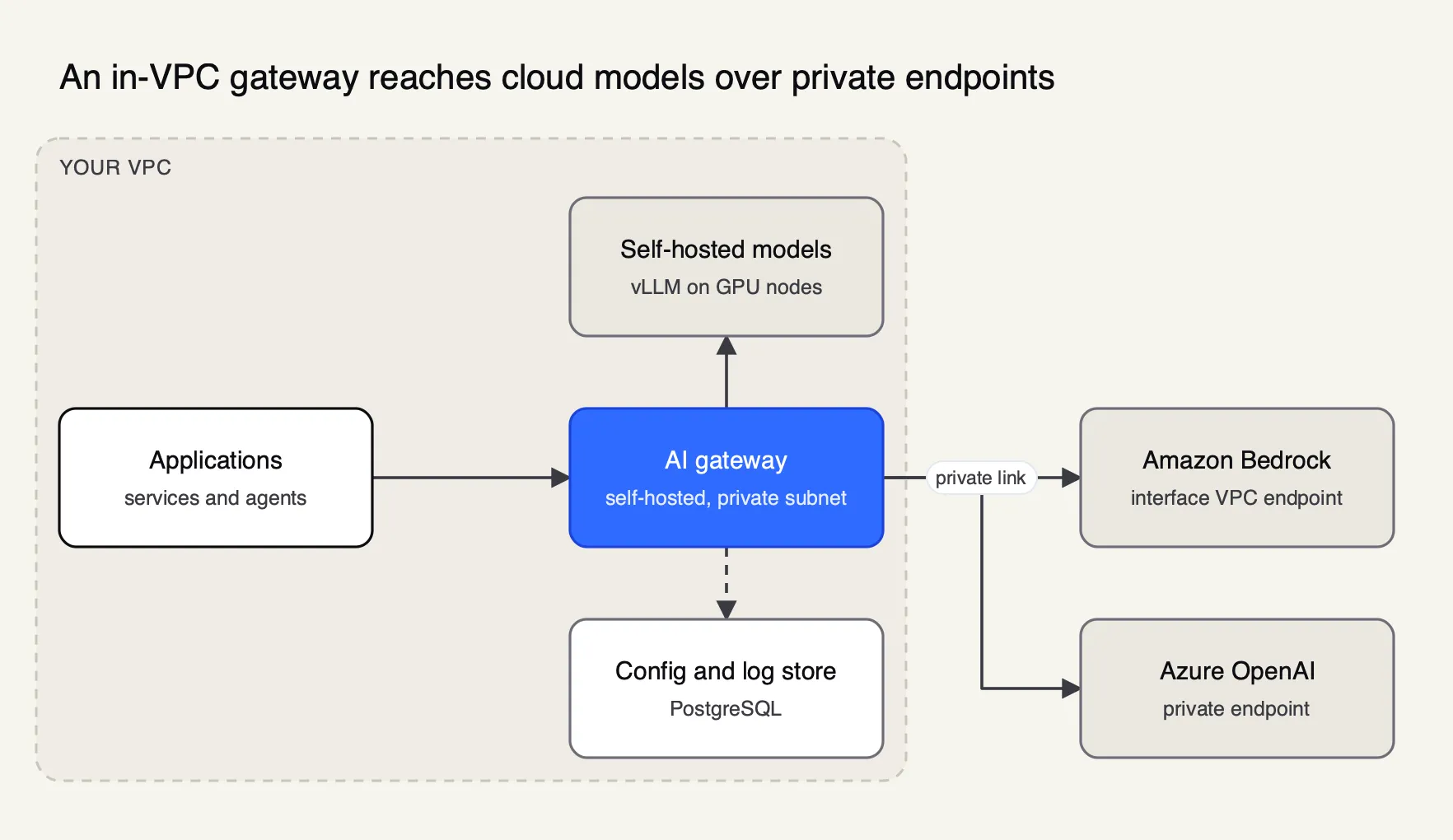 Figure 2: In-VPC deployment keeps prompts on private addresses end to end: the gateway needs routes only to private endpoints and its own database, not to the public internet.
Evaluation criteria
The criteria below are weighted toward teams that will run the gateway inside a network they control and may have to operate it with no internet access at all. Outbound dependencies come first, because a single mandatory call home rules a gateway out of an air-gapped site regardless of its features.
| Criterion | What was checked | Why it matters for a private deployment |
|---|---|---|
| Outbound dependencies | Every fetch the docs describe at startup and runtime, and whether each can point at a local file or be turned off | One unresolvable call home blocks an air-gapped install |
| Offline installation | How the software ships (images, charts, packages) and whether a mirrored copy is enough | Decides the size of the transfer bundle |
| Licence handling | Open-source licence, and how a commercial licence is loaded | An online licence check fails behind an air gap |
| Local model support | Native routes for vLLM, Ollama and other OpenAI-compatible servers | Local inference is the only model source in an air gap |
| Failover and load balancing | Retries, fallbacks, weights, health checks across local and private endpoints | GPU servers are a scarce, shared resource |
| Governance in the self-hosted edition | Keys, budgets, rate limits, logs | Shared private models need per-team controls |
| Footprint | Required databases, caches, control planes, Kubernetes | Every dependency is another system to mirror and patch |
The vendor documentation for each gateway was read on 10 October 2026. Nothing here was installed in a lab; where the documentation does not state something, the table says so.
The five gateways at a glance
| Rank | Gateway | License | Runtime and footprint | Local model routes | Documented outbound fetches |
|---|---|---|---|---|---|
| 1 | Bifrost | Apache 2.0 | Go binary; SQLite by default, PostgreSQL 16+ optional | vLLM, Ollama, SGL and other providers | Pricing and model data, MCP catalog; both accept file:// |
| 2 | LiteLLM | MIT, enterprise directory commercial | Python proxy; PostgreSQL and Redis in the Helm path | hosted_vllm/, Ollama | Model cost map; bundled copy via an environment flag |
| 3 | Kong AI Gateway | Kong Gateway Enterprise | Linux packages, Docker images or Helm | Ollama, vLLM, Llama formats | Not published as a list; licence loaded from a local file |
| 4 | Apache APISIX | Apache 2.0 | etcd, or standalone file-driven mode | OpenAI-compatible endpoints | Not published as a list |
| 5 | Agent Router | Apache 2.0 | Kubernetes, Envoy Gateway, Helm | Self-hosted models speaking the OpenAI schema | Not published as a list |
The ranking rewards a documented answer to the outbound-dependency question, a small footprint, native routes to local inference servers, and governance in the self-hosted edition. A team that already operates Kong, APISIX or Envoy at the network edge would reasonably move that product up, because consolidating on a proxy the operations team already patches saves more effort than any single feature. A broader ranking that includes managed services is in the Frontier Wire list of the best AI gateways of 2026.
1. Bifrost
Bifrost is an AI gateway written in Go and published on GitHub under Apache 2.0. It exposes one OpenAI-compatible API across 25+ providers and 10,000+ models, and it runs as a single process. It ranks first here because its documentation answers the air-gap question directly instead of leaving it to the operator to discover.
Outbound dependencies. The air-gapped deployment guide lists exactly what Bifrost fetches from the internet: the pricing and model-parameter datasheets, and the catalog behind its MCP server library. Both settings accept a file:// URL. Operators download the two datasheets on a connected machine, carry them across, and set pricing_url and model_parameters_url to the local paths. The MCP catalog can be loaded the same way, or turned off by setting its sync interval to zero, after which no request goes to the vendor’s servers. Bifrost re-reads each local file on every sync tick, so refreshing pricing data means replacing a file on disk, with no restart. Metrics are exposed locally on a Prometheus /metrics endpoint for an in-network collector to scrape.
Installation. The open-source build ships as the maximhq/bifrost container image and as an npm package, and the Helm chart covers Kubernetes, so a mirrored image and chart are the whole software bundle. Configuration and logs use SQLite by default, which removes the database from the transfer list for a single-node install; PostgreSQL 16 or later is the production option. The on-premise guide covers Bifrost Enterprise images, which are pulled with registry credentials issued to the customer; an air-gapped site mirrors them into its internal registry like any other image.
Local models and failover. vLLM is a first-class provider: the vLLM provider page documents chat, Responses, embeddings, rerank and transcription against a local server, with the API key optional for unauthenticated local instances and an option to use vLLM’s Anthropic-compatible Messages endpoint. Ollama and SGL have their own provider entries, and step-by-step setup guides exist for running vLLM behind Bifrost and serving Ollama models through Bifrost. Retries with exponential backoff, ordered fallback chains across providers and weighted load balancing across keys are part of the open-source build, so traffic can move from a busy GPU server to a second one, or from a local model to a private Bedrock endpoint. Per-provider settings accept a private CA certificate for internal TLS and an HTTP or SOCKS5 egress proxy, which covers the usual in-VPC network controls.
Governance. Virtual keys with budgets, rate limits and model allow-lists are in the open-source edition, which matters when several teams share a small pool of GPUs; the overview of governance and observability in Bifrost shows how keys, budgets and request logs fit together. Bifrost’s published benchmark reports 11 µs of added overhead per request at 5,000 RPS on an AWS t3.xlarge.
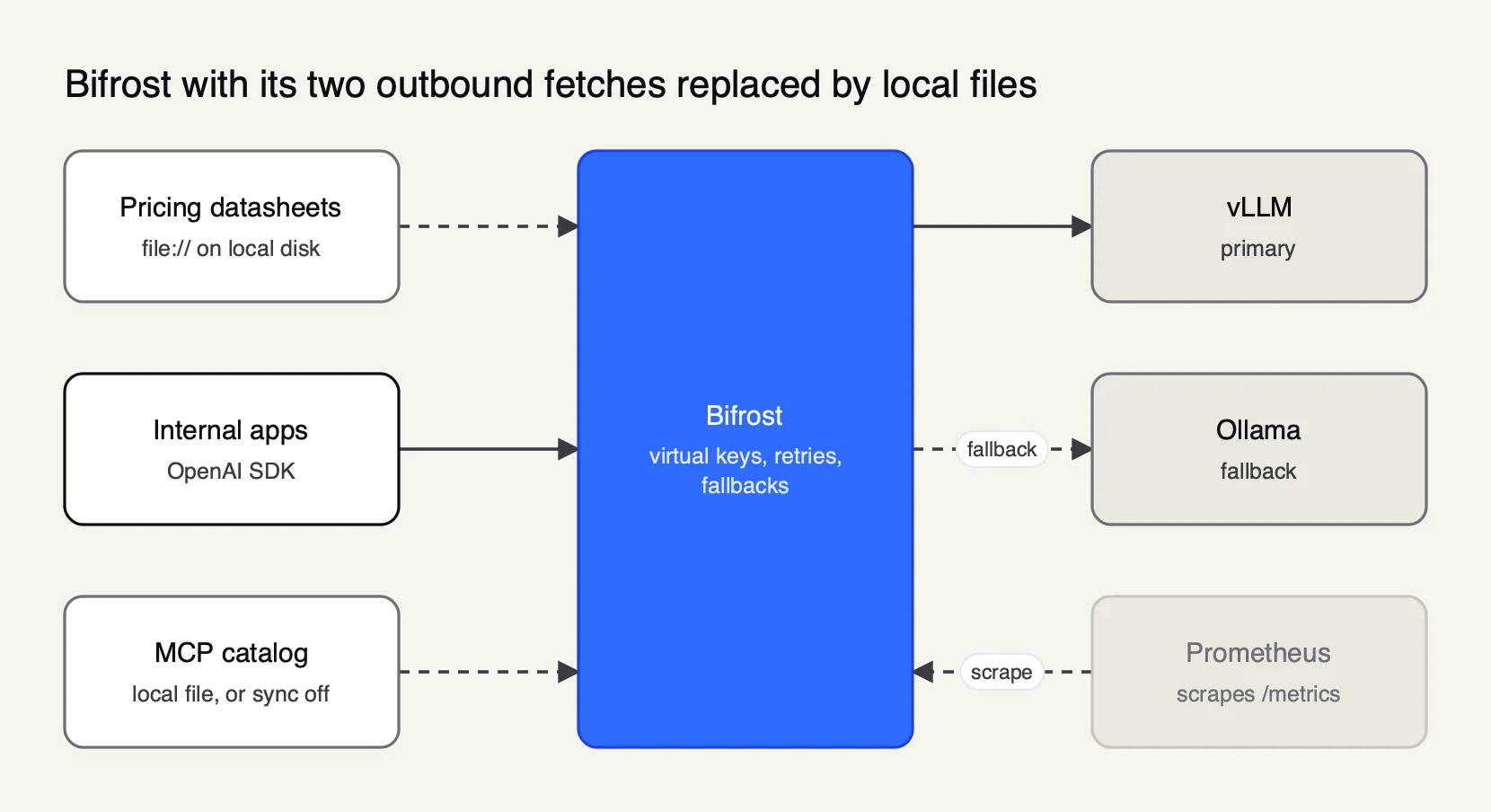 Figure 3: Bifrost documents two outbound fetches; pointing both at local files is the whole air-gap configuration on the gateway side.
Enterprise tier. Clustering, adaptive load balancing, guardrails, OIDC user provisioning, RBAC, audit logs and in-VPC deployments are listed on the enterprise overview. The in-VPC offering runs on GKE, EKS or AKS through Helm and carries a 99.95% monthly uptime commitment for the gateway and its log pipeline. The enterprise deployment options page summarizes the in-VPC, air-gapped and multi-cloud variants.
Best for: teams that need a self-hosted gateway with a documented, file-based answer to every outbound call, native vLLM and Ollama routes, and governance in the free edition.
2. LiteLLM
LiteLLM is an open-source LLM proxy and Python SDK from BerriAI. Its license file is MIT for everything outside an enterprise/ directory, which carries a commercial license.
Outbound dependencies. The data security page states that LiteLLM runs no telemetry when self-hosted and stores no data on LiteLLM servers. The proxy fetches its model cost map from GitHub at startup by default; the configuration reference documents LITELLM_LOCAL_MODEL_COST_MAP=True, which uses the copy bundled with the package and disables the remote fetch. Updated pricing then arrives with the next package upgrade.
Installation. The production deployment guide uses Helm on EKS, GKE or AKS, or Terraform modules for AWS and GCP. Official images are published to ghcr.io/berriai, mirrored at docker.litellm.ai, and signed, and the guide itself recommends pinning versions and pointing at a mirrored registry where a platform cannot pull from GHCR. The Helm path needs PostgreSQL and Redis, so both have to be in the transfer bundle.
Local models and failover. The hosted_vllm/ route sends chat, embeddings, completions, rerank and transcription requests to a vLLM OpenAI-compatible server, and Ollama has its own provider. Fallbacks move a request to another model group after the configured retries, and models that keep failing are put into a cooldown.
Best for: Python-centric platform teams that already run PostgreSQL and Redis and want a self-hosted proxy with a bundled, offline cost map.
3. Kong AI Gateway
Kong AI Gateway is the set of AI plugins for Kong Gateway, Kong’s API gateway for conventional API traffic. The multi-provider routing plugin, AI Proxy Advanced, is part of Kong’s AI Gateway Enterprise offering.
Licence handling. Kong Gateway Enterprise loads its licence at startup. The license documentation describes a signed JSON file supplied by Kong, read from a default path, a KONG_LICENSE_PATH location or an environment variable, in both traditional and hybrid deployments. Licences expire at midnight on the expiration date, so an air-gapped site schedules licence renewal as one more file to carry across.
Installation. Kong Gateway ships as Debian, Ubuntu, Red Hat and Amazon Linux packages, binary downloads, Docker images including a distroless variant, and Helm charts. That spread suits mixed estates where some gateways run on virtual machines and some on Kubernetes. Kong also sells Konnect, a managed control plane; an air-gapped site uses the self-managed modes.
Local models and failover. AI Proxy Advanced lists Ollama, vLLM and Llama alongside Bedrock, Vertex AI and Azure OpenAI as targets. It load-balances across them with round-robin, consistent hashing, least connections, lowest latency, lowest usage, semantic and priority algorithms. From version 3.10 fallbacks work across targets with different formats, and version 3.13 adds a circuit breaker with health checks.
Best for: organizations that already run Kong Gateway Enterprise at the edge and want AI traffic under the same plugins, licensing and operations runbooks.
4. Apache APISIX
Apache APISIX is an Apache Software Foundation API gateway, licensed under Apache 2.0. Its AI support comes from two plugins: ai-proxy for a single provider and ai-proxy-multi for several.
Installation and footprint. The installation guide covers Docker Compose, Helm, RPM and DEB packages, and source builds. In its usual modes APISIX keeps configuration in etcd, which has to be secured and mirrored. The standalone file-driven mode loads the full configuration from a local YAML or JSON file and does not use etcd at all, which removes one service from an air-gapped bundle and makes configuration changes a file transfer.
Local models and failover. ai-proxy-multi translates requests for OpenAI, Azure, Anthropic, Gemini, Vertex AI, Amazon Bedrock, DeepSeek, OpenRouter and other OpenAI-compatible APIs, which is the route for vLLM and Ollama. It adds weighted round-robin, consistent hashing and semantic balancing, retries, health checks and fallback on configurable HTTP status codes, and it can write token usage, model and time to first response into the access log.
Best for: teams already running APISIX, or teams that want a foundation-governed gateway whose entire configuration can live in one file.
5. Agent Router
Agent Router is the project formerly called Envoy AI Gateway. Its site describes it as an Agentic AI Foundation project with the same code and maintainers, and the repository is licensed under Apache 2.0. It is Kubernetes-native and built on Envoy Gateway and Envoy Proxy; the documented prerequisites are kubectl and Helm.
Local models and failover. The supported-provider table includes OpenAI, AWS Bedrock, Azure OpenAI, Gemini, Google Vertex AI and Anthropic, plus a self-hosted-models entry for servers that speak the OpenAI schema, with vLLM as the documented example. Provider fallback is declared on the route: the first backend is primary, later backends are fallbacks, and retry policies decide when traffic moves.
Footprint. A Kubernetes cluster with Envoy Gateway is the minimum, so Agent Router fits sites that already run Kubernetes with an internal registry and Helm repository, and adds little for them. Outside Kubernetes it is not an option.
Best for: platform teams that standardize on Kubernetes and Envoy and want AI routing declared as Kubernetes resources next to the rest of their traffic policy.
Outbound dependencies compared
For an air-gapped site, the table below is the shortlist filter. “Not published” means the vendor documentation read for this article does not list the gateway’s outbound calls, which does not mean there are any; it means an operator has to establish the list through testing with egress blocked.
| Gateway | Documented runtime fetches | Offline switch | Licence for the AI features |
|---|---|---|---|
| Bifrost | Pricing and model-parameter datasheets; MCP catalog | file:// URLs for all three; catalog sync can be set to 0 | Apache 2.0; Enterprise images via issued registry credentials |
| LiteLLM | Model cost map from GitHub | LITELLM_LOCAL_MODEL_COST_MAP=True | MIT core; enterprise directory commercial |
| Kong AI Gateway | Not published | Licence read from a local file or variable | Kong Gateway Enterprise subscription |
| Apache APISIX | Not published | Standalone file-driven configuration | Apache 2.0 |
| Agent Router | Not published | Not published | Apache 2.0 |
Two practical points apply to all five. Model pricing data goes stale on a disconnected network, so cost reports are only as current as the last file transferred. And any gateway that logs to an external observability service needs that service inside the network too; the sibling article on LLM cost control with an AI gateway covers what those logs and budgets are used for.
Running local models behind the gateway
A private LLM stack usually starts with one inference server and grows into several, and the gateway is what keeps that growth invisible to applications. Ollama is often the first server a team installs, on a workstation or a single machine. vLLM is aimed at serving models to many concurrent users on GPU servers. Both expose OpenAI-compatible endpoints, so a team can run Ollama for experiments and vLLM for shared production use and route between them by model name at the gateway.
Three patterns cover most deployments:
- Pool by model. Several vLLM replicas serve the same model and the gateway balances across them by weight or by health, removing a replica that starts returning errors.
- Tier by cost. A small local model answers routine requests and a larger one, or a private cloud endpoint in an in-VPC setup, takes requests that fail or exceed a context limit.
- Separate by team. Each team gets its own key with a budget and a model allow-list, so one team’s batch job cannot starve another team’s interactive tool.
Routing logic between local and hosted models is covered in more depth in the companion list of gateways for routing between vLLM, Ollama and cloud LLMs, and in Bifrost’s own comparison of LLM gateways for self-hosted models on vLLM, SGLang and Ollama.
Choosing a gateway for a private LLM deployment
The fastest way to narrow the list is to start from the network, then the existing stack. A true air gap favors gateways that document every outbound call and accept local files for each, and a small footprint, because everything in the bundle has to be transferred and patched by hand. That points to Bifrost first, with LiteLLM next if the team is comfortable carrying PostgreSQL and Redis. An in-VPC deployment relaxes the transfer problem, and the choice moves toward what the operations team already runs: Kong for Kong estates, APISIX for APISIX estates, Agent Router for Kubernetes platforms built on Envoy. For the policy side of the decision, the roundup of AI governance platforms for air-gapped deployments works as a checklist of controls to test.
A short test plan settles the rest:
- Install the candidate in a network with all egress blocked and watch its logs and DNS queries at startup.
- Point it at one vLLM server and one Ollama server, send traffic, and stop one server mid-run to confirm failover.
- Issue two team keys with different budgets and confirm the limits hold.
- Rotate a data file (pricing, licence or configuration) the way it will be rotated in production, and confirm whether a restart is needed.
The open-source subset of these gateways is compared on license and project health in the Frontier Wire ranking of open-source AI gateways for self-hosting, and the full field, managed options included, is in the 2026 AI gateway rankings.
Limits of this comparison
This comparison is based on vendor documentation read on 10 October 2026, not on installations in an isolated lab. Where a vendor does not publish a list of outbound calls, the article does not guess one. Products change quickly in this category: Agent Router was renamed from Envoy AI Gateway, and Kong’s features are versioned release by release. Licence terms, enterprise packaging and supported providers should be confirmed against current documentation before procurement. The conclusion would change for a team whose existing gateway already passes the blocked-egress test, since replacing a working edge proxy rarely pays for itself; for a team choosing fresh, the documented offline path and small footprint are what decide the ranking.
Sources
- NIST CSRC glossary: air gap (from CNSSI 4009-2022)
- Amazon Bedrock: interface VPC endpoints (AWS PrivateLink)
- Azure AI services: virtual networks and private endpoints
- vLLM: OpenAI-compatible server
- Ollama: OpenAI compatibility
- Bifrost source repository (GitHub, Apache 2.0)
- Bifrost docs: air-gapped deployment
- Bifrost docs: on-premise deployment
- Bifrost docs: in-VPC deployments
- Bifrost docs: enterprise overview
- Bifrost docs: vLLM provider
- Bifrost docs: benchmarking
- LiteLLM docs: data privacy and security
- LiteLLM docs: configuration settings
- LiteLLM docs: production deployment
- LiteLLM docs: fallbacks
- Kong docs: license entity
- Kong docs: AI Proxy Advanced plugin
- Apache APISIX docs: ai-proxy-multi plugin
- Apache APISIX docs: installation guide
Questions readers ask
What is an on-premise LLM?
An on-premise LLM is a language model that runs on hardware the organization controls, in its own data center or private cloud, instead of being called over the internet from a vendor API. Prompts, outputs and model weights stay inside the organization's network. An inference server such as vLLM or Ollama serves the model, and an AI gateway usually sits in front of it to handle keys, routing and logs.
Can an AI gateway run fully offline?
Yes, if every runtime dependency is available inside the network. Container images and charts are mirrored to an internal registry, and any data the gateway normally downloads, such as model pricing tables or tool catalogs, is loaded from local files. Bifrost and LiteLLM both document switches that replace remote fetches with local copies, and APISIX can run from a local configuration file without etcd.
What is the difference between an air-gapped and an in-VPC deployment?
An air-gapped network has no automated connection to outside networks, so software and data cross only through a manual, reviewed transfer. An in-VPC deployment runs inside a private cloud network that can still reach selected services over private endpoints, such as Amazon Bedrock through AWS PrivateLink. In-VPC allows hosted models; a true air gap allows only models served locally.
Do I need an AI gateway for a private LLM?
Not for one model and one application. A gateway earns its place when several teams share the inference servers, when access has to be scoped per team or per application, when usage must be logged for audit, or when traffic should fail over between a local model and a private cloud endpoint. Those needs usually arrive soon after the first private model goes into production.
What's the best offline LLM?
There is no single answer, because the right model depends on the task, the hardware and the license terms. The gateway question is separate: every gateway in this list can front any open-weight model served through an OpenAI-compatible API, so a team can change the offline model behind the gateway without changing application code.