
Claude Code security: permissions, sandboxing and the scanner
The phrase now means two things: Anthropic's Claude Security scanner, and the job of keeping a coding agent with shell access from doing harm. Permission modes, the sandbox, managed settings, MCP policy and gateway routing, mapped to the incidents that shaped them.
TL;DR
- “Claude Code security” means two different things. One is Anthropic’s vulnerability scanner, announced as Claude Code Security in February 2026 and now sold as Claude Security on the Enterprise plan. The other is the work of securing Claude Code itself, an agent that runs shell commands with the developer’s own access.
- The real incidents so far came through the repository, not the prompt box: Check Point showed in February 2026 that project settings files could run commands and leak API keys before the trust dialog appeared. All three issues are patched.
- Claude Code’s controls stack in layers: PreToolUse hooks, deny and ask rules, the permission mode, an OS-level sandbox for shell commands, and a container or VM for the whole process. The sandbox is off by default and still lets commands read
~/.sshunless told otherwise.- Managed settings are what make any of this an organizational control. Without them, a developer or a repository can loosen every rule.
- Routing the agent through an AI gateway such as Bifrost moves provider keys, MCP tool allow-lists, guardrails and request logs off the laptop; Bifrost Edge, in early access, extends that routing to the desktop apps and agents a gateway would otherwise miss.
Claude Code security is the set of controls that decide what Anthropic’s coding agent may read, run, change and send while it works in a developer’s repository, plus, since February 2026, the name searchers use for Anthropic’s AI vulnerability scanner. Both meanings matter to the same people. A security team that buys a scanner to find flaws in code is usually the team that has to approve an agent with shell access on hundreds of laptops. Both are covered below, starting with the threat model and the incidents that shaped Claude Code’s defaults, then working through each control in Anthropic’s documentation and what it does not cover. Every behavior described comes from Anthropic’s docs, disclosures and vendor documentation read in October 2026; no attacks were run for this piece.
Claude Code security: two meanings
The search term splits cleanly. Anthropic announced Claude Code Security on February 20, 2026, as “a new capability built into Claude Code on the web” that “scans codebases for security vulnerabilities and suggests targeted software patches for human review,” released as a limited research preview to Enterprise and Team customers. The announcement said Anthropic’s team had used Claude Opus 4.6 to find “over 500 vulnerabilities in production open-source codebases.”
The product has since been renamed. The Claude Security product page describes it as “available in public beta for Claude Enterprise,” scanning connected GitHub repositories with Claude Mythos 5.1, putting each finding through “an adversarial verification pass,” and pushing results to Slack or Jira by webhook. Anthropic also ships a Claude Security plugin for Claude Code itself, which runs a multi-agent scan inside a local session on whatever model the session uses and writes patches that are “never applied automatically.”
The second meaning is older and broader: Claude Code is an agent that edits files, runs commands, calls MCP servers and pushes to git. Securing that agent is the subject of the rest of this piece, because it is the problem every team adopting Claude Code has, whether or not it buys the scanner.
The coding agent threat model
A coding agent’s threat model is the set of ways untrusted text can become an action taken with the developer’s own privileges. Claude Code reads repository files, MCP tool results, fetched web pages and package scripts; any of them can carry instructions, and the agent can turn those instructions into shell commands, file writes, network calls and pushes.
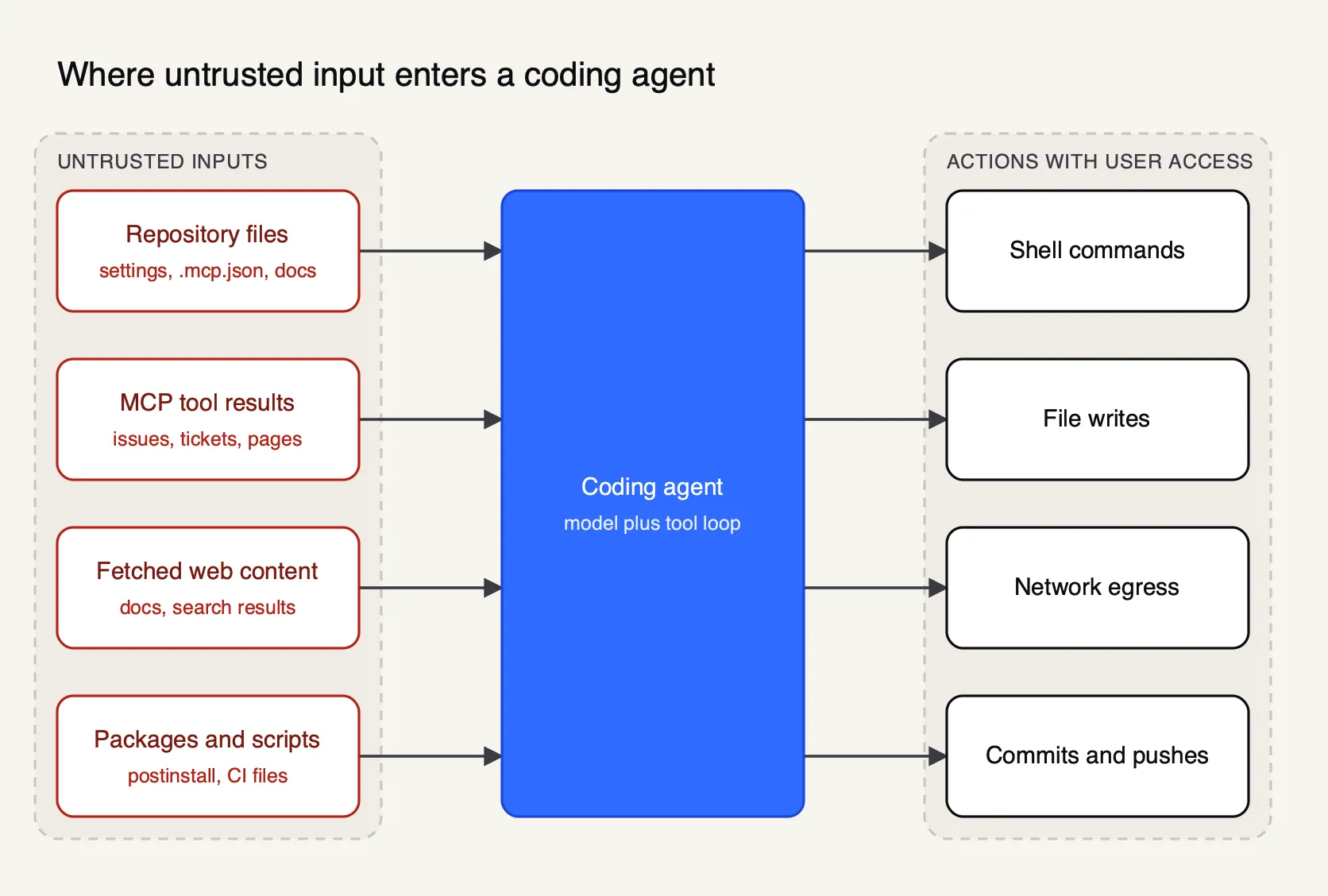
Figure 1: Every input on the left can carry instructions, and every action on the right runs with the developer’s own access.
OWASP’s LLM01 entry defines the core problem: “Indirect prompt injections occur when an LLM accepts input from external sources, such as websites or files,” and “it is unclear if there are fool-proof methods of prevention for prompt injection.” The OWASP Top 10 for Agentic Applications, published in December 2025, names the agent-specific versions of that risk. Four map directly onto a coding agent:
- ASI01 Agent Goal Hijack: instructions hidden in a README, an issue or a tool result change what the agent is trying to do.
- ASI02 Tool Misuse and Exploitation: the agent uses tools it is allowed to use, such as
git pushorcurl, in ways that cause harm. - ASI04 Agentic Supply Chain Vulnerabilities: a poisoned package, plugin or MCP server ships the attack.
- ASI05 Unexpected Code Execution (RCE): the agent, or the configuration it loads, runs code nobody approved.
The Model Context Protocol adds its own warning. The 2026-07-28 specification states that “tools represent arbitrary code execution and must be treated with appropriate caution,” and that “MCP itself cannot enforce these security principles at the protocol level.” For a coding agent, that means every MCP server a developer connects inherits the agent’s reach. The Frontier Wire’s comparison of MCP security tools covers that layer in depth.
Incidents that shaped Claude Code’s defaults
The most instructive Claude Code security incidents did not involve a clever prompt. They involved configuration that a repository supplies and that Claude Code loaded before a human had a chance to look at it. Anthropic’s current trust model, which warns about repository configuration and defers network activity until the user accepts the trust dialog, is largely a response to them.
Check Point Research disclosed three issues on February 25, 2026, all patched before publication:
| Issue | Identifier | Mechanism | Fix implemented |
|---|---|---|---|
| Hooks in project settings | GHSA-ph6w-f82w-28w6 | A repository’s .claude/settings.json defined SessionStart hooks that ran shell commands without explicit approval | August 26, 2025 |
| MCP consent bypass | CVE-2025-59536 | enableAllProjectMcpServers or enabledMcpjsonServers in project settings auto-approved servers in .mcp.json, whose commands ran before the trust dialog could be read | September 22, 2025 |
| API key exfiltration | CVE-2026-21852 | A project could set ANTHROPIC_BASE_URL; requests carrying the user’s API key went to that host before the trust dialog appeared | December 28, 2025 |
Check Point quotes the remediation for the third issue: “Claude Code now defers all network operations until after explicit user consent.” The pattern behind all three is ASI05 and ASI04 together. A cloned repository is code, and its configuration files are code too.
Two other events widen the frame. The Nx security advisory for the August 2025 compromise of the nx npm package reproduces a script that carried a prompt telling a local AI agent to act as “a file-search agent” and inventory configuration and environment files, an attempt to turn whatever coding agent was installed into a reconnaissance tool. In November 2025, Anthropic reported that a group it assessed as Chinese state-sponsored had manipulated Claude Code into “attempting infiltration into roughly thirty global targets,” using AI for “80-90% of the campaign” by breaking attacks into “small, seemingly innocent tasks.” That case is about misuse of the agent by its operator rather than an attack on a developer, but it shows how much autonomous work the tool can do once guardrails are talked around.
Claude Code permissions and permission modes
Claude Code permissions decide which tool calls run without a human. Each session runs in a permission mode that sets the baseline, and permission rules in settings files pre-approve or block specific tools on top of it. Rules are evaluated deny first, then ask, then allow, and deny rules apply in every mode.
Anthropic’s permission-mode reference lists six modes:
| Mode | What runs without asking | Anthropic’s stated use |
|---|---|---|
default (Manual) | Reads only | Sensitive work, reviewing every action |
acceptEdits | Reads, file edits, common filesystem commands | Iterating on code under review |
plan | Reads, plus classifier-approved commands where auto mode is available | Exploring before changing |
auto | Everything, with background safety checks | Long tasks, fewer prompts |
dontAsk | Reads and pre-approved tools; anything else is denied | Locked-down CI and scripts |
bypassPermissions | Everything | Isolated containers and VMs only |
Auto mode is now the starting mode for interactive terminal and VS Code sessions from Claude Code v2.1.283. A separate classifier model reviews actions before they run and, by default, blocks a long list that includes curl | bash, force pushes, production deploys, granting IAM permissions, printing a live credential into the transcript, and “repointing an API base URL, proxy endpoint, webhook receiver, or registry mirror at a third-party host.” Anthropic’s own warning is plain: “Auto mode reduces permission prompts but does not guarantee safety.” Administrators can remove it with disableAutoMode in managed settings.
dangerously-skip-permissions
--dangerously-skip-permissions is the flag that starts a session in bypassPermissions mode, which “disables permission prompts and safety checks so tool calls execute immediately, including writes to protected paths.” Explicit ask rules, critical-path deletions such as rm -rf ~, and a few interaction-only tools still prompt, and the CLI refuses the flag when run as root. Allow rules stop mattering in this mode; deny rules still block. The safe use is the one the table names: a container or VM that holds nothing the session should not be able to lose. To take the option away entirely, set permissions.disableBypassPermissionsMode to "disable" in managed settings.
Permission rules have a structural limit worth knowing. A Bash deny rule matches the command as written, so Bash(curl *) does not catch the same program called by path or inside sh -c. Anthropic’s permissions guide tells administrators to pair such rules with sandbox network isolation, which is enforced by the operating system rather than by string matching.
Claude Code sandboxing
The Claude Code sandbox is an operating-system boundary around the shell commands the agent runs. It limits which files those commands can write and which network hosts they can reach, using Seatbelt on macOS and bubblewrap on Linux and WSL2. It is off by default and covers shell commands only, not the agent’s file tools, MCP servers or hooks.
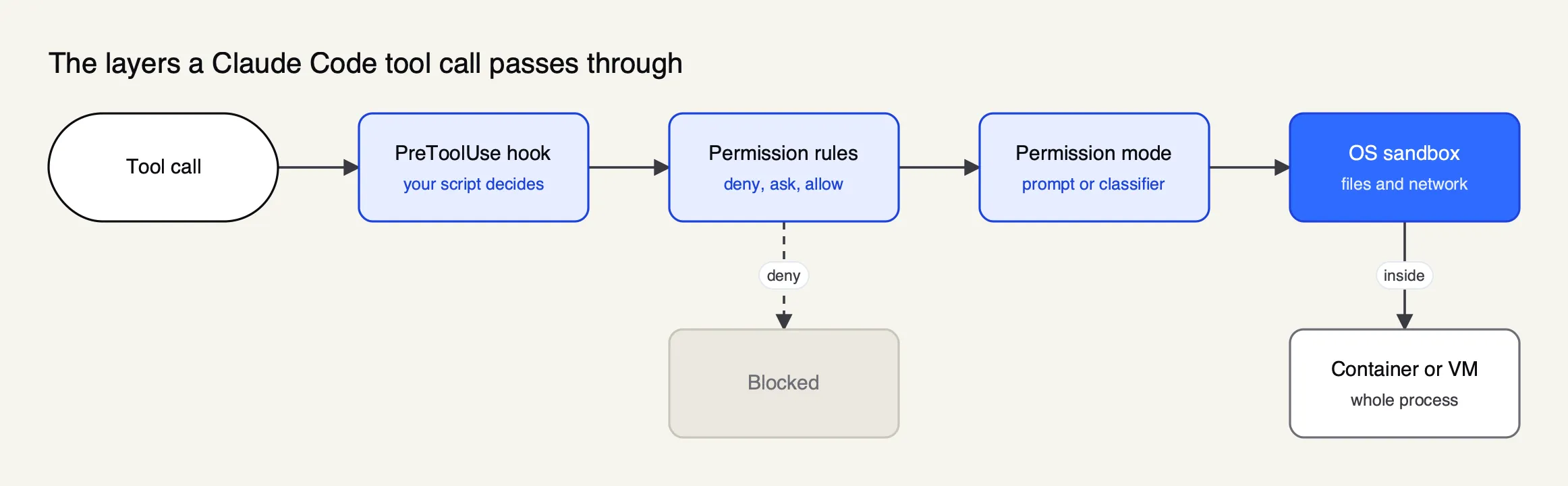
Figure 2: Hooks, rules and modes decide whether a call runs; the sandbox and the container limit what it can reach once it does.
The sandboxing documentation gives the defaults once /sandbox or sandbox.enabled turns it on. Writes are limited to the working directory and a per-user temp directory. Network traffic has “no direct route out” and goes through a local proxy whose allowed-domain list “start[s] empty.” Reads are the gap: by default a sandboxed command can read “most of the machine, including credential files such as ~/.ssh and ~/.aws/credentials,” and it inherits Claude Code’s environment variables, “including any secrets in its environment.” The docs add that “there is no built-in credential deny list, so only the files and variables you list are restricted.” The sandbox.credentials block closes that gap by denying or masking named files and variables.
Three further details change how much the sandbox can be trusted:
- The escape hatch. When a command fails inside the sandbox, Claude can ask to retry it unsandboxed.
allowUnsandboxedCommands: falseremoves that option. - Failing open. If bubblewrap is missing on Linux, Claude Code can fall back to unsandboxed execution.
failIfUnavailable: truemakes it refuse to start instead. - What runs outside. Hooks, local MCP servers, LSP servers and helper commands such as
apiKeyHelper“run with your full access.”
For a boundary around the whole process, Anthropic’s sandbox environments page compares the open source sandbox runtime, dev containers, custom containers and VMs. Its reference dev container adds an egress firewall script and runs as a non-root user, and carries its own caveat: with --dangerously-skip-permissions, a container does “not prevent a malicious project from exfiltrating anything accessible inside the container, including the Claude Code credentials stored in ~/.claude.” Isolation limits the blast radius. It does not stop a session from leaking what it can read to a host it can reach.
Claude Code managed settings for enterprise
Claude Code managed settings are the policy an organization deploys to every developer machine. Claude Code applies them above user, project and command-line settings, so no lower level can override them, and a set of managed-only lock keys makes it ignore rules from lower levels entirely. Without managed settings, every control above is a suggestion.
Anthropic’s managed settings guide offers four delivery mechanisms: a managed-settings.json file in a system directory (/Library/Application Support/ClaudeCode/ on macOS, /etc/claude-code/ on Linux), an MDM profile or Windows registry value pushed through Jamf, Intune or Group Policy, server-managed settings from the claude.ai admin console, and per-IdP-group policy through Anthropic’s self-hosted Claude apps gateway. Running /status on a machine shows which source is in force.
The keys that matter most for security:
| Control | Managed setting | Effect |
|---|---|---|
| Remove bypass mode | permissions.disableBypassPermissionsMode: "disable" | --dangerously-skip-permissions stops working |
| Remove auto mode | disableAutoMode: "disable" | Sessions fall back to Manual |
| Own the permission rules | allowManagedPermissionRulesOnly: true | Project and user allow rules are ignored |
| Require the sandbox | sandbox.enabled, failIfUnavailable, allowUnsandboxedCommands: false | No fallback to unsandboxed shell commands |
| Own the network allowlist | sandbox.network.allowManagedDomainsOnly: true | Only managed domains are reachable |
| Own MCP | managed-mcp.json or allowManagedMcpServersOnly: true | Only approved servers load |
| Own hooks | allowManagedHooksOnly: true | Repository and user hooks stop running |
| Pin the endpoint | allowedProviders: ["customEndpoint"] plus ANTHROPIC_BASE_URL in env | Claude Code refuses any other API destination |
Two caveats come from the docs themselves. A developer can still type a command at the ! shell prompt and run it outside the sandbox, “with the same access they already have in any terminal outside Claude Code.” And headless runs behave differently from interactive ones: in a claude -p or Agent SDK session in a folder that was never trusted, servers in the repository’s .mcp.json are “connected without asking, approved or not,” and repository hooks run. Anthropic’s permissions reference recommends --setting-sources user, --bare or disableAllHooks before running claude -p on a repository you did not write. That advice applies to every CI pipeline that points Claude Code at pull requests from outside contributors.
MCP servers and hooks
MCP servers and hooks are the two ways Claude Code runs code that is not a shell command the model chose. Both run outside the sandbox with the developer’s full access, both can be supplied by a repository, and both can be locked to an approved set through managed settings. They are also the two mechanisms behind the Check Point findings.
For MCP, Anthropic’s managed MCP configuration starts from an uncomfortable default: “By default, anyone running Claude Code can connect any MCP server they choose.” Anthropic “reviews connectors against its listing criteria” for its directory but “doesn’t security-audit or manage any MCP server.” The documented patterns run from disabling MCP entirely (an empty managed-mcp.json) to a fixed deployment, to an approved catalog with allowedMcpServers and allowManagedMcpServersOnly. The Frontier Wire’s guide to MCP servers for coding agents covers which servers are worth approving, and its survey of MCP gateways covers centralizing them.
Hooks cut both ways. A PreToolUse hook runs “before the permission prompt” and can return "permissionDecision": "deny" with a reason, which makes it the most flexible enforcement point Claude Code has: a script can block writes to production config, inspect a command against an internal policy service, or log every call. The hooks reference also documents a ConfigChange event for auditing settings edits during a session. The same mechanism is an attack path when a repository supplies it, which is why allowManagedHooksOnly exists.
Secrets, credentials and network egress
Secrets reach a coding agent in three ways: through files it can read, through environment variables it inherits, and through the credential it uses to call the model. Each needs a separate control, and the third is the one most teams leave on every laptop as a long-lived provider key.
For files, Read deny rules such as Read(./.env) and Read(./secrets/**) cover Claude’s file tools and the shell commands Claude Code recognizes as reads, and sandbox.credentials covers sandboxed commands. For environment variables, CLAUDE_CODE_SUBPROCESS_ENV_SCRUB strips credentials from every subprocess. For egress, the sandbox proxy enforces a domain allowlist and the dev container reference adds a firewall. Anthropic’s security page notes that Claude Code stores its own API keys and tokens in the macOS Keychain where available, and in a 0600 file on Linux.
The model credential is where a gateway changes the picture. Anthropic’s gateway documentation describes the arrangement: “the provider key stays server-side; developers hold gateway credentials instead,” and offboarding “revokes one credential.” Combined with allowedProviders: ["customEndpoint"], a pinned base URL also closes the class of attack behind CVE-2026-21852, since Claude Code then refuses any endpoint other than the one the organization set.
How Bifrost governs Claude Code traffic
Bifrost is an open-source AI gateway that Claude Code can use as its LLM endpoint and as its MCP server. It holds provider credentials centrally, issues each developer or CI job a revocable virtual key, filters which MCP tools each key can call, and logs every request. It gets a worked example here because its documentation covers each of those controls for Claude Code specifically.
Bifrost is written in Go and released under Apache 2.0 on GitHub. It exposes 25+ providers and 10,000+ models through one OpenAI-compatible API, plus an Anthropic-compatible endpoint, and its published benchmark reports 11 µs of added overhead per request at 5,000 RPS on an AWS t3.xlarge.
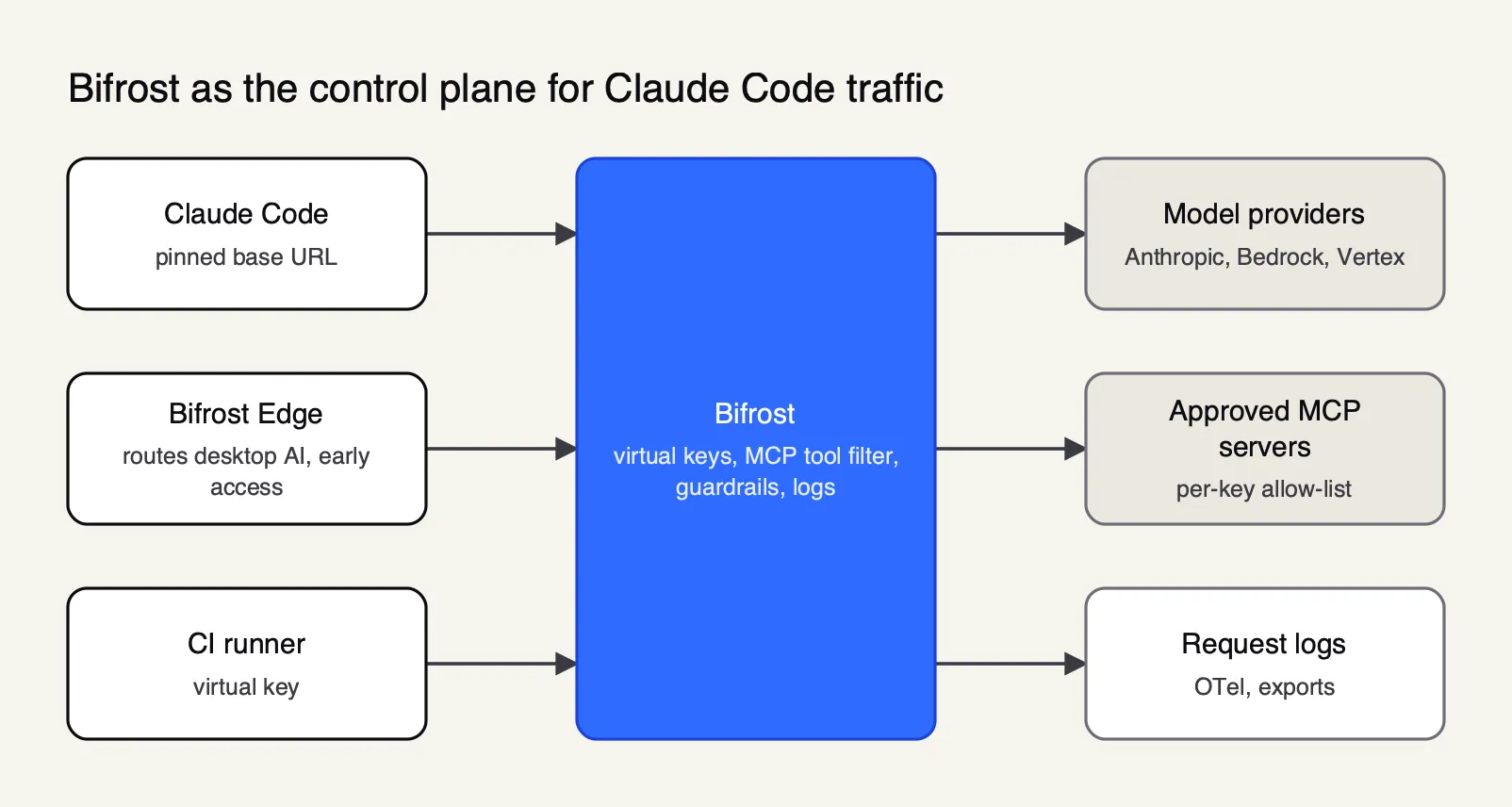
Figure 3: Credentials and tool policy live on the gateway, so a laptop holds a revocable virtual key instead of a provider key.
The controls, as the Bifrost Claude Code guide and related docs describe them:
- Credentials. Claude Code points
ANTHROPIC_BASE_URLat Bifrost’s/anthropicpath with ask-bf-*virtual key. A new virtual key “with no provider configuration denies all providers.” Enterprise rollouts can use SSO throughapiKeyHelper, with tokens kept in the operating-system keyring rather than in settings files. The guide recommends the sameallowedProviderspinning Anthropic documents. - MCP tool access. Pointed at Bifrost’s
/mcpendpoint, Claude Code sees only the tools its key allows. MCP tool filtering is deny-by-default per virtual key, a caller-supplied tool header “can only narrow, never widen,” and the allow-list “is enforced again at MCP tool execution time.” Interactive clients can authenticate with OAuth 2.1 instead of a pasted key. - Request visibility. Built-in observability records inputs, outputs, tokens, cost and latency for every request, with OpenTelemetry export, which complements the client-side events Claude Code’s own monitoring emits.
- Auto mode compatibility. Anthropic notes that a gateway which drops or truncates auto mode’s server-side review results causes Claude Code to fall back to local classifier calls or deny the action. Bifrost’s guide documents how to keep model names recognizable so server-side review stays eligible.
Enterprise tier. Guardrails on model traffic and on MCP tool arguments and results, including built-in secrets detection based on Gitleaks rules and integrations with AWS Bedrock Guardrails, Azure Content Safety, Google Model Armor and CrowdStrike AIDR, are part of Bifrost Enterprise, as are HMAC-signed audit logs of administrative changes and SSO.
A gateway governs only the traffic configured to reach it. Bifrost Edge, listed as early access, is the endpoint layer for that gap: per its documentation, it runs on macOS, Windows and Linux machines and routes AI traffic from Claude Code, Codex CLI, Claude Desktop, Cursor and browser AI through the organization’s Bifrost, so the gateway’s keys, budgets and guardrails apply. Its MCP governance inventories the MCP servers configured in each supported app and enforces allow or deny decisions on the device.
Other routes exist. Anthropic ships its own self-hosted Claude apps gateway inside the claude binary, with IdP sign-in and per-group managed settings, though its upstreams are Anthropic’s API or Claude on Bedrock, Google Cloud and Microsoft Foundry, and it has no service-token flow for CI. Any gateway exposing Anthropic’s API format works, per Anthropic’s docs, and the gateways for Claude Code, Codex CLI and Cursor comparison ranks the main options.
Further reading on the gateway approach includes Maxim’s articles on governing Claude Code access with an AI gateway, AI coding agent security across Cursor, Claude Code and Copilot, and adding and governing MCP servers in Claude Code.
Audit logs and Claude Code telemetry
Claude Code audit logging comes from two places: the client’s own OpenTelemetry export, which records sessions, tool decisions, permission-mode changes and MCP connections, and the gateway or provider in the request path, which records every model call. Client telemetry redacts prompts and tool details by default, so audit coverage depends on settings an administrator has to choose deliberately.
Anthropic’s monitoring documentation lists events including tool decision, permission mode changed, MCP server connection, hook execution and managed settings resolved. Prompt text, tool arguments and tool output are off unless OTEL_LOG_USER_PROMPTS, OTEL_LOG_TOOL_DETAILS and OTEL_LOG_TOOL_CONTENT are set, and managed settings can lock the OTLP destination so developers cannot redirect it. The choice is a privacy trade-off: logging tool arguments captures Bash commands and file paths, which is what an investigator wants and what a works council may not.
Server-side records fill the other half. Cloud sessions on Anthropic’s infrastructure log “all operations” for audit, per the security page; local sessions leave model-call records wherever the traffic went, which is one argument for routing it through a gateway the organization controls. Maxim’s write-ups on Claude Code monitoring and MCP audit logging requirements go further into what compliance teams ask for.
Claude Code security review tools
Claude Code security review covers four Anthropic tools for finding vulnerabilities in code, each at a different stage. They examine the code Claude writes or the code a team already has. None of them governs the agent’s own behavior, which is why they sit alongside the controls above rather than replacing them.
Anthropic’s security guidance plugin documentation lays out the stack:
| Stage | Tool | What it covers |
|---|---|---|
| In session | Security guidance plugin | Pattern checks on each edit, a model review of each turn’s diff, an agentic review of each commit Claude makes |
| On demand | /security-review | One security pass over the current branch’s changes |
| Deep scan | Claude Security plugin | Multi-agent scan of a repository, a diff or a commit, with reviewed findings and patches |
| Pull request | Code Review (Team and Enterprise) | Multi-agent correctness and security review |
| Managed service | Claude Security (Enterprise) | Scheduled scans of connected GitHub repositories on Claude Mythos 5.1 |
The guidance plugin’s limits are stated in its own docs: “None of the layers block writes or commits,” and its rules “are guidance for the reviewer, not deterministic guardrails.” For hard enforcement, Anthropic points back to a hook that blocks the edit. Existing static analysis and dependency scanners stay in CI; Anthropic’s table lists them as covering “supply-chain checks, and policy enforcement the plugin does not attempt.”
A baseline Claude Code security configuration
A defensible baseline for Claude Code depends on who runs it and against what code. The common thread is to decide centrally, enforce through managed settings, isolate anything unattended, and keep model credentials off the laptop. The table below maps Anthropic’s documented controls to three common situations.
| Situation | Permission mode | Isolation | Policy and credentials |
|---|---|---|---|
| Individual developer, own repositories | Auto or Manual; deny rules for .env and secrets folders | Sandbox on, sandbox.credentials for ~/.ssh and ~/.aws | Personal key in the Keychain; MCP servers from trusted sources only |
| Engineering team, company repositories | Auto, with disableBypassPermissionsMode | Sandbox required with failIfUnavailable and no unsandboxed retry | Managed settings via MDM; approved MCP catalog; managed hooks only; gateway credentials with a pinned base URL |
| CI on untrusted pull requests | dontAsk with explicit allow rules | Container or VM, non-root, egress firewall | --setting-sources user or --bare; scoped short-lived gateway key; no write access to protected branches |
Two habits sit outside any configuration file. Anthropic’s best-practice list starts with “Review suggested commands before approval” and “Avoid piping untrusted content directly to Claude.” And trust prompts only work if they are read: the Check Point issues were dangerous precisely because commands ran before a human could make the decision the dialog asked for.
Claude Code security, in both senses of the phrase, has moved fast in 2026. Anthropic’s scanner has gone from research preview to an Enterprise product, and the agent’s defaults have tightened after each disclosure. What has not changed is the shape of the problem: an agent with a developer’s access reads text from sources nobody fully controls. Teams that treat permission modes as preferences will find their policy is whatever the last repository set. Teams that enforce managed settings, sandbox shell commands, approve MCP servers centrally and route model and tool traffic through infrastructure they own, a gateway on the network side and an endpoint agent where the gateway cannot see, have controls that hold when the model is wrong. Readers comparing those gateway options can start from the site’s survey of gateways for coding agents.
Sources
- Anthropic: Making frontier cybersecurity capabilities available to defenders (Claude Code Security, February 20, 2026)
- Claude Security product page
- Claude Code docs: Security
- Claude Code docs: Choose a permission mode
- Claude Code docs: Permissions
- Claude Code docs: Configure the sandboxed Bash tool
- Claude Code docs: Choose a sandbox environment
- Claude Code docs: Development containers
- Claude Code docs: Deploy managed settings
- Claude Code docs: Managed MCP configuration
- Claude Code docs: Hooks reference
- Claude Code docs: Monitoring
- Claude Code docs: Other LLM gateways
- Claude Code docs: Security guidance plugin
- Claude Code docs: Claude Security plugin
- Check Point Research: RCE and API token exfiltration through Claude Code project files (February 25, 2026)
- Nx security advisory GHSA-cxm3-wv7p-598c (malicious Nx packages, August 2025)
- Anthropic: Disrupting the first reported AI-orchestrated cyber espionage campaign (November 13, 2025)
- OWASP Top 10 for LLM Applications: LLM01 Prompt Injection
- OWASP Top 10 for Agentic Applications (December 2025)
- Model Context Protocol specification (2026-07-28)
- Bifrost docs: Claude Code integration
- Bifrost docs: MCP tool filtering per virtual key
- Bifrost docs: Guardrails
- Bifrost docs: Bifrost Edge overview
- Bifrost source repository (GitHub, Apache 2.0)
Questions readers ask
Is Claude Code safe to use?
Claude Code is as safe as its configuration. By default it asks before edits and most shell commands, stores credentials in the macOS Keychain or a 0600 file, and defers network activity until a folder is trusted. Risk rises with auto-approval, untrusted repositories and unvetted MCP servers. Enterprises should enforce managed settings, turn on the sandbox and centralize credentials rather than rely on per-developer judgment.
What does --dangerously-skip-permissions do in Claude Code?
The flag starts Claude Code in bypassPermissions mode, which runs tool calls without permission prompts or safety checks, including writes to protected paths. Explicit deny and ask rules still apply. Anthropic's documentation says the mode is for isolated containers and VMs only, and the CLI refuses it when run as root. Administrators can disable it with permissions.disableBypassPermissionsMode in managed settings.
What is Claude Code Security?
Claude Code Security was the name of the research preview Anthropic announced on February 20, 2026, which scans a codebase for vulnerabilities and suggests patches for human review. The product is now called Claude Security, in public beta for Claude Enterprise and running on Claude Mythos 5.1. A separate Claude Security plugin runs the same kind of scan inside a Claude Code session.
Does the Claude Code sandbox stop prompt injection?
No. The sandbox limits what a shell command can read, write and reach on the network, so it reduces the damage an injected instruction can do. It does not stop the model from following the instruction, and it does not cover built-in file tools, MCP servers or hooks, which run outside it. Anthropic's own docs warn that any setup allowing network egress can still leak readable data.
Can administrators stop developers from loosening Claude Code settings?
Yes. Managed settings, delivered by file, MDM or the claude.ai console, sit above user and project settings. Locks such as allowManagedPermissionRulesOnly, allowManagedMcpServersOnly, allowManagedHooksOnly and sandbox.network.allowManagedDomainsOnly make Claude Code ignore rules from lower levels. A developer can still run commands by hand in their own terminal, so managed settings govern the agent, not the person.