
Shadow AI monitoring: a practical guide to detection, inventory and policy
Shadow AI detection is a data problem before it is a blocking problem. The signal sources that reveal unapproved AI tools, what to log and how long to keep it, how to build an AI inventory that NIST and ISO 42001 would recognise, and how to roll monitoring out through MDM without breaking employee privacy law.
TL;DR
- Shadow AI detection joins five signal families: network logs, identity and OAuth grants, endpoint inventory, code and secret scanning, and expense data. Each one misses tools the others see.
- The output is an AI asset inventory with one record per tool, which is what NIST AI RMF GOVERN 1.6 and the NIST Generative AI Profile ask organizations to maintain.
- Three policy tiers (sanctioned, tolerated, blocked) turn the inventory into decisions, and each tier gets a different monitoring response.
- Log metadata by default and prompt content only where a risk justifies it. In the EU, workplace monitoring law and works councils shape what can be collected.
- On laptops, an endpoint agent paired with an AI gateway covers what network tools cannot see: Bifrost Edge (early access) inventories AI apps and MCP servers and routes their traffic through the Bifrost gateway.
Shadow AI monitoring is the ongoing collection of signals that show which AI tools, models, agents and integrations employees use without approval, joined into an inventory that governance teams can act on. It is the operational half of shadow AI detection: the definitions, risks and breach data are covered in the Frontier Wire explainer on what shadow AI is. This guide covers the work that follows that decision to look. It sets out which logs and systems carry the signal, what to retain and for how long, how to build an AI inventory, how to sort tools into policy tiers, how to roll monitoring out through device management, and where employee privacy law draws the line.
What shadow AI monitoring covers
Shadow AI monitoring covers every channel through which an AI service can receive company data without review: web chat services, desktop AI clients, browser extensions, AI features inside approved SaaS products, coding agents, Model Context Protocol (MCP) servers and scripts that call model APIs. The goal is not surveillance of individuals but an accurate, current list of tools and their exposure.
The scale argument is settled. Microsoft and LinkedIn’s 2024 Work Trend Index found that 78% of AI users are bringing their own AI tools to work, a figure that rises to 80% at small and medium-sized companies. The survey was conducted by an independent research firm, Edelman Data & Intelligence, among 31,000 knowledge workers in 31 markets between February and March 2024, so it is self-reported and two and a half years old. Newer breach and telemetry data appears in the shadow AI explainer.
Three properties separate AI monitoring from ordinary shadow IT discovery:
- The payload is the risk. A shadow file-sharing app stores what the user chose to upload. An AI tool is designed to receive whatever text, code or files the user is working on.
- Much of it never crosses the network as a new app. A local MCP server talks to its client over standard input and output on the laptop. A coding agent reuses a provider API that the company may already allow.
- Plan type changes the data terms. The same model can sit inside or outside a contract depending on which account the user signed in with, so domain-level visibility is not enough to judge exposure.
Shadow AI detection signal sources
Shadow AI detection draws on five signal families: network traffic, identity and OAuth records, endpoint inventory, code and secret scanning, and finance data. Network and identity sources show which services people reach; endpoint and code sources show what is installed and configured; finance shows what is being paid for outside procurement.
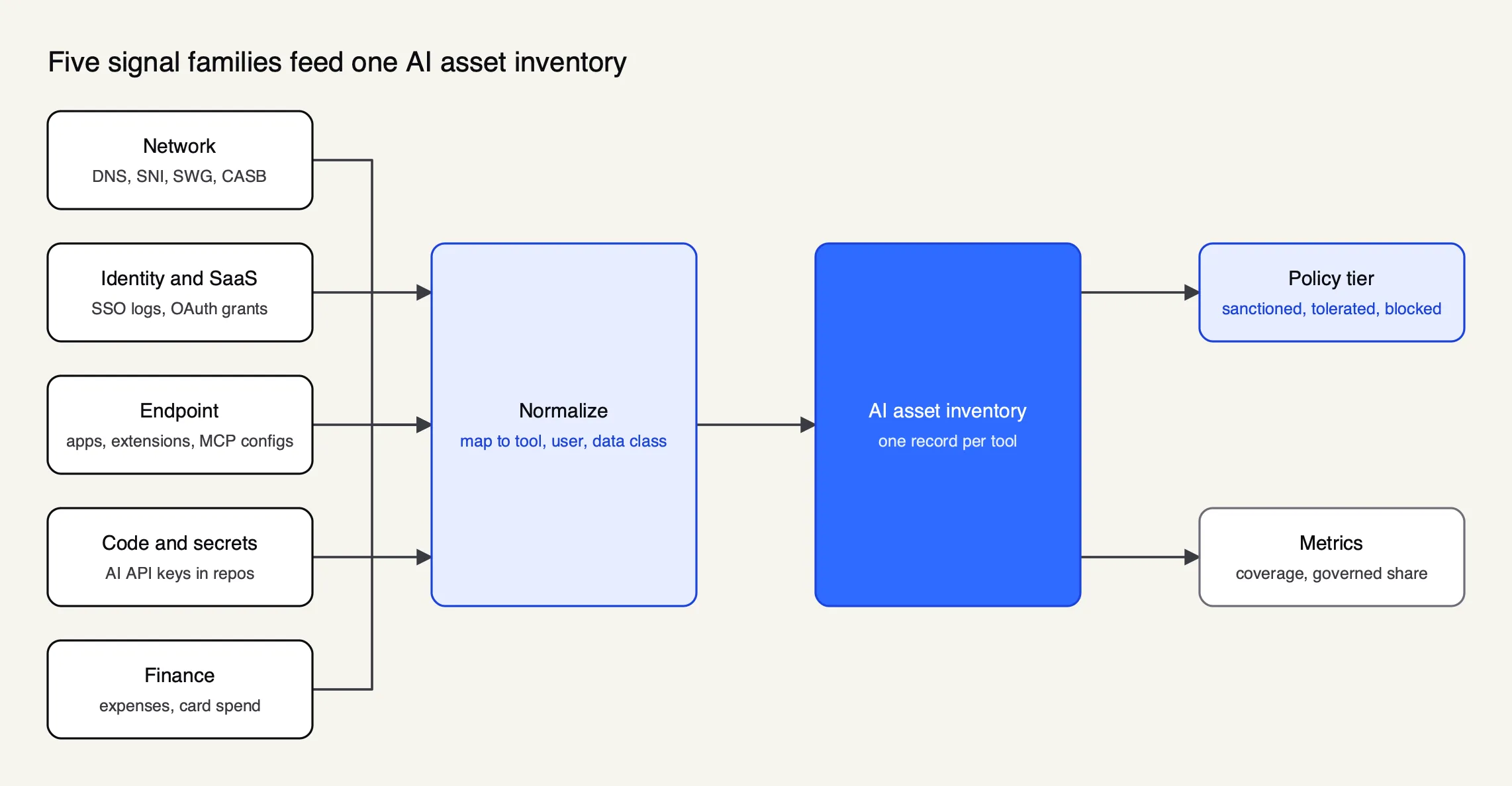 Figure 1: No single signal sees every AI tool; the inventory is where they are joined and deduplicated.
| Signal family | What it reveals | Blind spots | Example sources |
|---|---|---|---|
| Network (DNS, SNI, SWG, CASB) | Connections to known AI domains, users, bytes uploaded | Off-network laptops, unknown endpoints, local MCP servers, prompt content without TLS inspection | Microsoft Entra Global Secure Access, Defender for Cloud Apps, Cloudflare Gateway |
| Identity and SaaS | Sign-ins with corporate identity, third-party OAuth grants and scopes | Personal accounts that never touch corporate identity | Google Workspace API controls, identity provider logs |
| Endpoint | Installed AI apps and versions, browser extensions, coding agents, MCP server configs | Personal and unmanaged devices | MDM software inventory, EDR, endpoint AI agents |
| Code and secrets | AI provider API keys committed to repositories, AI SDK dependencies | Keys kept in local environment files | GitHub secret scanning, dependency manifests |
| Finance | AI subscriptions and API bills paid on cards or expensed | Free tiers | Expense and card systems |
Network: DNS, SNI and secure web gateways
Network monitoring is the fastest place to start because most organizations already collect DNS and proxy logs. Even without decrypting traffic, the DNS query and the TLS Server Name Indication (SNI) field show the hostname a device connected to, which is enough to match traffic against a list of AI domains.
Commercial tools package this. Microsoft describes shadow AI discovery in Global Secure Access as inspecting internet and Microsoft 365 traffic for connections to generative AI applications, SaaS MCP servers and model provider APIs, then matching them against the Defender for Cloud Apps catalog. A separate feature, Generative AI Insights, uses TLS inspection and deep packet inspection to log prompt content, which is a much larger privacy decision than domain-level discovery. Organizations without a cloud proxy can upload firewall and proxy logs to Defender for Cloud Apps for snapshot or continuous reports, scored against a catalog of more than 31,000 apps.
Cloudflare’s AI security report is useful as a model for the output, because it groups AI applications by review status (Unreviewed, In Review, Unapproved and Approved) and reports data uploaded to AI applications by that status. Bytes uploaded to unreviewed tools is one of the more honest early metrics a program can track.
Identity and OAuth grants
Identity data answers a different question: which AI services have been connected to company accounts and data. When an employee signs in to an AI note-taker or writing assistant with a corporate Google or Microsoft account and grants it access to mail, calendar or files, the grant is recorded centrally.
In Google Workspace, the App access control review lists “Accessed apps” with the number of users and the OAuth scopes each app requested, and apps can be set to Trusted, Limited, Specific Google data or Blocked. Exporting that list monthly and filtering for AI vendors is often the cheapest discovery step available, and it finds tools with standing access to company data rather than one-off visits.
Endpoint inventory: desktop apps, extensions and coding agents
Endpoint inventory is the only source that sees what is installed, regardless of which network the laptop is on. MDM and endpoint detection platforms already collect installed software lists; querying them for AI desktop clients (Claude, ChatGPT, Cursor, Codex and similar) and command-line agents installed through package managers produces a per-device view.
Browser extensions deserve a separate query. Chrome’s ExtensionSettings policy can block extensions by ID, block any extension requesting a given API permission, or remove extensions that were already installed, so an extension inventory can turn into enforcement through the same policy channel.
MCP server configs on laptops
MCP servers are the hardest shadow AI to see, because a local server runs as a process on the developer’s machine and talks to its client without touching the network. They are, however, declared in configuration files at documented paths, which makes them inventoriable.
| Client | Where MCP servers are configured |
|---|---|
| Claude Desktop | claude_desktop_config.json under ~/Library/Application Support/Claude/ on macOS or %APPDATA%\Claude\ on Windows (MCP docs) |
| Claude Code | ~/.claude.json for local and user scope, .mcp.json in a project root for project scope (Claude Code docs) |
| Cursor | .cursor/mcp.json in a project or ~/.cursor/mcp.json in the home directory (Cursor docs) |
OWASP’s MCP Top 10 lists shadow MCP servers as MCP09 and describes them as unapproved or unsupervised deployments of Model Context Protocol instances spun up for experimentation, often with default credentials or permissive configurations. A script run through MDM that reads these files and reports server names, commands and URLs (never the environment variables, which often hold tokens) gives a first fleet-wide MCP inventory. The Frontier Wire survey of MCP security tools covers the products that go further, and this analysis of shadow MCP servers at the gateway covers the traffic side.
API keys and expense data
Two signals catch AI use that never appears as an app. The first is code: GitHub’s secret scanning supports patterns for AI provider credentials, including Anthropic, OpenAI, Google Gemini, Mistral AI, Groq and Hugging Face keys. A personal API key in a company repository is evidence of an integration that bypasses procurement and any central gateway.
The second is money. Searching expense reports and corporate card statements for AI vendors finds individual subscriptions and API bills, and it surfaces teams that need a sanctioned option. Coding agents are a common source of both signals, a pattern this piece on shadow AI coding tools examines in detail.
What to log and how long to keep it
A shadow AI monitoring program should log metadata by default (who, which tool, when, how much data, which policy fired) and capture prompt content only where a specific risk justifies it. Retention should follow purpose: long enough to investigate incidents and show compliance, short enough that the logs do not become a new store of sensitive data.
The joint UK NCSC and US CISA guidelines for secure AI development make the second point directly. Their asset guidance lists prompts and logs among AI-related assets and states: “You treat logs as sensitive data and implement controls to protect their confidentiality, integrity and availability.” A prompt log is a copy of whatever employees typed into an AI tool, which can include the exact customer data the program exists to protect.
| Record | Fields worth keeping | Content? | Typical retention driver |
|---|---|---|---|
| Discovery events | Tool, domain or binary, device, user or pseudonym, first and last seen, bytes uploaded | No | Inventory accuracy; 90 days to 12 months |
| Gateway request logs | User or key, model, provider, tokens, cost, latency, guardrail outcome | Optional, per use case | Cost attribution and incident review |
| Guardrail events | Rule fired, action (redact, block), data class | Redacted snippet at most | Security investigation |
| Policy decisions | Tool, tier, approver, date, rationale | No | Audit trail for the life of the policy |
| Administrative audit log | Who changed which policy or key, when | No | Compliance; often a year or more |
For high-risk AI systems under the EU AI Act, Article 26 requires deployers to keep automatically generated logs under their control for a period appropriate to the intended purpose, of at least six months, unless provided otherwise in Union or national law, in particular data protection law. Most shadow AI use is not a high-risk system, but the six-month floor is a reasonable reference for gateway logs that might later need to show how an AI tool was used.
Content logging is the decision that most affects privacy. A sensible default is metadata for all traffic, content for a narrow set of uses (regulated workflows, agents with write access, incident investigations with a defined trigger), and redaction applied before anything is stored. This Bifrost blog post on MCP audit logging requirements works through what tool-call logs need to contain for governance and compliance reviews.
Building an AI inventory
An AI inventory is an organized record of every AI system, tool and integration the organization uses, with an owner, a risk tier and the data each one receives. It turns scattered detection signals into the single list that policy, procurement and audit all work from, and it is the artifact frameworks ask for first.
NIST’s AI Risk Management Framework states the requirement as GOVERN 1.6: “Mechanisms are in place to inventory AI systems and are resourced according to organizational risk priorities.” The AI RMF Playbook describes an inventory as “an organized database of artifacts relating to an AI system or model.” The NIST Generative AI Profile (NIST AI 600-1) adds generative-AI actions under the same item: GV-1.6-001 asks organizations to enumerate generative AI systems for the inventory, GV-1.6-002 to define exemptions for AI embedded in application software, and GV-1.6-003 to record data provenance, known issues, human oversight roles, sensitive data considerations, and underlying foundation models, versions and access modes.
Two further actions in the profile map directly onto shadow AI. GV-6.1-007 asks organizations to “inventory all third-party entities with access to organizational content and establish approved GAI technology and service provider lists,” and GV-6.2-004 to establish continuous monitoring of third-party GAI systems in deployment. An approved provider list is the sanctioned tier; continuous monitoring is the program this guide describes.
ISO/IEC 42001:2023, published in December 2023, specifies requirements for an AI management system and is applicable to any organization, regardless of size, type and nature, that provides or uses products or services built on AI systems. An organization seeking certification needs to know which AI systems sit inside its management system scope, which is impossible while shadow AI is unmeasured.
| Inventory field | Why it matters | Source signal |
|---|---|---|
| Tool, vendor and plan | Plan decides data terms and training defaults | Network, identity, finance |
| Business owner | Someone accountable for the review | Survey, procurement |
| Users and teams | Scope of exposure and who to notify | Identity, endpoint, network |
| Data classes received | Drives the policy tier | Owner attestation, DLP |
| Models and access mode | NIST GV-1.6-003 field | Vendor documentation, gateway logs |
| MCP servers and integrations | Agent tool access and OAuth scopes | Endpoint configs, OAuth grants |
| Policy tier and last review | Shows the decision and its age | Governance workflow |
Deduplication is the unglamorous core of the job. The same tool appears as a domain in proxy logs, a binary in software inventory, an OAuth client in the identity console and a line on an expense report; the inventory needs one record with all four attached. A roundup of AI inventory tools covers products that automate parts of this.
Policy tiers: sanctioned, tolerated, blocked
Policy tiers convert the inventory into decisions. A sanctioned tool has business data terms and runs through the governed path; a tolerated tool may be used with public data only and is watched; a blocked tool is denied, with a pointer to the approved alternative. Each tier gets a different monitoring response.
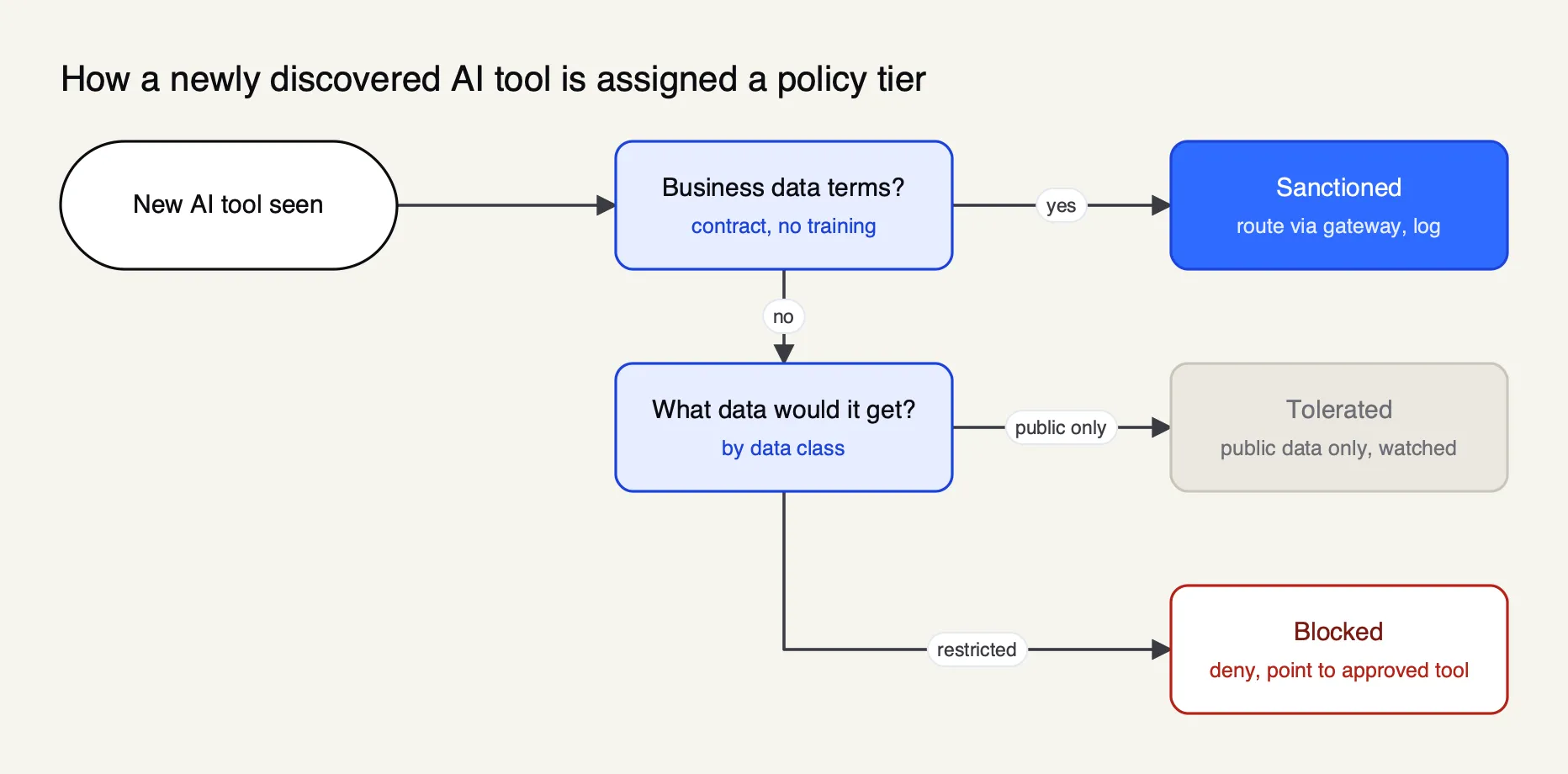 Figure 2: The tier sets the monitoring response: route and log, watch and nudge, or block with a pointer to an approved tool.
| Tier | Criteria | Allowed data | Monitoring response |
|---|---|---|---|
| Sanctioned | Business plan or API contract, no training on customer content, acceptable region and retention | Up to the classes approved for that tool | Route through a central gateway with per-user keys, budgets, guardrails and request logs |
| Tolerated | Consumer terms, low data exposure, real business value, no sanctioned equivalent yet | Public information only | Domain and volume monitoring, in-browser notice, review in 90 days |
| Blocked | No acceptable terms, or would receive restricted data, or runs with broad local access | None | Deny at network, browser or endpoint; message names the approved tool |
| Pending | Newly discovered, not yet reviewed | Default per policy | Logged; owner contacted |
The “pending” row reflects how real systems behave. Cloudflare’s dashboard separates unreviewed from in-review tools, and endpoint agents typically let a newly seen app keep working until someone denies it. That default is a policy choice: blocking pending tools stops exposure but generates friction, while allowing them keeps people productive at the cost of a short window of unreviewed use.
NIST’s Generative AI Profile asks for transparent acceptable use policies for GAI (GV-1.4-002). Publishing the tier list inside that policy, with a request path and a turnaround time, is what makes monitoring defensible: employees can see what is allowed before anything is logged against them. The shadow AI explainer lists the eight points such a policy should cover.
Rolling out monitoring through MDM
MDM is the delivery channel for endpoint monitoring and for most of the enforcement that follows it. The same platform that installs software can deploy inventory scripts, browser policies, agent configuration files and endpoint agents, which keeps the rollout inside change management rather than relying on each employee to configure tools.
A rollout that avoids the common failures runs in four stages:
- Inventory only. Deploy collection scripts and extension inventory to a pilot group. No blocking. Compare results with network and identity data to calibrate.
- Publish the tiers. Announce the acceptable use policy and the sanctioned list, and stand up the gateway that sanctioned tools route through.
- Enforce for new installs. Block newly installed tools in the blocked tier and require approval for new MCP servers, leaving existing use alone for a grace period.
- Enforce fleet-wide. Remove blocked tools, apply MCP allowlists, and report the governed share of AI use monthly.
Agent vendors increasingly support this channel directly. Claude Code reads a managed-mcp.json file that an administrator can deploy through Jamf, Group Policy or Intune to a fixed system path (for example /Library/Application Support/ClaudeCode/ on macOS); when present, users cannot add any other MCP servers. A softer option uses allowlists and denylists in managed settings, and the documentation notes that without the allowManagedMcpServersOnly lock, a user’s own settings can broaden the allowlist. Cursor states that team admins can distribute shared MCP servers and enterprise admins can configure MCP policy. The Frontier Wire guide to Claude Code security covers the rest of that agent’s managed settings.
Privacy, works councils and employee monitoring law
Shadow AI monitoring is employee monitoring, and in many jurisdictions it needs a legal basis, transparency, proportionality and, in some countries, agreement with employee representatives before it starts. Designing for data minimisation from the first stage is cheaper than renegotiating a rollout later.
Four legal hooks recur in EU deployments:
- GDPR Article 88 allows member states, by law or collective agreement, to set specific rules for processing employee data, and requires those rules to address transparency and “monitoring systems at the work place.”
- GDPR Article 35 requires a data protection impact assessment where processing is “likely to result in a high risk to the rights and freedoms of natural persons.” Content-level prompt logging tied to named employees is the kind of processing that usually warrants one.
- Germany’s Works Constitution Act, Section 87(1) no. 6 gives the works council a co-determination right over “the introduction and use of technical devices designed to monitor the behaviour or performance of the employees.” In practice, a works agreement covering scope, purpose limitation and access rights comes before rollout.
- EU AI Act Article 26(7) requires that before a high-risk AI system is put into use at the workplace, deployers who are employers shall inform workers’ representatives and affected workers. Article 4 asks providers and deployers to take measures supporting staff AI literacy, and after the 2026 amendment does not require providers or deployers to guarantee any specific level of it. Monitoring data that shows which tools teams use is a practical input to targeting that training.
Design choices that make monitoring easier to agree with employee representatives:
- Report at team or tool level by default, and restrict re-identification of individuals to defined security incidents.
- Log metadata rather than content, and redact before storage where content is needed.
- Omit IP addresses and locations from audit records where agreements require it.
- Set retention per record type and enforce it in the tooling, not only in policy.
- Publish what is collected, who can see it and how long it is kept, in the acceptable use policy.
None of this is legal advice; the rules differ by member state and sector, and counsel should review the design.
Endpoint monitoring with Bifrost Edge and an AI gateway
An AI gateway records every request routed to it but cannot see tools that never use it; network monitoring sees domains but not local agents or MCP configs. An endpoint agent that both inventories AI tools and routes their traffic through the gateway closes both gaps, and it is the clearest worked example of the signal model in Figure 1.
Bifrost is used as the example because its documentation covers both halves: an open-source AI gateway (GitHub) serving 25+ providers and 10,000+ models through one OpenAI-compatible API, and Bifrost Edge, an endpoint agent that the product page lists as early access.
Bifrost’s published benchmark reports 11 µs of overhead at 5,000 RPS on an AWS t3.xlarge, which matters when every laptop’s AI traffic passes through one gateway.
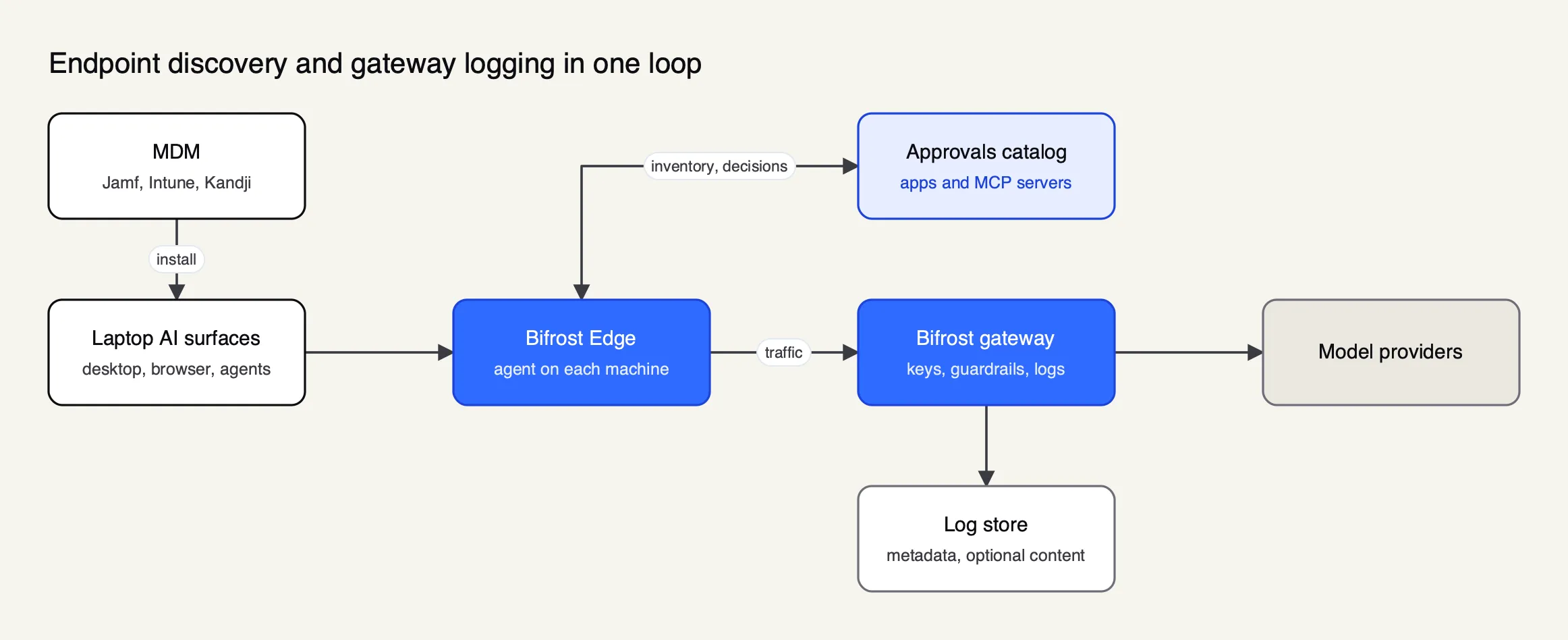 Figure 3: Edge supplies the inventory and on-device enforcement; the gateway supplies the per-request record.
Mapped to the stages of this guide, the documentation describes:
- Inventory. The Devices dashboard lists each machine with its owner, platform, agent version, installed AI apps and configured MCP servers, with first-seen and last-active times. MCP governance reads the MCP configuration of supported apps, which the supported applications page lists as Claude Code, Claude Desktop, Gemini CLI, OpenCode, Codex and Cursor.
- Tiers. The Approvals dashboard uses Pending, Approved and Denied, and a pending item keeps working until it is denied. Catalogs are deduplicated across the fleet, so one decision applies wherever a tool appears, and a denied MCP server is blocked on the device even if it was configured before the policy existed.
- Logging. The gateway’s virtual keys carry metadata such as cost center or owner into every log entry, and content logging can be switched off per key while usage metadata is still recorded.
- Retention and privacy. Log store retention is configurable in days, and the audit log can omit IP addresses, an option the documentation ties to employee privacy law and works council agreements in Germany.
- Rollout. Edge deploys through MDM platforms including Jamf, Microsoft Intune, Kandji, Omnissa Workspace ONE and JumpCloud, with a managed configuration that carries no secrets; identity comes from a single SSO sign-in on first launch.
- Guardrails. Guardrail profiles configured at the gateway, such as secrets detection and PII rules, apply to Edge traffic without endpoint configuration.
Enterprise tier. Guardrails, audit logs and log exports are part of Bifrost Enterprise, and the product page describes Edge as early access for existing enterprise customers.
The Bifrost resource on shadow AI and this explainer on endpoint AI governance cover the endpoint model in more depth. Endpoint routing pairs with network discovery rather than replacing it: the network layer still sees devices with no agent, and identity data still sees OAuth grants made from personal machines. For the gateway half on its own, the Frontier Wire primer on running a gateway in front of every model call explains the mechanics.
Shadow AI metrics that matter
Shadow AI metrics should measure coverage and movement toward the governed path, not raw counts of tools found, which rise as detection improves. Five measures, reported monthly by team, show whether the program is working and where to sanction a tool next.
| Metric | Definition | Why it matters |
|---|---|---|
| Governed share | AI requests or bytes through the sanctioned path divided by all AI traffic observed | The headline outcome; should rise every quarter |
| Inventory coverage | Managed devices reporting endpoint inventory divided by all managed devices | Unreported devices are blind spots |
| Time to decision | Median days from first sighting of a tool to a tier decision | Long queues push people around the process |
| Unreviewed exposure | Bytes uploaded to pending or tolerated tools | Tracks risk while reviews are outstanding |
| Unapproved MCP servers | Distinct MCP servers configured on managed devices without approval | Agent tool access is the fastest-growing surface |
Two secondary measures help with budgeting: AI spend found outside procurement (from expense data), and AI provider keys found by secret scanning per quarter. A steady fall in both shows the sanctioned path is meeting demand. A wider view of getting visibility and control over shadow AI discusses how CISOs report these figures upward.
Limits of this guide
This guide draws on framework texts, regulation and vendor documentation read in October 2026. None of the products named were deployed or tested for it, and capabilities come from their published documentation. Survey figures are self-reported and dated, and the legal summary is general; national employment law and sector rules can be stricter.
Two developments would change the advice. If AI vendors made business data terms the default on consumer plans, the tolerated tier would grow and content monitoring would matter less. If operating systems or browsers shipped native, policy-controlled AI traffic routing, endpoint agents would become a configuration rather than a product. Until then, shadow AI monitoring works when it joins several signals into one inventory, publishes the tiers before enforcing them, logs only what the purpose requires, and measures success as the share of AI use that runs through a governed path.
Sources
- NIST AI 600-1: Artificial Intelligence Risk Management Framework, Generative Artificial Intelligence Profile (July 2024)
- NIST AI 100-1: Artificial Intelligence Risk Management Framework (AI RMF 1.0)
- NIST AI RMF Playbook: Govern
- ISO/IEC 42001:2023 Information technology, Artificial intelligence, Management system (IEC Webstore)
- EU AI Act, Article 4: AI literacy
- EU AI Act, Article 26: Obligations of deployers of high-risk AI systems
- GDPR Article 88: Processing in the context of employment
- GDPR Article 35: Data protection impact assessment
- Works Constitution Act (Betriebsverfassungsgesetz), English translation, Section 87
- OWASP MCP Top 10
- NCSC, CISA and partners: Guidelines for secure AI system development, secure development
- Microsoft and LinkedIn: 2024 Work Trend Index
- Microsoft Learn: Shadow AI discovery in Global Secure Access
- Microsoft Learn: Set up Cloud Discovery in Defender for Cloud Apps
- Cloudflare One: AI security report dashboard
- Google Workspace Admin Help: Control which apps access Google Workspace data
- Chrome Enterprise Help: Configure ExtensionSettings policy
- GitHub Docs: Supported secret scanning patterns
- Claude Code docs: Connect Claude Code to tools via MCP
- Claude Code docs: Control MCP server access for your organization
- Model Context Protocol: Connect to local MCP servers
- Cursor docs: Model Context Protocol
- Bifrost Edge documentation: overview
- Bifrost documentation: virtual keys
- Bifrost source repository (GitHub)
Questions readers ask
What is shadow AI detection?
Shadow AI detection is the process of finding AI tools, models, agents and integrations that employees use without approval. It combines network logs, identity and OAuth records, endpoint inventory of AI apps and MCP server configurations, secret scanning for AI API keys, and expense data, then joins those signals into one AI asset inventory that security and governance teams can act on.
How do you detect shadow AI?
Start with the signals you already collect. Filter DNS and secure web gateway logs for AI domains, export OAuth grants from your identity and productivity suites, query endpoint inventory for AI desktop apps and coding agents, read MCP configuration files on managed laptops, scan repositories for AI provider keys, and search expense reports for AI subscriptions. Deduplicate the results into one record per tool.
How do you avoid shadow AI?
Give people a sanctioned option that is as useful as the tool they would otherwise use, on a business plan with contractual data terms, and make requesting a new tool faster than going around the process. Monitoring then measures how much AI use runs through the approved path and finds the tools that still need a decision.
Is it legal to monitor employee AI use?
Usually, if it is proportionate, transparent and designed with data minimisation, but the rules vary by country. In the EU, GDPR Article 88 lets member states set specific rules on workplace monitoring, and in Germany a works council has a co-determination right over technical devices designed to monitor employee behaviour or performance. Take legal advice and involve employee representatives before rollout.
What should an AI inventory include?
At minimum each entry should name the tool and vendor, the plan and data terms, the business owner, the user count, the data classes it receives, the underlying models, any MCP servers or integrations, the policy tier, and the date of last review. NIST's Generative AI Profile adds data provenance, known issues, human oversight roles and access modes.