
Rate limiting: a practical guide to algorithms, 429s and LLM limits
Six algorithms, four places to enforce them, one status code and a draft standard for telling clients how much quota is left. A working reference for rate limiting HTTP APIs, with the request and token limits that OpenAI, Anthropic and Google apply to model traffic.
TL;DR
- Rate limiting caps how much a client can consume per unit of time. The six algorithms in common use (fixed window, sliding log, sliding window counter, token bucket, leaky bucket and GCRA) trade memory per client against how precisely they handle bursts.
- Limits belong at more than one layer: the edge for floods, the gateway for per-key and per-tenant quotas, the service for concurrency, and the client for self-throttling.
- Across many nodes, a limit is only as accurate as its shared counter. Local counters are fast but drift; a central store such as Redis is accurate but adds a network hop, and most production designs combine the two.
- HTTP 429 (RFC 6585) and Retry-After (RFC 9110) are the standard rejection signals. Clients should honor Retry-After and otherwise back off exponentially with jitter, within a capped retry budget.
- LLM APIs limit tokens as well as requests: OpenAI counts RPM and TPM, Anthropic splits input and output tokens (ITPM and OTPM) and does not count most cached reads, and Gemini limits per project rather than per key.
Rate limiting is the practice of capping how many requests, or how many units of some other resource, a client can consume in a given period, and rejecting or delaying whatever exceeds the cap. It protects a service from overload and abuse, shares capacity fairly between customers and puts a ceiling on cost. Every large public API uses it, and model APIs now apply it to tokens as well as requests. Running a rate limiter well comes down to four choices: an algorithm, a place in the request path to enforce it, a way to share counters across machines, and a protocol for telling clients when to come back.
Rate limiting, quotas and throttling
Rate limiting caps the rate of consumption over a short window, such as 100 requests per second. A quota caps total consumption over a longer period, such as a monthly spend cap. Throttling slows excess requests instead of rejecting them. Load shedding drops low-priority work based on system health rather than on who sent it.
The distinctions matter because they fail differently. A rejected request can be retried; a queued request adds latency; a quota that resets on the first of the month cannot be waited out in seconds. Stripe’s engineering post on rate limiters and load shedders draws the line this way: a load shedder “makes its decisions based on the whole state of the system rather than the user who is making the request.” Stripe describes running four limiters in production, with a per-user request rate limiter as the most important and a concurrent requests limiter that caps how many calls a user may have in flight at once.
Model providers apply all of these. Anthropic separates spend limits from rate limits, and when an organization reaches its monthly spend cap the API returns a 429 with error code enforced_spend_limit_reached and no retry-after header, because waiting a few seconds will not help. Google’s Gemini API adds spend-based rate limits evaluated over a rolling 10-minute window. A client that treats every 429 the same way will retry requests that cannot succeed.
Rate limiting algorithms compared
Rate limiting algorithms differ in what they store per client and how they treat bursts. Fixed windows store one counter but allow double bursts at window edges. Sliding logs are exact but store every timestamp. Sliding window counters approximate with two counters. Token buckets, leaky buckets and GCRA model a refill rate with a burst allowance.
Fixed window counter
The simplest limiter keeps one counter per client per time window and resets it when the window ends. The Redis documentation describes it as the first rate limiter pattern for the INCR command: build a key from the client IP and the current second, increment it inside a MULTI/EXEC block with an expiry, and reject the call when the count passes 10. The cost is one counter and one atomic increment per request.
The weakness is the boundary. A client allowed 100 requests per minute can send 100 in the last second of one minute and 100 in the first second of the next, so 200 requests arrive in two seconds without breaking the rule. Cloudflare’s account of building its limiter calls this approach “not terribly accurate” because the reset lets regular traffic spikes through.
Sliding window log
A sliding log stores the timestamp of every request and counts how many fall within the last window. It is exact: there is no boundary to exploit. It is also expensive, since memory grows with the limit and every check reads the whole log. Cloudflare rejected it for this reason, noting it has “huge processing and memory requirements”, especially for long windows such as 5,000 requests per hour.
Sliding window counter
The sliding window counter keeps the current and previous fixed-window counts and weights the previous one by how much of it still overlaps the sliding window. With a 50 per minute limit, 42 requests in the previous minute and 18 in the 15 seconds of the current one, the estimated rate is 42 × 45/60 + 18 = 49.5. It assumes the previous window’s traffic was evenly spread, so it is an approximation. Cloudflare measured it on 400 million requests from 270,000 sources and found that 0.003% of requests were wrongly allowed or limited. Kong’s Rate Limiting Advanced plugin uses a sliding window by default, with fixed windows as an option.
Token bucket
A token bucket holds up to a fixed number of tokens, refills at a steady rate, and spends one token (or more, for a costly request) per request. A full bucket permits a burst equal to its capacity; after that, throughput settles at the refill rate. Network engineers have specified it for decades: RFC 2697 defines its single rate three color marker with two token buckets sized by a committed and an excess burst size, refilled at the committed information rate.
It is the algorithm most API operators name. Anthropic states that its API “uses the token bucket algorithm”, so capacity is replenished continuously rather than reset at fixed intervals. Stripe uses it too, with a bucket for every user, and Envoy’s local rate limit filter returns a 429 when its bucket is empty.
Leaky bucket
A leaky bucket accepts requests into a fixed-size queue that drains at a constant rate. Excess requests wait until the queue is full and are then rejected, so output is smooth even when input is bursty. NGINX’s limit_req module states that its limitation is done using the leaky bucket method: with rate=1r/s and burst=5, excess requests are delayed until they exceed the burst size, and nodelay serves the burst immediately instead of spacing it out.
Generic cell rate algorithm (GCRA)
GCRA comes from Asynchronous Transfer Mode networks, where the ATM Forum recommended it for scheduling fixed-size cells. It behaves like a leaky bucket but stores a single timestamp per key, the theoretical arrival time, and needs no background drip process. Each request compares the current time with that timestamp minus the burst allowance, then advances it by one emission interval. The redis-cell module exposes GCRA as one Redis command whose reply maps directly onto limit, remaining, Retry-After and reset values.
| Algorithm | State per key | Burst behavior | Accuracy | Documented users |
|---|---|---|---|---|
| Fixed window | One counter with expiry | Up to twice the limit across a window boundary | Low at boundaries | Redis INCR pattern; Kong fixed-window option |
| Sliding window log | One timestamp per request | No boundary burst | Exact | Rare at scale because of memory cost |
| Sliding window counter | Two counters | Smoothed; small estimation error | Approximate (0.003% misclassified in Cloudflare’s test) | Cloudflare; Kong Rate Limiting Advanced default |
| Token bucket | Token count and last refill time | Burst up to bucket size, then refill rate | Exact for its model | Anthropic API, Stripe, Envoy local filter, RFC 2697 |
| Leaky bucket | Queue or level that drains | Excess delayed, then rejected | Exact for its model | NGINX limit_req |
| GCRA | One timestamp | Burst allowance without a drip process | Exact for its model | redis-cell |
For most HTTP APIs the choice is between a token bucket (or GCRA, which gives the same behavior with less state) when bursts are acceptable and a sliding window counter when the aim is a steady ceiling with minimal storage. Fixed windows remain useful for long periods such as daily quotas, where a boundary burst is small relative to the total.
Where to enforce rate limits
Rate limits can be enforced at the edge network, at an API or AI gateway, inside the backend service and in the client. Each layer sees a different identity and a different unit of cost, so the edge limits by IP and path, the gateway by key, tenant and tokens, the service by concurrency, and the client throttles itself.
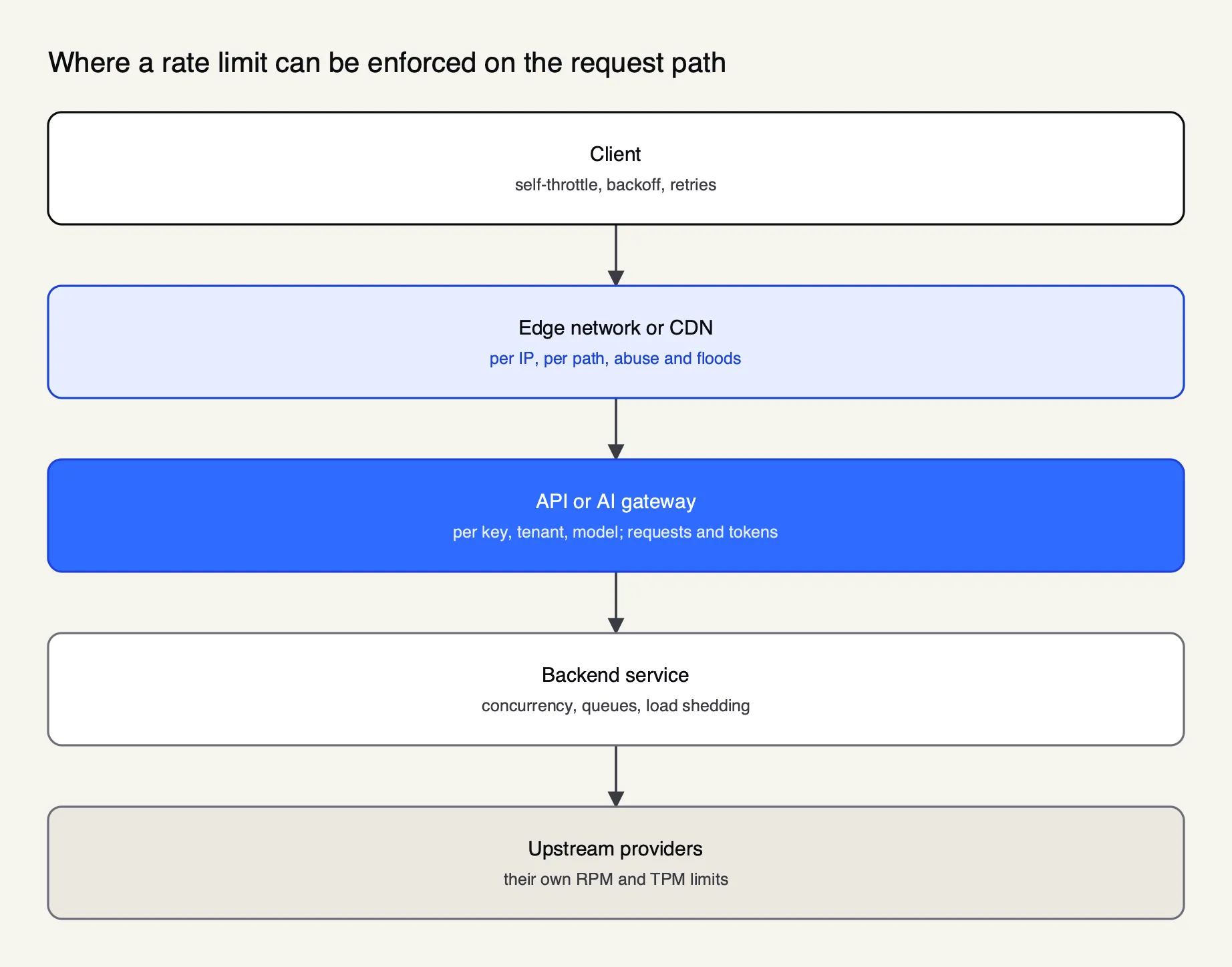
Figure 1: Each layer sees a different identity and a different cost, so production systems usually limit at more than one.
Edge. A CDN or web application firewall stops floods before they reach origin. Cloudflare’s rate limiting rules match requests by expression and count them by characteristics such as IP or an API key header, over a period, with a mitigation timeout once the limit is reached. Edge limits are coarse by design: Cloudflare’s docs warn that rules “are not designed to allow a precise number of requests” to reach origin, because counters can lag by a few seconds.
Gateway. An API gateway knows who the caller is after authentication, so this is where per-consumer, per-plan and per-tenant quotas live. Kong’s Rate Limiting plugin limits by consumer when an authentication plugin is configured and falls back to client IP otherwise. For model traffic, an AI gateway also sees tokens and cost, which a generic gateway does not; the differences are covered in how an LLM gateway differs from an API gateway. Identity-aware limits per user and group are the subject of a companion piece on user-managed access and rate limiting.
Service. Inside the backend, the scarce resources are workers, database connections and CPU. Concurrency limits and load shedding protect them better than a per-second count. Stripe’s worker utilization load shedder, for example, sheds lower-priority traffic when workers back up.
Client. A well-behaved client stays under the limit before the server has to say so: it reads remaining-quota headers, spaces batch jobs and backs off on rejection. For LLM workloads, client-side token budgeting matters because one long prompt can consume more quota than hundreds of short ones.
| Layer | Typical key | Unit | Strength | Weakness |
|---|---|---|---|---|
| Edge or CDN | IP, path, header | Requests | Absorbs floods before origin | Imprecise; counters per data center |
| API or AI gateway | API key, consumer, tenant, model | Requests, tokens, cost | Knows identity and cost | Needs shared state when scaled out |
| Backend service | Endpoint, priority class | Concurrency, queue depth | Protects scarce resources | Rejection happens late in the path |
| Client | Own credentials | Requests and tokens | Avoids errors entirely | Cannot be enforced |
Distributed rate limiting
A rate limit enforced by several gateway nodes is only as accurate as the counter they share. Per-node counters are fast but let a client exceed the limit when traffic spreads across nodes. A central store such as Redis gives an accurate global count at the cost of a network round trip per check, so most designs mix the two.
Kong’s plugin documentation lays out the trade-off as three counter policies. The local policy keeps counters in memory on each node, with minimal overhead but drift as the node count changes unless a consistent-hashing load balancer pins each client to one node. The cluster policy stores counters in Kong’s data store and forces a read and a write per request. The redis policy shares counters through Redis. Both shared policies are accurate only when sync_rate is 0, meaning every request updates the shared count synchronously. For the local policy, Kong’s own example of splitting a limit across nodes sets 30 requests per second per node on a balanced five-node cluster to approximate a 100 per second global limit, accepting some error.
Redis is the usual shared store because it offers atomic increments and key expiry. The operations still need care: the Redis docs show that a naive INCR followed by a separate EXPIRE has a race condition that can leak a key forever, and fix it by running both inside a Lua script. Token bucket and GCRA implementations on Redis follow the same rule: read, compute and write in one atomic step, or two nodes will spend the same token.
Envoy separates the decision into its own service. Its global rate limiting integration calls a gRPC rate limit service on every request or connection, and the reference implementation, envoyproxy/ratelimit, is written in Go with Redis as its cache, optionally split into one instance for per-second limits and another for everything else. Envoy’s docs recommend a two-stage design in which a local token bucket absorbs bursts that might otherwise overwhelm the global service, and the global limit does the fine-grained work.
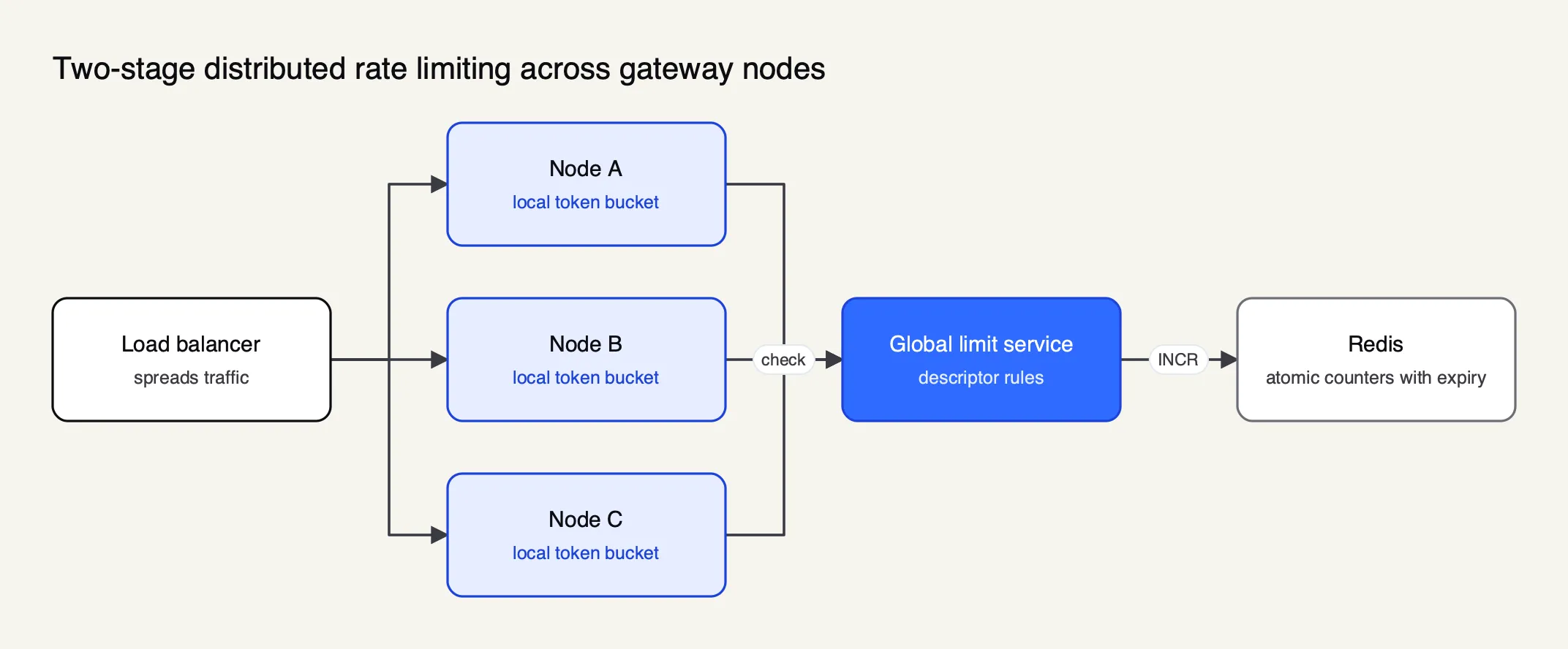
Figure 2: Local buckets absorb bursts cheaply; the shared counter keeps the limit accurate across nodes.
At planetary scale, even a shared counter is regional. Cloudflare states that it does not support global counters across its whole network: each data center keeps its own, and every rule carries the data center ID as a mandatory characteristic. Its original design also took counting off the request path entirely, running increments asynchronously and caching a mitigation decision in server memory once a client crossed the threshold.
Three operational rules follow from these designs:
- Decide what happens when the store is down. Stripe’s advice is to catch errors at every level so that a limiter bug or a Redis outage will fail open and leave the API working. Failing closed is safer for cost limits and worse for availability.
- Launch in shadow mode. Stripe recommends to dark launch each rate limiter and watch what it would block. NGINX offers
limit_req_dry_runand Envoy’s rate limit service has a shadow mode for the same purpose. - Accept a known error. No distributed limiter is exact at every instant. Pick the error budget (a few percent over, a few seconds of lag) and size the limit with headroom against the downstream resource.
HTTP 429, Retry-After and RateLimit headers
A server that rejects a request for exceeding a rate limit should return HTTP 429 Too Many Requests, defined in RFC 6585, and may include a Retry-After header, defined in RFC 9110, giving the wait in seconds or as a date. An IETF draft adds RateLimit-Policy and RateLimit fields so servers can publish quotas before clients hit them.
RFC 6585 section 4 defines 429 as the status for a user who “has sent too many requests in a given amount of time,” says the response should explain the condition, and allows Retry-After. It deliberately leaves out how the server identifies the user or counts requests, and it states that 429 responses must not be stored by a cache. RFC 9110 defines Retry-After’s two forms, an HTTP date or a number of delay seconds, and its meaning on 503 responses as how long the service is expected to be unavailable.
Defaults vary. NGINX’s limit_req rejects with 503 unless limit_req_status is set, so clients that only retry on 429 will treat an NGINX rejection as a server failure. OpenAI now returns 429 with code slow_down when traffic ramps too quickly and 503 with server_is_overloaded when a model is overloaded, and its docs ask clients to handle both status codes.
The remaining-quota headers most APIs send predate any standard: X-RateLimit-Limit, X-RateLimit-Remaining and vendor variants. The IETF HTTPAPI working group’s RateLimit header fields draft, at revision 11 and still an Internet-Draft, replaces them with two structured fields:
- RateLimit-Policy describes each quota:
"permin";q=50;w=60means 50 quota units per 60-second window. Optional parameters set the unit (requests,content-bytesorconcurrent-requests) and a partition key. - RateLimit reports current state:
"default";r=50;t=30means 50 units remain and the effective window is 30 seconds. The draft warns that a positiveris not a guarantee the next request will be served.
The draft also registers problem types such as quota-exceeded, with a violated-policies member naming the policies a client broke, and states that when a response carries both fields, Retry-After takes precedence. Some gateways already follow earlier revisions: Kong returns RateLimit-Limit, RateLimit-Remaining and RateLimit-Reset, which its docs say are based on the Internet-Draft and may change as it evolves.
Handling 429 errors on the client
A client that receives a 429 should first check whether the error is retryable at all, then wait for the duration in Retry-After if the server sent one, and otherwise retry with exponential backoff plus random jitter. Every retry loop needs a cap on attempts and total time, and only one layer of the stack should own retries.
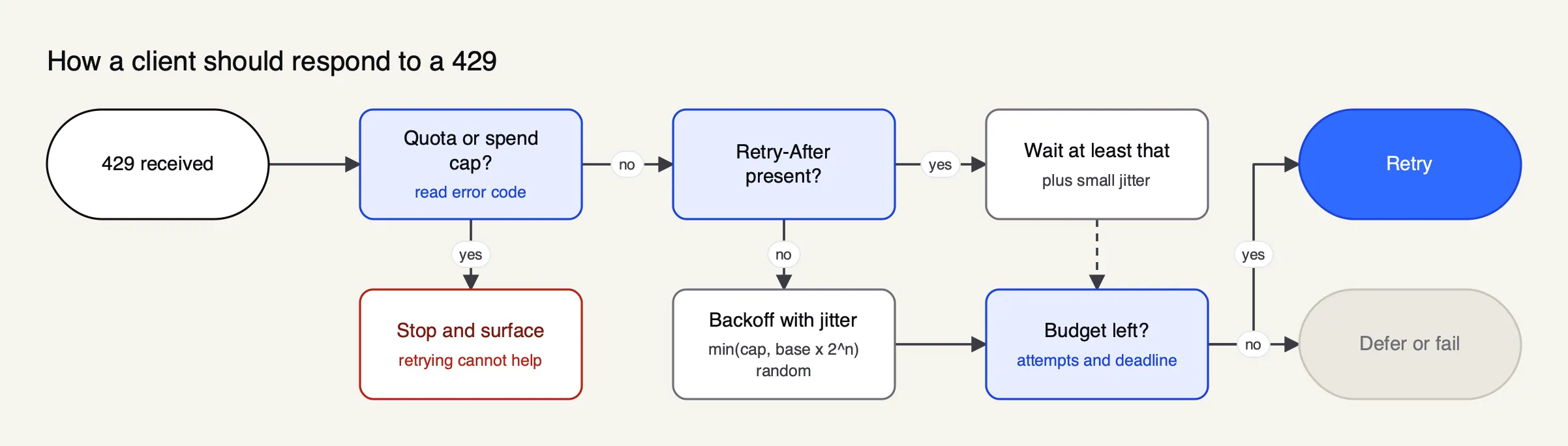
Figure 3: Retry-After wins when present; jittered backoff is the fallback, and both need a cap.
Exponential backoff doubles the wait after each failure; jitter randomizes it so that thousands of clients rejected at the same moment do not all return at the same moment. Google Cloud’s documented algorithm waits min((2^n) + random_number_milliseconds, maximum_backoff) seconds, adding up to 1,000 random milliseconds to avoid clients retrying “in synchronized waves”, with a maximum backoff typically of 32 or 64 seconds. Marc Brooker’s 2015 post on the AWS Architecture Blog, “Exponential Backoff And Jitter”, compared variants by simulation and found that unjittered backoff did the most work and took the longest, while “Full Jitter” (a random wait between zero and the exponential ceiling) used the least work.
The model providers give consistent guidance:
- OpenAI asks clients to follow Retry-After when it is present and valid, treat it as a minimum, fall back to exponential backoff with jitter otherwise, and not retry quota or billing errors. It also warns that SDK retries and application retries can nest, multiplying requests, so one of them should be disabled or counted.
- Google’s Gemini API recommends backoff with jitter for 429
RESOURCE_EXHAUSTEDand 503 errors, and says to retry only transient errors, not 400, 402 or 403. Its Python SDK retries up to four times by default, starting near one second with a 60-second cap. - Anthropic says to wait the number of seconds in
retry-afterwhen the header is present, and notes that its spend-cap 429 never carries it, so automatic retries fail until access resumes.
Two refinements apply to streaming and to agents. OpenAI notes that once a stream has started, an error arrives as a stream event and the request should not be replayed automatically after output has been consumed. And agent loops that make dozens of calls per task need a deadline for the whole task, not only per attempt, or a single rate-limited step can stall a run for minutes. Failover to another provider or key is the other half of resilience, covered in the Frontier Wire guide to LLM failover and load balancing.
LLM rate limits: RPM, TPM, ITPM and OTPM
LLM APIs limit requests per minute (RPM) and tokens per minute (TPM), and some add daily limits. Anthropic splits tokens into input tokens per minute (ITPM) and output tokens per minute (OTPM). Limits are set per organization, project or workspace and vary by model and usage tier, and each provider returns its own headers.
Token limits exist because request counts say little about cost. OpenAI’s guide gives the example of 20 short requests filling a 20 RPM limit long before a 150,000 TPM limit is touched; the reverse happens when a few requests carry very long contexts. Whichever limit is reached first triggers the 429.
| Provider | Limit dimensions | Scope | How tokens are counted | Rate limit headers |
|---|---|---|---|---|
| OpenAI | RPM, RPD, TPM, TPD, plus images and audio for some models | Organization and project, by model and usage tier; some model families share a limit | The larger of max_tokens and an estimate from request length | x-ratelimit-limit-requests, -tokens; x-ratelimit-remaining-*; x-ratelimit-reset-*; project-token variants; Retry-After |
| Anthropic | RPM, ITPM, OTPM per model class | Organization, with optional lower workspace limits | Token bucket; ITPM excludes cache reads on most models; OTPM counts tokens actually generated | anthropic-ratelimit-{requests,tokens,input-tokens,output-tokens}-{limit,remaining,reset}; retry-after |
| Google Gemini | RPM, TPM (input), RPD; spend-based limit per 10 minutes | Per project, not per API key; RPD resets at midnight Pacific | Input tokens per minute | None listed on the rate limits page; limits shown in AI Studio |
Three details change how a client should budget.
What counts. OpenAI calculates usage as the maximum of max_tokens and an estimate from the request’s character count, so an inflated max_tokens consumes quota that is never used. Anthropic does the opposite for output: OTPM is evaluated as tokens are produced and max_tokens does not factor in.
For input, Anthropic’s cache-aware ITPM counts uncached input and cache writes but not cache reads on most models, so a 2,000,000 ITPM limit with an 80 percent cache hit rate can process about 10,000,000 input tokens per minute. Prompt caching is therefore a capacity tool as well as a price discount, as the Frontier Wire comparison of prompt caching and semantic caching explains.
How fast traffic may grow. Limits are not the only ceiling. OpenAI applies a ramp-rate limit and suggests that once traffic reaches 1 million input TPM it should grow by no more than 50% every 15 minutes; a slow_down 429 can arrive while traffic is under both RPM and TPM. Anthropic describes similar acceleration limits for sharp increases, and notes that a 60 RPM limit may be enforced as one request per second, so short bursts fail even when the minute total is within bounds.
Which limit the headers describe. Anthropic’s anthropic-ratelimit-tokens-* headers report the most restrictive limit in effect, which may be a workspace limit rather than the organization’s. OpenAI’s reset headers use durations such as 6m0s while Anthropic’s use RFC 3339 timestamps, so a client that reads both needs two parsers. Gemini limits apply per project rather than per API key, so issuing more keys in the same project adds no capacity.
Published numbers change often and are tied to tiers. For example, Anthropic’s Start tier lists 1,000 RPM, 2,000,000 ITPM and 400,000 OTPM for Claude Opus 5.5 at the time of writing, and OpenAI’s tiers qualify by cumulative credit purchases. Teams running Claude or OpenAI at volume will find practical walkthroughs in guides to managing OpenAI rate limits at scale and managing Claude rate limits.
Rate limiting LLM traffic at a gateway
Provider limits apply to a whole organization or project, so one team or customer can exhaust capacity for everyone else. An AI gateway in front of the providers can enforce its own request and token limits per key, team or customer, return 429s before a request leaves the network, and route around a provider that is at its limit.
Several gateways do this. Kong’s AI Rate Limiting Advanced plugin uses token counts returned by the provider and can limit on total, prompt or completion tokens, or on a cost computed from per-million-token prices. LiteLLM’s proxy sets rpm_limit, tpm_limit and max_parallel_requests on virtual keys.
Bifrost, an open-source AI gateway written in Go (source on GitHub), serves as the worked example here because its documentation specifies the full hierarchy, the counters and the error types, which makes the behavior checkable.
Bifrost routes to 25+ providers and 10,000+ models through one OpenAI-compatible API, and its published benchmark reports 11 µs of overhead at 5,000 RPS on an AWS t3.xlarge, the cost of adding a governance hop.
In Bifrost the unit of policy is the virtual key, a credential the gateway issues in place of a provider key. Rate limits come in two parallel types: request limits (for example, 100 requests per minute) and token limits covering prompt and completion tokens (for example, 50,000 tokens per hour). A request must pass both at every level that has one, checked in a fixed hierarchy: the provider config inside the key, the virtual key itself, then the key’s team and customer if attached.
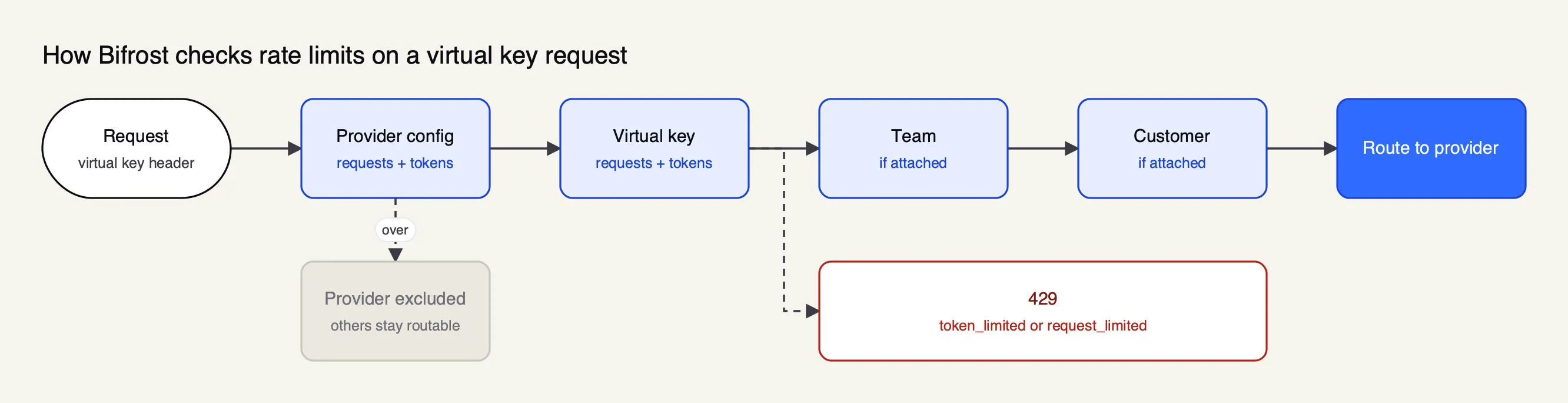
Figure 4: Every level that has a limit must pass, and a provider over its own limit drops out of routing.
The provider-config level is what distinguishes a gateway limit from a provider limit. A key that can reach both OpenAI and Anthropic can carry separate limits for each, and when one provider config exceeds its limit, that provider is excluded from routing while the key’s other providers remain available. A 1,000,000 token per hour limit on the OpenAI config and 500,000 on Anthropic, as in the docs’ example, caps each upstream separately without blocking the key. Model limits add caps keyed on a specific model, globally or per virtual key.
Each counter has its own window, set as a reset duration from 1m to 1Y, and an owner can be calendar-aligned so daily and longer windows reset at UTC boundaries. When a limit is exceeded, the gateway returns 429 with a top-level type of token_limited or request_limited naming the dimension that ran out, and a message stating the tier and window; budget overruns are a separate 402 budget_exceeded. A client can therefore distinguish a gateway token limit from a request limit from a spend cap by reading one field.
On the upstream side, Bifrost treats a provider 429 as a per-key failure: it rotates to another key in the pool but still applies backoff, since account-level quotas are often shared across keys. Its backoff formula is min(initial × 2^attempt, max) multiplied by a jitter factor of 0.8 to 1.2, with defaults of 500 ms and 5,000 ms. It records provider retry hints from Retry-After, Azure’s retry-after-ms and the google.rpc.RetryInfo detail that Gemini and Vertex AI place in the error body, and deliberately ignores the x-ratelimit-reset-* headers because they report when a limit refills rather than how long one request must wait.
Enterprise tier. Sharing governance counters across several gateway nodes uses Bifrost Enterprise clustering, which replicates usage counters between nodes over a gRPC channel alongside gossip-based membership; the open-source build keeps budgets and counters in memory on a single instance.
For the cost side of the same controls (budgets per key, team and customer, and how they interact with provider spend limits), see the Frontier Wire’s guide to LLM cost management at the gateway.
Further reading on designs for many tenants includes a budget and rate limit architecture for multi-tenant LLM platforms, an overview of applying rate limits to LLM traffic, and a walkthrough of virtual keys and budgets in Bifrost.
Choosing and tuning rate limits
Start from the resource being protected, not from a round number. Measure current usage per client, set limits with headroom above normal peaks, run them in shadow mode before enforcing, publish the limits in headers, and give each tenant its own key so one cannot exhaust another’s capacity.
A practical sequence:
- Name the scarce resource. For a database-backed API it is connections or CPU; for an LLM application it is the provider’s TPM and the monthly budget. The limit should be derived from that resource’s capacity divided among the clients that share it.
- Pick the key. IP for anonymous traffic at the edge; API key, consumer or tenant at the gateway; user or group for internal AI tools. Limits keyed by identity need authentication first, which is why the gateway is the natural home for them.
- Pick the algorithm per limit. A token bucket or GCRA for per-second and per-minute limits where short bursts are acceptable; a sliding window counter for a steady ceiling; fixed windows for daily or monthly quotas.
- Measure, then enforce. Run the limiter in dry-run or shadow mode, compare what it would have blocked against real traffic, then switch it on. Keep a deliberate choice on fail-open versus fail-closed for when the counter store is unavailable.
- Tell clients. Return 429 with Retry-After, include remaining-quota headers, and use a machine-readable error type that separates rate limits from quota and spend caps.
- Stay under upstream limits. For LLM traffic, set gateway token limits per provider below the organization’s provider limits, so a single noisy key receives a 429 from the gateway instead of pushing the whole organization into the provider’s.
Rate limiting is old technology applied to a new unit. The algorithms date from packet networks, the status code from 2012, and the header draft is still moving through the IETF. What has changed with model APIs is that the scarce resource is tokens, priced per million and split between input and output, which makes accurate per-tenant token limits close to a requirement for any application that shares provider capacity. The teams that avoid outages and surprise invoices are those that enforce limits at their own gateway, read the provider’s headers, and retry with discipline.
Sources
- RFC 6585: Additional HTTP Status Codes (429 Too Many Requests)
- RFC 9110: HTTP Semantics, Retry-After
- IETF draft-ietf-httpapi-ratelimit-headers-11: RateLimit header fields for HTTP
- RFC 2697: A Single Rate Three Color Marker
- OpenAI: Rate limits guide
- Anthropic: Rate limits
- Google Gemini API: Rate limits
- Google Gemini API: Troubleshooting guide
- Google Cloud Memorystore: Exponential backoff
- Envoy: Global rate limiting
- Envoy: Local rate limit filter
- envoyproxy/ratelimit (reference rate limit service)
- NGINX: ngx_http_limit_req_module
- Redis: INCR command and rate limiter pattern
- redis-cell: GCRA rate limiting module for Redis
- Brandur Leach: Rate limiting, cells and GCRA
- Stripe: Scaling your API with rate limiters
- Cloudflare: How we built rate limiting capable of scaling to millions of domains
- Cloudflare: Rate limiting rules
- Cloudflare: How Cloudflare determines the request rate
- Kong: Rate Limiting plugin
- Kong: Rate Limiting Advanced plugin
- Kong: AI Rate Limiting Advanced plugin
- LiteLLM: Budgets and rate limits
- Bifrost docs: budget and limits
- Bifrost docs: virtual keys
- Bifrost docs: model limits
- Bifrost docs: retries and fallbacks
- Bifrost docs: clustering
- Bifrost source repository (GitHub)
Questions readers ask
What is rate limiting?
Rate limiting is a control that caps how many requests, or how much of some other unit such as tokens or bytes, a client can consume in a period of time. When the client exceeds the limit, the server rejects or delays further requests, usually with HTTP status 429 Too Many Requests, until enough time has passed for capacity to return.
What are the different types of rate limiting?
The common algorithms are fixed window counters, sliding window logs, sliding window counters, token buckets, leaky buckets and the generic cell rate algorithm (GCRA). They differ in how much state they keep per client and how they treat bursts. Limits are also classified by what they count (requests, tokens, concurrent requests, spend) and by scope (per IP, per key, per user, per project or global).
What is a rate limiting error?
It is the response a server returns when a client has exceeded its allowed rate. RFC 6585 defines HTTP 429 Too Many Requests for this case and allows a Retry-After header saying how long to wait. Some servers use 503 instead; NGINX's limit_req module returns 503 by default unless limit_req_status is changed.
How do I know the rate limit of an API?
Check the provider's documentation and console, then read the response headers. OpenAI returns x-ratelimit-limit, remaining and reset headers for requests and tokens, Anthropic returns anthropic-ratelimit headers, and gateways such as Kong return RateLimit-Limit, RateLimit-Remaining and RateLimit-Reset. An IETF draft defines standard RateLimit-Policy and RateLimit fields for the same purpose.
What is the difference between rate limiting and throttling?
The terms overlap. Rate limiting usually means rejecting requests once a limit is reached, while throttling usually means slowing them down, by delaying or queueing excess requests so they are processed at the allowed rate. NGINX's limit_req does both: it delays excess requests up to a burst size and rejects anything beyond it.