
Self-hosted LLMs: how to run a local LLM, from laptop to GPU cluster
Running a model on your own hardware is now a configuration problem more than a research one. The hard parts are sizing GPU memory, choosing between Ollama, llama.cpp, LM Studio, vLLM and SGLang, reading the licence, and putting a production API in front of a server that was built for one user.
A self-hosted LLM is a large language model whose weights run on hardware you control, a laptop, a workstation or a GPU server, rather than behind a provider’s API. Running a local LLM in 2026 takes four decisions: how much memory the model and its context need, which runtime matches the traffic, which open-weight licence fits the use, and how the server is exposed to applications. Getting the first one wrong is the most common reason a self-hosted deployment is slow, crashes, or never leaves a developer’s desk.
TL;DR
- A self-hosted LLM’s GPU memory has to hold the model weights and a KV cache that grows with every token of context and every concurrent request; the cache, not the weights, is what usually runs out.
- 4-bit quantization shrinks an 8B model from about 15 GiB to under 5 GiB in llama.cpp’s own measurements, and on that hardware it also generated text faster than the 16-bit version.
- Ollama, llama.cpp and LM Studio are built for one user on one machine; vLLM and SGLang are serving engines for many users on data-center GPUs.
- Every major runtime speaks an OpenAI-compatible API, but their defaults assume a trusted local network, so production use needs authentication, quotas and a fallback path in front of them.
- Open-weight licences differ: Qwen3 and gpt-oss ship under Apache 2.0, while Llama 3.1 carries attribution rules and a 700 million monthly active user threshold.
Self-hosted LLM, local LLM and private LLM
A self-hosted LLM is an open-weight model served from infrastructure the user operates, whether that is a single laptop or a rack of GPUs. “Local LLM” usually means the laptop or workstation case, “on-premise LLM” the data-center case, and “private LLM” any deployment where prompts never reach a third party.
The terms overlap because the software is the same. A runtime loads a model file, holds it in GPU or system memory, and answers requests over HTTP. What changes between a laptop and a cluster is scale: how many requests arrive at once, how long each prompt is, and how much memory sits behind the model.
Three kinds of deployment cover most of what teams build:
- Personal local LLMs. One developer runs a model on a laptop or desktop for coding help, document questions or offline work. Ollama, llama.cpp and LM Studio dominate here.
- Team or departmental servers. A workstation or a single GPU server serves a handful of internal tools. The runtime has to handle some concurrency and be reachable over the network.
- Production serving. Applications with many users call models on data-center GPUs. vLLM and SGLang are the usual engines, often behind a gateway that adds authentication, quotas and routing.
The Frontier Wire’s comparison of gateways for air-gapped and in-VPC deployments covers the third case from the network side. This guide covers the runtime, the model and the hardware underneath it.
Reasons to run a local LLM
Teams self-host for data control, predictable cost at high volume, offline operation and control over model versions. The trade-off is that they take on capacity planning, upgrades and uptime, and the models that fit on modest hardware are smaller than hosted frontier models.
The reasons that hold up in practice:
- Data residency and confidentiality. Prompts, documents and outputs stay on hardware the organisation controls. For regulated data this can remove a vendor review entirely.
- Offline and edge use. Once the weights are downloaded, a local runtime needs no network connection to answer.
- Version control. A hosted model can be retired or changed by its provider. A model file on disk answers the same way until someone replaces it.
- Cost at sustained volume. A GPU that is busy most of the day can cost less per token than API pricing. A GPU that sits idle costs the same either way, which is why utilisation, not list price, decides the economics.
- Customisation. Fine-tuned and adapter-based models can be served directly; vLLM’s README lists multi-LoRA support for serving several adapters on one base model.
The reasons that do not hold up as well: “it will be cheaper” for a team sending a few thousand requests a day, and “it will be as good as the best hosted model” when the hardware is a single consumer GPU. Both claims depend on numbers covered in the next two sections. For a view of what hosted models cost per token, see the site’s analysis of why reasoning models have a cost problem.
Local LLM hardware and VRAM sizing
GPU memory must hold three things: the model weights, the KV cache, and runtime working buffers. Weights are a fixed cost set by parameter count and precision. The KV cache grows with context length and with the number of requests served at once, and it is the part most sizing estimates leave out.
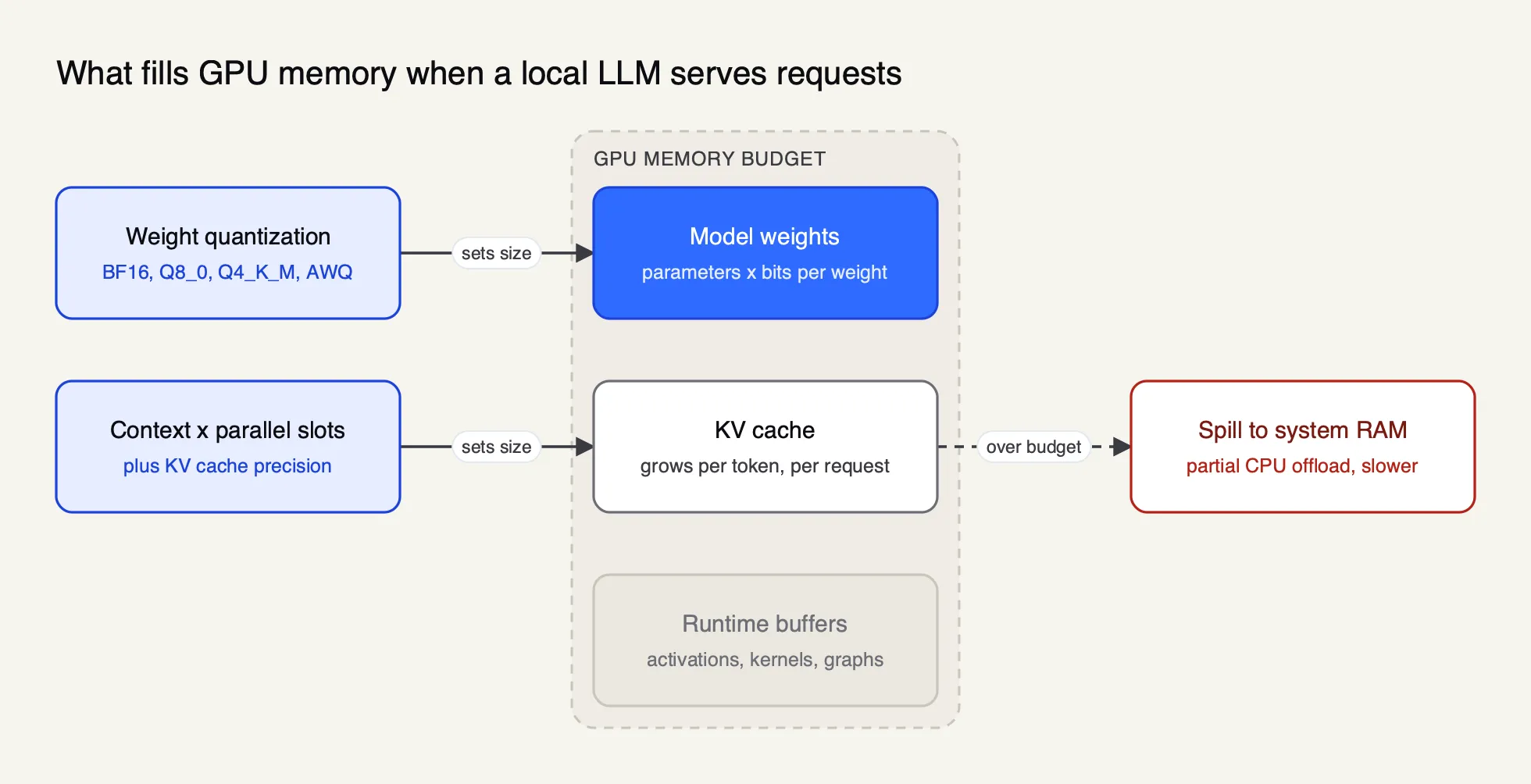
Figure 1: Weights are a fixed cost; the KV cache grows with every token of context and every request served at once.
Weights
Weight memory is roughly the parameter count multiplied by the bits per weight, divided by eight. The llama.cpp project publishes measured sizes for Llama 3.1 in its quantize tool documentation: the 8B model is 32.1 GB at full 32-bit precision and 4.9 GB in the Q4_K_M format; the 70B model is 280.9 GB and 43.1 GB; the 405B model is 1,625.1 GB and 249.1 GB.
Those numbers set the first hardware boundary. A 4-bit 70B model does not fit on a single 24 GB or 32 GB consumer card, and needs either several cards, a data-center GPU, or partial offload to system memory.
KV cache
The KV cache stores the attention keys and values for every token already processed, so the model does not recompute them for each new token. Its size per token is two (keys and values) times the number of layers, times the number of key-value heads, times the head dimension, times the bytes per value.
The arithmetic is easy to do from a model’s published config. Qwen3-8B has 36 layers, 8 key-value heads and a head dimension of 128, stored in bfloat16 (two bytes). That gives 147,456 bytes, or 144 KiB, per token:
| Context per request | Concurrent requests | KV cache (16-bit) | KV cache (8-bit) |
|---|---|---|---|
| 4,096 tokens | 1 | 576 MiB | 288 MiB |
| 32,768 tokens | 1 | 4.5 GiB | 2.25 GiB |
| 32,768 tokens | 4 | 18 GiB | 9 GiB |
At four concurrent requests with full native context, the cache is several times larger than the 4-bit weights. This is why Ollama’s FAQ states that required memory scales with OLLAMA_NUM_PARALLEL multiplied by OLLAMA_CONTEXT_LENGTH, and why its default context window is a conservative 4,096 tokens.
The vLLM authors made the same point in the PagedAttention paper: KV cache memory per request “is huge and grows and shrinks dynamically”, and managing it badly wastes memory through fragmentation and limits batch size. Their fix, paging the cache like operating-system virtual memory, reported two to four times the throughput of earlier serving systems at the same latency.
What happens when memory runs out
Most local runtimes degrade rather than fail. llama.cpp supports CPU and GPU hybrid inference to “partially accelerate models larger than the total VRAM capacity”, per its README, and Ollama reports split loads such as “48%/52% CPU/GPU” in ollama ps. The model still runs, but the layers in system memory run at CPU speed. A deployment that reports a partial CPU load is usually the cause of a “local LLMs are slow” complaint.
The runtimes also offer KV cache quantization. Ollama’s OLLAMA_KV_CACHE_TYPE accepts q8_0, which its documentation says uses about half the memory of 16-bit with a very small loss in precision, and q4_0 at about a quarter with a more noticeable loss at long context.
GGUF and LLM quantization
Quantization stores model weights at lower precision, such as 8 or 4 bits instead of 16, to cut memory and often raise generation speed. GGUF is the single-file format llama.cpp and Ollama use for quantized models; GPTQ, AWQ and FP8 are the formats more common on vLLM and SGLang.
GGUF is defined in the ggml project’s specification as a binary format that holds all the information needed to load a model in one file, including its hyperparameters as key-value metadata, and supports memory-mapped loading. The file name convention encodes the base model, size, fine-tune, version and encoding, which is why a download page lists files such as ...-Q4_K_M.gguf and ...-Q8_0.gguf side by side.
llama.cpp’s quantize documentation publishes a full table for Llama 3.1 8B. A subset:
| Format | Bits per weight | Size (GiB) | Text generation (tokens/s) |
|---|---|---|---|
| F16 | 16.00 | 14.96 | 29.17 |
| Q8_0 | 8.50 | 7.95 | 50.93 |
| Q6_K | 6.56 | 6.14 | 58.67 |
| Q5_K_M | 5.70 | 5.33 | 67.23 |
| Q4_K_M | 4.89 | 4.58 | 71.93 |
| IQ3_M | 3.76 | 3.52 | 70.15 |
Two points come out of the table. First, generation speed rose as precision fell, from 29 tokens per second at F16 to 72 at Q4_K_M on the project’s test setup, because producing each token means reading the weights from memory and smaller weights are read faster. Second, gains flatten below four bits: IQ3_M is smaller but no faster than Q4_K_M, and llama.cpp notes that quantization introduces accuracy loss usually measured in perplexity or KL divergence, which an importance matrix (--imatrix) can reduce.
The GPU-serving formats come from research papers. GPTQ quantizes weights to 3 or 4 bits in one shot using approximate second-order information and reports “negligible accuracy degradation” on large models. AWQ protects the roughly 1% of weights that matter most to activations, and its authors report it generalises to instruction-tuned and multimodal models. vLLM’s quantization page lists support for AWQ, GPTQ, GGUF, FP8 and INT8 variants and more, with a hardware compatibility table that matters: AWQ, for example, is not listed for Volta GPUs or AMD GPUs.
Some models now ship quantized from the start. OpenAI’s gpt-oss-20b model card says the models were post-trained with MXFP4 quantization of the mixture-of-experts weights, so gpt-oss-120b runs on a single 80 GB GPU and gpt-oss-20b within 16 GB of memory.
A practical default for single-user local use is Q4_K_M or Q5_K_M GGUF; for GPU serving, the vendor’s own FP8 or AWQ release where one exists. Quality loss is task-dependent, so it is worth testing the quantized model on real prompts before committing.
Inference runtimes for self-hosted LLMs
An inference runtime loads model weights, schedules requests, manages the KV cache and exposes an API. The main open options are Ollama, llama.cpp, LM Studio, vLLM and SGLang, with Docker Model Runner as a packaging layer; Hugging Face’s TGI is now in maintenance mode.
| Runtime | Built for | Licence | Model format | Hardware (from its docs) | API |
|---|---|---|---|---|---|
| Ollama | One machine, simple CLI | MIT | GGUF, Safetensors import | NVIDIA, AMD (ROCm, Vulkan), Apple Metal, CPU | Native + OpenAI-compatible on port 11434 |
| llama.cpp | Portable C/C++ inference | MIT | GGUF | CPU (x86, ARM, RISC-V), CUDA, HIP, Metal, Vulkan, SYCL | llama-server, OpenAI-compatible |
| LM Studio | Desktop app with GUI | Proprietary app | GGUF, MLX | Apple Silicon Macs, x64 and ARM Windows, x64 and ARM Linux | OpenAI- and Anthropic-compatible on port 1234 |
| vLLM | High-throughput GPU serving | Apache 2.0 | Hugging Face weights, AWQ, GPTQ, FP8, GGUF and more | NVIDIA, AMD, Intel GPUs, CPUs, plugin hardware | OpenAI- and Anthropic-compatible |
| SGLang | GPU serving, agent and structured workloads | Apache 2.0 | Hugging Face weights and quantized variants | NVIDIA, AMD Instinct, Google TPU, Intel, Apple Silicon, Ascend | OpenAI-compatible |
| Docker Model Runner | Running models as Docker artifacts | Docker product | GGUF, Safetensors | llama.cpp everywhere; vLLM on Linux with NVIDIA | OpenAI- and Ollama-compatible |
A few details the table cannot hold:
- Ollama supports NVIDIA GPUs from compute capability 5.0 with a recent driver, AMD Radeon cards through ROCm with Vulkan as an additional path, and Apple GPUs through Metal. It keeps a model in memory for five minutes after the last request by default, adjustable with
keep_alive. - llama.cpp is the engine under much of the local ecosystem. Its README describes “minimal setup and state-of-the-art performance on a wide range of hardware” and lists 1.5-bit to 8-bit integer quantization.
llama-serveradds parallel decoding, continuous batching and multi-GPU split modes. - LM Studio runs llama.cpp models on all three desktop platforms and Apple’s MLX on Apple Silicon. Its system requirements recommend 16 GB of RAM. A headless build called llmster runs it without the desktop app.
- vLLM started at UC Berkeley’s Sky Computing Lab. Its README lists PagedAttention, continuous batching, chunked prefill, prefix caching, speculative decoding, and tensor, pipeline, data and expert parallelism, with support for more than 200 model architectures.
- SGLang is hosted by the non-profit LMSYS. Its paper introduces RadixAttention, which reuses the KV cache across requests that share a prompt prefix, and reports up to 6.4 times higher throughput than earlier systems on agent, reasoning, JSON decoding and multi-turn chat tasks.
- Docker Model Runner pulls models from Docker Hub, any OCI registry or Hugging Face and runs them on llama.cpp, vLLM or Diffusers engines.
- Text Generation Inference carries a notice that it “is now in maintenance mode”, accepting only minor fixes, and recommends vLLM, SGLang, llama.cpp and MLX going forward. New deployments should not start on it.
vLLM vs Ollama and other runtime matchups
The runtime choice follows from traffic, not from the model. One user on one machine is well served by Ollama, llama.cpp or LM Studio. Many concurrent users on data-center GPUs need a serving engine with continuous batching and paged KV memory, which means vLLM or SGLang.
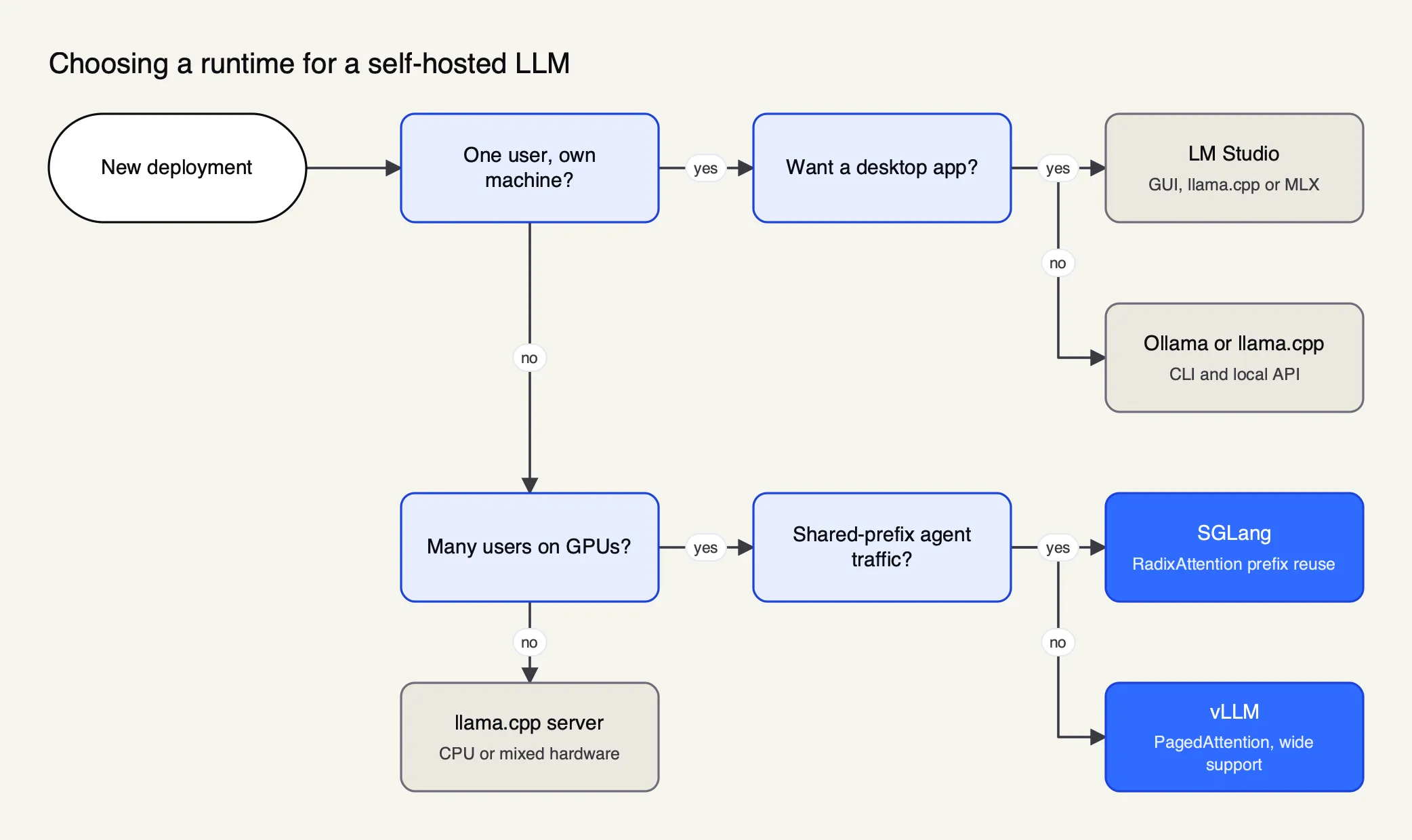
Figure 2: The runtime follows from who sends the requests and how many arrive at once, not from which model is fashionable.
vLLM vs Ollama
Ollama processes one request per model at a time by default (OLLAMA_NUM_PARALLEL is 1), loads GGUF files, and is installed and running in minutes on a laptop. vLLM is designed to batch many requests on a GPU, pages the KV cache to fit more sequences into the same memory, and exposes metrics, health and load endpoints for operations. For a single developer the difference is small. For a shared server with dozens of users, vLLM’s batching is the reason to accept its heavier setup.
LM Studio vs Ollama
Both run GGUF models on a single machine and serve an OpenAI-compatible API, so for most users the difference is the interface and the licence. LM Studio is a desktop application with a model browser and chat UI, plus MLX support on Macs; it is free to download but proprietary. Ollama is MIT-licensed and command-line first, which makes it easier to script, containerise and run as a service.
llama.cpp vs Ollama
Ollama wraps local inference of GGUF models behind a model registry, a background service and short commands. Using llama.cpp directly gives access to every flag: quantization choices, split modes across GPUs, parallel slots, KV cache options and API keys on llama-server. Teams that want a reproducible build or unusual hardware, such as RISC-V or SYCL devices, tend to use llama.cpp directly.
SGLang vs vLLM
Both are Apache 2.0 GPU serving engines with OpenAI-compatible servers, continuous batching and broad quantization support. SGLang’s distinguishing idea is RadixAttention: when many requests begin with the same long system prompt, tool definitions or document, the shared prefix’s KV cache is computed once and reused. Agent workloads, which resend the same tool schemas on every turn, fit that pattern. vLLM also lists prefix caching, so the honest advice is to benchmark both on your own prompts.
Choosing the best local LLM for the job
The best local LLM is the most capable open-weight model whose licence fits your use and whose quantized weights, plus KV cache, fit your memory. Model rankings change monthly; licence terms and memory arithmetic do not.
Start from the memory budget in the sizing section and work backwards. A laptop with 16 GB of unified memory fits a 4-bit 8B model with room for context; a single 80 GB data-center GPU fits gpt-oss-120b per its model card, or a 4-bit 70B model with a moderate KV cache. For current picks by size class, the site keeps a ranked list of the top open-weight models.
Licences need reading, not assuming. Three common cases:
| Model family | Licence | Terms worth knowing |
|---|---|---|
| Qwen3 (e.g. Qwen3-8B) | Apache 2.0 | Permissive; commercial use and modification allowed with notice |
| gpt-oss (20b, 120b) | Apache 2.0 | The model card cites no copyleft restrictions or patent risk |
| Llama 3.1 | Llama 3.1 Community License | Must display “Built with Llama” when distributing; derivative model names must begin with “Llama”; licensees above 700 million monthly active users must request a separate licence |
The Llama 3.1 licence text is explicit on both the attribution and the 700 million user threshold. Other families carry their own acceptable-use policies and naming rules, which the site maps in its survey of open-weight licensing.
Context length is part of the model choice too. Qwen3-8B’s model card lists 32,768 tokens natively and 131,072 with YaRN scaling, and recommends adding the scaling configuration only when long contexts are needed. Longer context costs KV cache memory at the 144 KiB per token rate computed above.
Serving through an OpenAI-compatible API
Every runtime covered here exposes an OpenAI-compatible HTTP API, so existing client code can switch to a self-hosted LLM by changing the base URL. Compatibility is partial, though, and the defaults assume a trusted local network rather than the open internet.
The endpoints, from each project’s documentation:
| Runtime | Base URL in its docs | Notable endpoints |
|---|---|---|
| Ollama | http://localhost:11434/v1/ | chat completions, completions, responses, embeddings, models |
| llama.cpp server | Set at launch | chat completions, responses, embeddings |
| LM Studio | http://localhost:1234/v1 | chat completions, completions, responses, embeddings, models |
| vLLM | Set at launch with vllm serve | completions, chat completions, responses, embeddings, audio, plus Anthropic messages, health and metrics |
| SGLang | Set at launch | OpenAI-compatible routes |
Ollama’s documentation says it supports “a subset of the OpenAI API”. Its chat completions endpoint supports streaming, JSON mode, vision and tools, but not tool_choice, logprobs or n, and the cloud variant documents that stateful Responses requests are unsupported. LM Studio notes it implements /v1/responses specifically so that Codex works against it.
Security defaults deserve attention. Ollama binds 127.0.0.1 port 11434 and its FAQ shows setting OLLAMA_HOST=0.0.0.0 to expose it on a network, at which point anyone who can reach the port can use the model. llama.cpp’s llama-server has no API key unless one is passed. vLLM’s own docs warn that development endpoints enabled by VLLM_SERVER_DEV_MODE “should NOT be used in production” and that dynamic LoRA loading is for local development only. A runtime is an inference engine, not an access-control layer.
Running a self-hosted LLM in production
Production self-hosting adds concerns the runtime alone does not cover: concurrency limits, memory headroom, monitoring, model upgrades, access control and a plan for when a GPU node fails. Most teams handle the last two with a gateway in front of the runtimes.
The operational checklist that recurs across the runtime docs:
- Set concurrency explicitly. Ollama’s
OLLAMA_NUM_PARALLELandOLLAMA_MAX_LOADED_MODELS, llama.cpp’s--parallelslots, and vLLM’s batching settings all trade memory for throughput. Size them against the KV cache table, not by guesswork. - Keep models warm. Ollama unloads a model five minutes after the last request by default; the first request after that pays the full load time. Set
keep_aliveto match traffic. - Watch memory placement. A model that silently spills to CPU still answers, slowly. Check
ollama psor the runtime’s equivalent after every model change. - Scrape metrics. vLLM exposes
/metrics,/healthand/load; llama.cpp exposes a slots endpoint. Feed them into the monitoring system already in use. - Pin model versions. Record the exact file or Hugging Face revision being served, so an upgrade is a deliberate change with a rollback.
- Put authentication and quotas in front. None of the runtimes is designed to track which team used how many tokens, enforce per-application limits or keep audit logs.
- Plan for failure. A single GPU server is a single point of failure. Either run several replicas behind a load balancer or route overflow and failures to another backend, which can be a hosted API for data that is allowed to leave.
This is where the self-hosting question meets the gateway question. The Frontier Wire compared five gateways that route between vLLM, Ollama and cloud models; readers choosing between them should start there. The next section shows the pattern with one of them.
Putting a gateway in front of local runtimes
An AI gateway gives self-hosted runtimes the features they lack: one API for every backend, per-team keys and limits, logging, and automatic fallback when a local server fails. Applications call the gateway; the gateway decides whether Ollama, vLLM, SGLang or a hosted model answers.
Bifrost, an open-source AI gateway written in Go and released under Apache 2.0 (source on GitHub), is used here as the worked example because its documentation covers each self-hosted runtime by name and it is itself self-hostable, which matters for teams whose reason to self-host is keeping traffic inside their network. It exposes 25+ providers and 10,000+ models through one OpenAI-compatible API, and its published benchmark reports 11 µs of added overhead per request at 5,000 RPS on an AWS t3.xlarge.
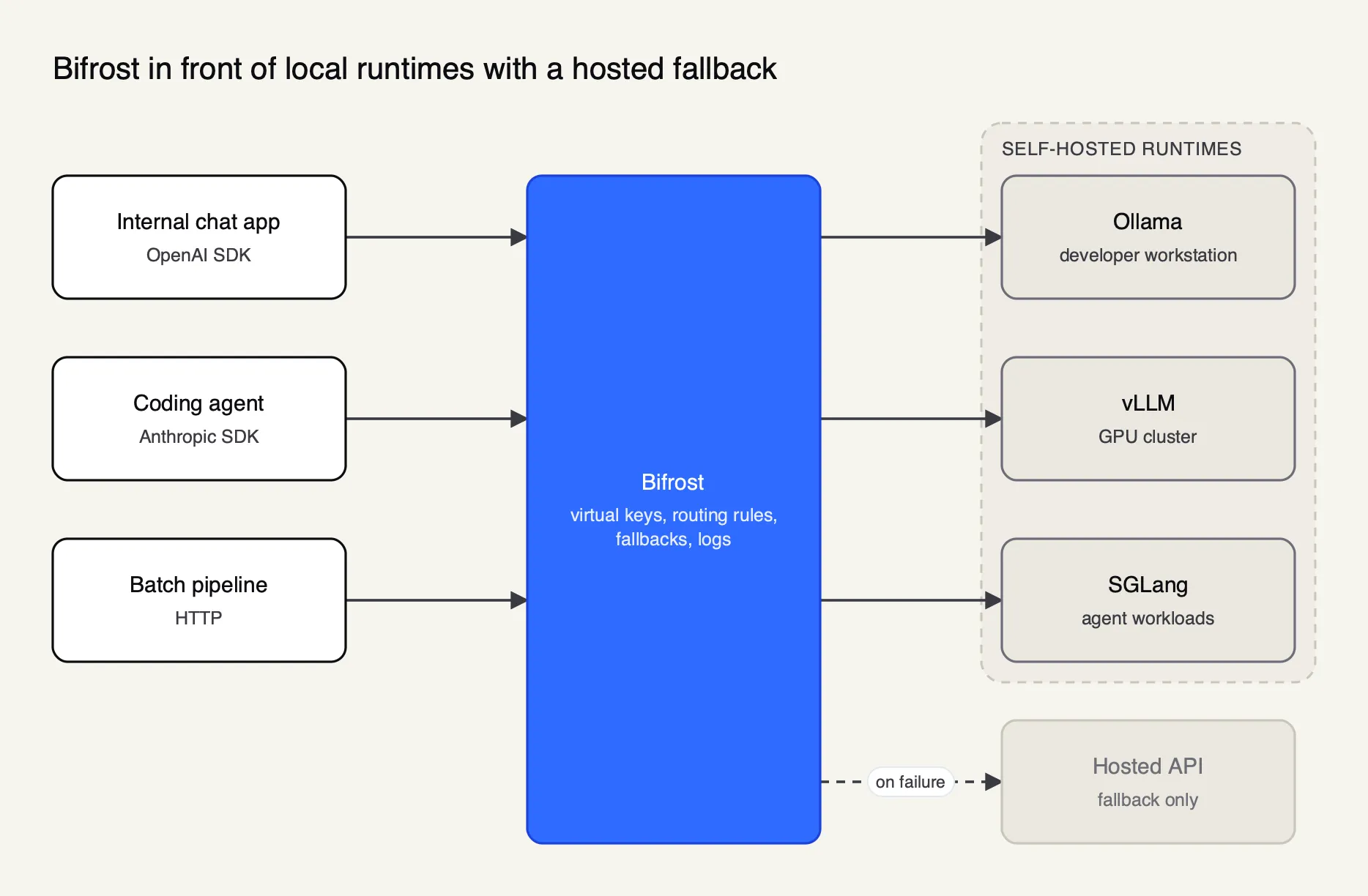
Figure 3: Applications keep one base URL while the gateway decides which local server, or which hosted fallback, answers.
Bifrost’s provider setup documentation treats self-hosted runtimes as providers that point at a URL you operate, with no API key required. A vLLM server is configured one key per served model:
{
  "providers": {
    "vllm": {
      "keys": [
        {
          "name": "vllm-llama3-70b",
          "value": "",
          "models": ["llama-3-70b"],
          "weight": 1.0,
          "vllm_key_config": {
            "url": "http://vllm-server:8000",
            "model_name": "meta-llama/Meta-Llama-3-70B-Instruct"
          }
        }
      ]
    }
  }
}
Ollama and SGLang use the same shape with ollama_key_config and sgl_key_config. The provider pages for Ollama and vLLM list which operations pass through: chat completions, text completions, embeddings and model listing, with streaming and tool calling.
Step-by-step walkthroughs are in Bifrost’s guides for connecting Ollama, connecting vLLM and connecting SGLang.
Three gateway features map onto the production checklist above:
- Fallbacks. A request can name a fallback chain, so a call to a local vLLM model falls through to another provider when the server returns errors or times out. The retries and fallbacks documentation describes per-provider retry budgets and records which provider actually served each request. Bifrost’s blog walks through enabling automatic fallback when a primary provider fails.
- Rule-based routing. Routing rules evaluate expressions over request headers, parameters and the caller before choosing a provider, which is how a team keeps requests tagged as confidential on the local model. The complexity router classifies requests as simple, medium or complex and can send simple ones to a local model; Ollama is one of the providers it supports for its classifier.
- Virtual keys. Virtual keys give each application or team its own credential with allowed models, budgets and token or request rate limits, filling the authentication gap the runtimes leave open. Requests are logged with tokens and latency by the built-in observability plugin.
Enterprise tier. Clustering for high availability and adaptive load balancing are part of Bifrost Enterprise; fallbacks, routing and virtual keys are listed among the open-source gateway’s features.
Bifrost’s own articles go further on two points this guide only touches: a ranking of gateways for self-hosted models on vLLM, SGLang and Ollama and an overview of the infrastructure stack behind production AI.
Teams comparing it with LiteLLM, Kong and the other options should read the site’s ranking of open-source AI gateways and its explainer on what an AI gateway does and what it costs to run.
A self-hosted LLM plan by scale
Match the stack to the traffic: a quantized GGUF model on Ollama or LM Studio for one person, llama.cpp or vLLM on a workstation for a small team, and vLLM or SGLang replicas behind a gateway for production. The table summarises the defaults this guide arrives at.
| Scale | Runtime | Model format | Memory planning | In front of it |
|---|---|---|---|---|
| One developer, laptop | Ollama, LM Studio or llama.cpp | Q4_K_M or Q5_K_M GGUF | Weights plus 4K to 8K context | Nothing, or a local gateway to share one API |
| Small team, one server | llama.cpp server or vLLM | GGUF or AWQ | Weights plus context times parallel slots | Authentication and per-user keys |
| Production, many users | vLLM or SGLang replicas | FP8 or AWQ, vendor releases preferred | KV cache sized for peak concurrency | Gateway with keys, limits, logging and fallback |
Two numbers decide most of these choices: the memory the KV cache needs at peak concurrency, and the share of requests that may leave the network if a local node fails. The first decides the hardware; the second decides whether a hosted fallback is allowed at all, and for teams in failover planning it determines how the routing is written.
A self-hosted LLM is no longer a research project. The runtimes are mature, the formats are standardised and the APIs match the ones applications already use. What still separates a working deployment from a frustrating one is arithmetic done before the hardware is bought, a runtime chosen for the traffic it will actually see, a licence read in full, and an access layer that the runtime was never meant to provide.
Sources
- llama.cpp: README (MIT licence, supported backends)
- llama.cpp: quantize tool README (quantization types, sizes and speeds)
- llama.cpp: server README (OpenAI-compatible routes, parallel slots, API keys)
- GGUF file format specification
- Ollama docs: FAQ (context length, concurrency, KV cache quantization, network binding)
- Ollama docs: OpenAI compatibility
- Ollama docs: hardware support
- vLLM: README
- vLLM docs: online serving
- vLLM docs: supported quantization formats
- Efficient Memory Management for Large Language Model Serving with PagedAttention (Kwon et al., SOSP 2023)
- SGLang: README
- SGLang: Efficient Execution of Structured Language Model Programs (Zheng et al., 2023)
- LM Studio docs: overview and system requirements
- LM Studio docs: OpenAI compatibility endpoints
- Text Generation Inference: README (maintenance mode notice)
- Docker docs: Docker Model Runner
- GPTQ: Accurate Post-Training Quantization for Generative Pre-trained Transformers (Frantar et al., 2022)
- AWQ: Activation-aware Weight Quantization for LLM Compression and Acceleration (Lin et al., 2023)
- Qwen3-8B model card and config (Apache 2.0)
- gpt-oss-20b model card (Apache 2.0)
- Llama 3.1 Community License Agreement
- Bifrost source repository (GitHub, Apache 2.0)
- Bifrost docs: provider setup for self-hosted endpoints
- Bifrost docs: retries and fallbacks
- Bifrost docs: benchmarking
Questions readers ask
What is meant by local LLM?
A local LLM is a large language model whose weights are downloaded and run on hardware you control, such as a laptop, workstation or your own server, instead of being called through a provider's hosted API. Prompts and outputs never leave that machine or network. Runtimes such as Ollama, llama.cpp, LM Studio, vLLM and SGLang load the weights and expose them, usually through an OpenAI-compatible API.
How much VRAM do you need to run an LLM locally?
Enough for the weights plus the KV cache. Weights take roughly parameters times bits per weight divided by eight, so llama.cpp's own table puts an 8B model at 4.58 GiB in Q4_K_M and 14.96 GiB in F16. The KV cache adds memory per token of context and per concurrent request; for Qwen3-8B it is 144 KiB per token at 16-bit precision.
Are local LLMs as good as ChatGPT?
The largest open-weight models are competitive with hosted frontier models on many tasks, but the models that fit on a single consumer GPU or laptop are smaller and usually weaker on long reasoning, broad knowledge and complex coding. For classification, extraction, summarisation and drafting, a quantized 8B to 30B model is often good enough. Test on your own tasks before deciding.
Which is better, Ollama, vLLM, or SGLang?
They target different jobs. Ollama is built for simple local use on one machine and processes one request per model at a time by default. vLLM and SGLang are serving engines for many concurrent users on data-center GPUs, using continuous batching and KV cache management. SGLang's RadixAttention targets workloads that share long prompt prefixes, such as agents.
Is Ollama still relevant?
Yes, for its intended job. Ollama remains one of the simplest ways to download and run open-weight models on a laptop or workstation, with GPU support for NVIDIA, AMD and Apple hardware and an OpenAI-compatible API on port 11434. It is less suited to serving many concurrent users, where vLLM or SGLang are the usual choices.