
Claude usage: plan limits, how to check them and API tracking
Claude usage is measured three different ways depending on how a request signs in. Subscriptions run on five-hour and weekly windows, API keys run on rate limits and spend caps, and usage-based Enterprise seats are billed per token. Where each meter lives and what drains it, per Anthropic's pages on 21 October 2026.
TL;DR
- Claude usage is metered three ways: paid subscriptions run on a five-hour session limit plus weekly limits, Claude API keys run on per-tier rate limits and monthly spend caps, and usage-based Enterprise seats have no allowance and are billed per token at API rates.
- Anthropic publishes multipliers, not message counts: Max is 5x or 20x Pro per session, Team Standard seats are 1.25x Pro and Premium seats 6.25x Pro. Chat, Claude Code and Claude Desktop all draw on one pool.
- Usage is checked in Settings, Usage in the Claude apps, with
/usagein Claude Code (/costand/statsare aliases), and on the Console’s Usage and Cost pages or the Usage and Cost Admin API for the API.- Long conversations, attachments, tools, higher effort and Opus-class models drain limits fastest; projects and prompt caching make repeated content count for less, and cached reads do not count toward most API input rate limits.
- Organizations that need per-team attribution across plans and API keys add OpenTelemetry, Anthropic’s Claude apps gateway or a general LLM gateway such as the open-source Bifrost.
Claude usage is the amount of Claude a person or organization consumes against whatever meter applies to them, and Anthropic runs three different meters. On a paid Claude subscription, usage is counted against a session limit that resets every five hours and a weekly limit. On a Claude API key, it is counted against per-minute rate limits and a monthly spend cap. On a usage-based Enterprise plan, it is simply billed per token. This guide covers how each meter works, how to check where an account stands, what drains usage fastest and how teams track it, using only Anthropic’s help center, pricing page and documentation as published on 21 October 2026. Plan limits change often; every figure below is dated to that reading.
What Claude usage means
“Claude usage” covers three separate systems that share a name. The first is plan usage on Free, Pro, Max and Team, measured in time windows. The second is API usage on the Claude Console, measured in tokens against rate limits and a spend cap. The third is consumption billing on usage-based Enterprise plans. Which one applies depends on how the request signed in, not on which app sent it.
The distinction matters because the same tool can sit on any of the three. Anthropic’s Claude Code usage guide puts it plainly: how a developer signed in determines how usage is metered, and everything else about Claude Code behaves the same way. A seat login produces a “limit reached, resets at time” message when the allowance runs out; an API key produces no hard stop, and the account is charged for what it uses.
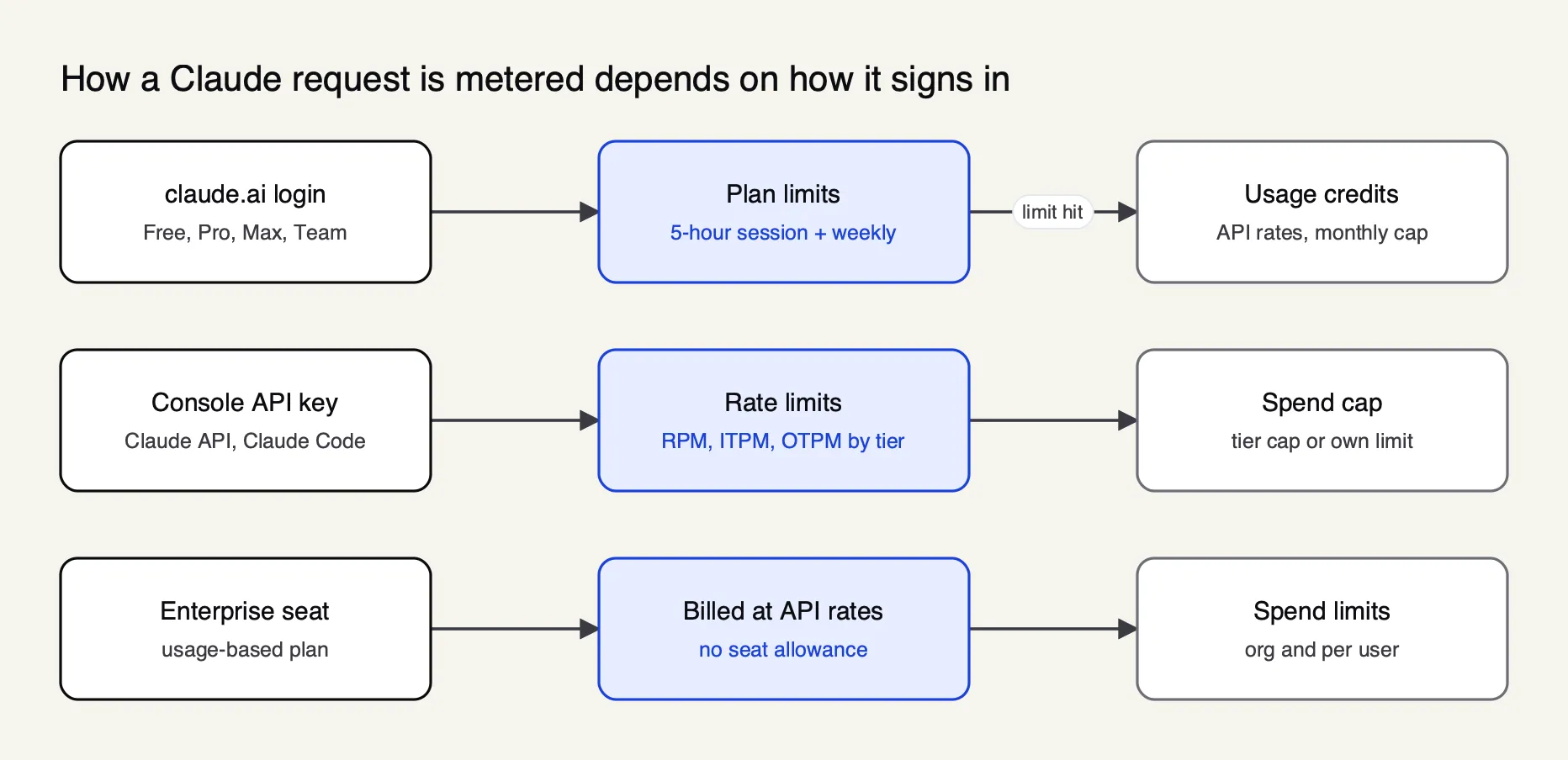 Figure 1: Subscription logins hit time-window limits, API keys hit rate limits and spend caps, and usage-based Enterprise seats hit only the spend limits an admin sets.
Anthropic also separates usage limits from length limits. The usage and length limits article defines usage limits as “quantity over time” across all conversations, and length limits as the context window that caps how long any single conversation can become. Hitting one is not hitting the other: a context-window warning is solved by a new chat or compaction, while a usage limit is solved by waiting, upgrading or paying for more.
Claude usage limits by plan
Anthropic does not publish message or token allowances for any plan. It publishes multipliers relative to other plans, a five-hour session window and a weekly window. Free covers everyday questions, Pro gives at least five times Free per session, Max gives five or 20 times Pro, and usage-based Enterprise seats carry no allowance at all and are billed per token.
The table collects what each plan page states. Prices are US list prices before tax.
| Plan | Price (US) | Per-session allowance | Weekly limit | Past the limit |
|---|---|---|---|---|
| Free | $0 | Baseline (“covers everyday questions”) | Not stated; pricing page says paid plans add weekly limits | Wait for reset or upgrade |
| Pro | $20 monthly, $17 a month billed annually | At least 5x Free | Yes, across all models | Usage credits, upgrade, wait |
| Max 5x | $100 monthly | 5x Pro | Yes, plus a separate Fable weekly limit | Usage credits, upgrade, wait |
| Max 20x | $200 monthly | 20x Pro | Yes, plus a separate Fable weekly limit | Usage credits, wait |
| Team Standard seat | $25 monthly, $20 billed annually | 1.25x Pro | Yes, per member | Usage credits enabled by the org |
| Team Premium seat | $125 monthly, $100 billed annually | 6.25x Pro | Yes, per member | Usage credits enabled by the org |
| Enterprise (usage-based) | $20 per seat a month, billed annually, plus usage at API rates | No allowance | No plan or seat limits | Spend limits set by admins |
The sources are the Pro plan article, the Max plan article and the Team plan article.
The FAQ on Anthropic’s pricing page states that Pro gives “at least 5x more usage per 5-hour session than Free”. The same FAQ describes Team seats in relative terms: Standard seats give more than Pro and Premium seats give 5x more than Standard, which matches the help center’s 1.25x and 6.25x figures.
The Enterprise plan article states that usage-based Enterprise plans have no plan or seat-level usage limits, and the pricing page lists Enterprise at US$20 per seat per month, billed annually, with a 20-seat minimum.
Three qualifications sit under the table. Team limits are per member: the Team article states that one member reaching a limit does not affect anyone else, and that allowances cannot be transferred between seats. Every individual plan page reserves the right to limit usage in other ways, such as weekly and monthly caps or model and feature usage, at Anthropic’s discretion. And Enterprise organizations provisioned before the single usage-based seat may still be on legacy Standard and Premium seats with allowances until their next renewal, according to the Enterprise billing article.
For the price side of the same plans, including what Claude Code adds and per-token API rates, The Frontier Wire’s Claude Code pricing guide sets out every tier. A separate walkthrough of Claude Pro usage limits and the usual workarounds covers the individual-plan case in more depth.
The five-hour session limit and weekly limit
Every paid plan runs two windows at once. The session limit resets every five hours; the weekly limit resets once a week at a fixed day and time assigned to the account, regardless of when the subscription started. A request is blocked when either window is full. Max plans add a third window, a separate weekly limit for Fable models.
The usage and length limits article describes this as a session limit “that resets every five hours, and weekly limits that reset once every week.” The plan pages add the detail that matters for planning: the weekly reset “stay[s] the same regardless of when you start using Claude or when your subscription begins,” and the next reset time is visible in Settings, Usage. Anthropic’s pricing FAQ describes the session window as rolling.
Both windows are shared across products. The same article states that “your usage of all different Claude product surfaces (claude.ai, Claude Code, Claude Desktop) counts towards the same usage limit,” and the Claude Code plan article extends that to Claude Code inside VS Code, Cursor and JetBrains IDEs. A developer who spends the morning in a long research chat starts the afternoon’s coding session with less headroom.
Claude Code has one documented exception at the session boundary. If the five-hour limit is reached partway through a response, Claude Code may keep working briefly to finish the step and shows “Usage limit reached · wrapping up”. The Pro and Max Claude Code article describes this wrap-up allowance as small and capped, counted against the weekly limit, available once per weekly period on Pro and at each session limit on Max, and still rolling out.
Anthropic also documents limit resets: a reset, if an account has one, restores the five-hour session limit or weekly limits to full. The plan articles mention them without stating how they are granted, so this guide does not either.
How to check Claude usage
Claude usage is checked in three places, one per meter. Subscribers open Settings, then Usage, in the Claude apps. Claude Code users run /usage. API organizations use the Claude Console’s Usage, Cost and Rate limits pages, or the Usage and Cost Admin API for programmatic access. Each shows only its own meter, so a mixed setup needs more than one.
In the Claude apps
The usage best practices article describes the Settings, Usage page for Pro, Max, Team and seat-based Enterprise plans. Its “Plan usage limits” section shows:
- Current session: how much of the five-hour limit has been used and how much time remains in the window.
- Weekly limits: when the weekly limit resets, for all models and for Fable where the plan includes it.
- Usage credits: spend against the plan’s limit when usage credits are enabled.
Usage-based Enterprise organizations have no plan limits to display, but the same article says consumption can still be tracked in Settings, Usage. Admins get more: the Enterprise billing article describes Organization settings, Usage, with month-to-date spend per member, spend-limit status, and a “Blocked by a spend limit” panel counting members blocked now, members near their limit and member-days lost this month.
In Claude Code
The current Claude Code command reference lists /usage as the command that will “show session cost, plan usage limits, and activity stats,” with /cost and /stats as aliases. The cost guide explains what the screen contains on a subscription:
- Plan usage bars for the session and weekly windows.
- Attribution of recent usage to skills, subagents, plugins and individual MCP servers, as percentages.
- Recommendations for any behavior behind at least 10% of recent usage, such as trimming a large CLAUDE.md, with an
fshortcut that applies the ones Claude Code can act on. - Loops, listing the heaviest scheduled tasks by tokens.
The breakdown is computed from local session history, so usage from other devices or from claude.ai is not included; the 24-hour and 7-day views toggle with d and w. The Session block’s dollar figure is calculated locally at list price and is meant for API users; the cost guide says subscribers can ignore it for billing and points API users to the Console for authoritative numbers.
The older Pro and Max help article still advises monitoring remaining allocation with /status. In the current command reference, /status opens a Settings tab showing version, model, account, and connectivity, which is the right place to confirm which login a session is using; the usage bars are in /usage. When a limit blocks a request, /rate-limit-options lists ways to keep working and /usage-credits opens the credit settings or, for Team and Enterprise members without billing access, sends a request to an admin.
In the Claude Console
For API keys, the Usage and Cost API documentation points to two Console pages, Usage at platform.claude.com/usage and Cost at platform.claude.com/cost. The rate limits page adds that the Usage page carries two rate-limit charts, one for input tokens with the cache rate and one for output tokens, each plotted against the current limit. The organization’s tier and limits are on the Rate limits page at platform.claude.com/usage/limits.
What uses Claude usage faster
Usage is consumed in proportion to the work Claude does, not the number of messages sent. Anthropic lists the drivers as message length, attachment size, conversation length, tool use, model choice, effort level, artifacts and multi-step tasks. The single largest factor in practice is conversation length, because every new message reprocesses the whole conversation before it.
The usage best practices article gives the full list, and each item maps to a mechanism:
| Factor | Why it consumes more usage | Source |
|---|---|---|
| Long conversations | Earlier messages are processed again with each new one; automatic context management in very long chats also “consume[s] more of your usage limit” | Usage and length limits |
| Attachments and pasted files | File content sits in context for the rest of the conversation | Pro plan article |
| Tools, connectors, web search, Research | Anthropic calls tools and connectors “token-intensive”; Research may consume tokens more quickly | Usage credits article |
| Extended thinking and effort level | Thinking tokens are billed as output tokens, and higher effort uses more tokens | Claude Code cost guide |
| Model choice | Opus “uses meaningfully more of your quota” than Sonnet; Haiku is cheapest | Claude Code usage guide |
| Agentic work in Claude Code | Subagents, agent teammates, scheduled tasks and compaction each send their own requests | Claude Code cost guide |
Claude Code makes the conversation-length effect especially visible. Anthropic’s guide states that every turn sends the conversation so far, the project context (CLAUDE.md and any files read) and the new prompt, and that “the first item grows the fastest.” A session that has read twenty files and produced fifteen diffs carries all of that on every subsequent message. The cost guide adds that the first message after a break longer than the prompt cache lifetime misses the cache and reprocesses the full context, and that agent teams use roughly seven times more tokens than a standard session when teammates run in plan mode.
Extended thinking deserves its own note. The cost guide states that it is on by default in Claude Code, that the default budget “can be tens of thousands of tokens per request depending on the model,” and that thinking cannot be turned off on Opus 5.5, Sonnet 5.5, Haiku 5.5 or the Fable models, where the lever is the effort level instead. The economics of paying for reasoning tokens are covered in The Frontier Wire’s piece on the reasoning-model cost problem.
Claude Code usage
Claude Code usage follows whichever meter its credential belongs to. Signed in with a claude.ai plan, it shares the five-hour and weekly windows with chat. Signed in with a Console key or a cloud provider, it is billed per token with no plan limit. The common surprise is an ANTHROPIC_API_KEY environment variable, which silently overrides a subscription login.
The Pro and Max Claude Code article states the override directly: if ANTHROPIC_API_KEY is set, Claude Code uses that key “instead of your Claude subscription,” resulting in API usage charges rather than the plan’s included usage. Running /status and checking the account line is the quickest way to confirm which meter a session is on.
For per-developer cost on API billing, Anthropic’s cost guide reports an enterprise average of about $13 per developer per active day and $150 to $250 per developer per month, with 90% of users below $30 per active day. Those are Anthropic’s figures across its enterprise deployments, and it recommends a small pilot to establish a baseline. The Claude Code pricing guide works through a session’s cost in detail, and an analysis of how engineering teams manage Claude Code usage limits covers the seat-planning side.
Claude Code’s own usage-reduction advice is concrete. The Claude Code usage guide lists five habits: clear between unrelated tasks with /clear, match the model to the job, point at file paths instead of pasting files, keep CLAUDE.md under roughly 200 lines, and ask for a plan before large changes. It recommends /model opusplan, which plans with Opus and executes with Sonnet.
Usage credits and extra usage on paid plans
Usage credits let a paid subscriber keep working after a limit is reached, billed at standard API rates instead of being blocked. They are prepaid, capped by a monthly spend limit the user sets, and separate from both the subscription fee and the monthly API credits that Max and Team plans include for building on the Claude Platform.
The usage credits article describes the sequence for Pro and Max. Once the five-hour, weekly or Fable limit is used up with credits enabled, requests switch to pay-as-you-go pricing and the notice changes to “Now using credits”; usage continues until the monthly spend limit or the balance runs out. Setup lives in Settings, Usage: enable credits, add a payment method, set a monthly limit or choose unlimited, prepay with “Add funds,” and optionally turn on auto-reload. Subscribers who signed up in a mobile app can only enable credits on the web.
Two related products are easy to confuse with usage credits:
- Usage bundles. Pro, Max and Team plans can prepay for credits in bundles at a discount: $50 for $45, $250 for $200 and $1,000 for $700, according to the usage bundles article. Individual plans can buy up to $2,000 of discounted bundles a month and Team owners up to $3,000.
- Monthly API credits. Max 5x includes $100 a month, Max 20x $200, and Team $20 per Standard seat and $100 per Premium seat, pooled and capped at $500, per the monthly API credits article. They are claimed into a linked Console organization and cover the Claude API, the playground, Managed Agents and the Agent SDK. They do not cover interactive Claude Code or extra usage in Claude apps, and unused credits expire each billing cycle.
On Team and seat-based Enterprise plans, admins turn usage credits on for the organization. The Claude Code cost guide states that spend limits can then be set at the organization, group or member level, and that the spend report in org analytics shows estimated spend per user and per model, updated daily, once credits are on. Usage inside the seat allowance is not metered in dollars.
Claude API usage and rate limits
Claude API usage is governed by the organization’s usage tier. Each tier sets requests per minute, input tokens per minute (ITPM) and output tokens per minute (OTPM) per model, plus a monthly spend cap: $500 on Start, $1,000 on Build and $200,000 on Scale. Organizations move up tiers automatically as they build usage history, or by requesting an increase.
The rate limits documentation states that limits are enforced at the organization level, that new organizations may start in an Evaluation tier below the standard limits, and that the API uses a token bucket, so capacity “is continuously replenished up to your maximum limit, rather than being reset at fixed intervals.” A 60 RPM limit may be enforced as one request per second, so short bursts can trigger errors below the nominal limit.
For current models the tiers read as follows, taking Sonnet 5.5 and Opus 5.5 as the example rows, which share the same figures:
| Tier | RPM | ITPM | OTPM | Monthly spend cap |
|---|---|---|---|---|
| Start | 1,000 | 2,000,000 | 400,000 | $500 |
| Build | 5,000 | 5,000,000 | 1,000,000 | $1,000 |
| Scale | 10,000 | 10,000,000 | 2,000,000 | $200,000 |
| Custom | Arranged with sales | Arranged with sales | Arranged with sales | None |
Fable models have lower limits on every tier, starting at 500,000 ITPM on Start. Two failure modes look alike and need different handling. Exceeding a rate limit returns HTTP 429 with a retry-after header. Reaching the tier’s spend cap also returns 429 with error type rate_limit_error, but without retry-after and with the code enforced_spend_limit_reached; retries fail until 00:00 UTC on the first of the next month or a tier increase. A spend limit the organization sets itself below the cap returns HTTP 400 instead.
Every response carries anthropic-ratelimit-* response headers with the limit, the remaining requests or tokens and the reset time for each limiter. Workspaces can be given lower spend and rate limits than the organization, which the workspace documentation describes as the way to stop one project from consuming another’s headroom. When Claude Code first authenticates against a Console account, it creates a dedicated “Claude Code” workspace whose spend can be capped the same way.
Teams handling 429s at scale typically add retries, fallbacks and per-team throttling in front of the API. The Frontier Wire’s explainer on rate limiting covers the algorithms, and a practitioner guide on managing Claude rate limits in 2026 applies them to Anthropic’s tiers specifically.
Tracking API usage with the Usage and Cost API
The Usage and Cost Admin API returns an organization’s historical Claude API usage and cost programmatically. The usage endpoint reports uncached input, cached input, cache creation and output tokens in one-minute, one-hour or one-day buckets, grouped by model, workspace, API key or service tier. The cost endpoint reports daily costs in US dollars. Both require an Admin API key.
The Usage and Cost API documentation lists the details that matter for a reporting pipeline:
- Endpoints:
/v1/organizations/usage_report/messagesfor tokens and/v1/organizations/cost_reportfor dollars. - Granularity:
1mbuckets up to 1,440 per request,1hup to 168 and1dup to 31. - Filters: API key, workspace, model, service tier, context window, data residency and speed.
- Exclusions: Priority Tier costs are not in the cost endpoint and must be tracked through usage.
- Freshness: data typically appears within five minutes of a request completing, and polling once a minute is supported.
The API is unavailable to individual accounts, and Claude Enterprise organizations on claude.ai use a separate Analytics API with an Analytics API key instead. For Claude Code specifically, the Claude Code Analytics API returns daily per-user metrics, including sessions, lines changed, tool acceptance rates and estimated cost by model.
Per-request numbers are also in every response. The Messages API returns a usage object, and Anthropic’s prompt caching page notes that input_tokens counts only tokens after the last cache breakpoint, so total input is the sum of cache_read_input_tokens, cache_creation_input_tokens and input_tokens. For estimates before sending, the token counting endpoint is free to use, subject to its own requests-per-minute limit. A general primer on tracking token usage covers the same fields across providers.
Prompt caching and Claude usage
Prompt caching lowers Claude usage on both meters. In the apps, content stored in projects is cached and “counts less against your limits when reused.” On the API, cache reads are billed at a fraction of the input price and, for most current models, do not count toward the ITPM rate limit at all, which raises effective throughput without a tier change.
The cache-aware ITPM section of the rate limits page gives the rule and an example. Uncached input_tokens and cache_creation_input_tokens count toward ITPM; cache_read_input_tokens do not, except on Claude Haiku 3.5. With a 2,000,000 ITPM limit and an 80% cache hit rate, an organization “could effectively process 10,000,000 total input tokens per minute.”
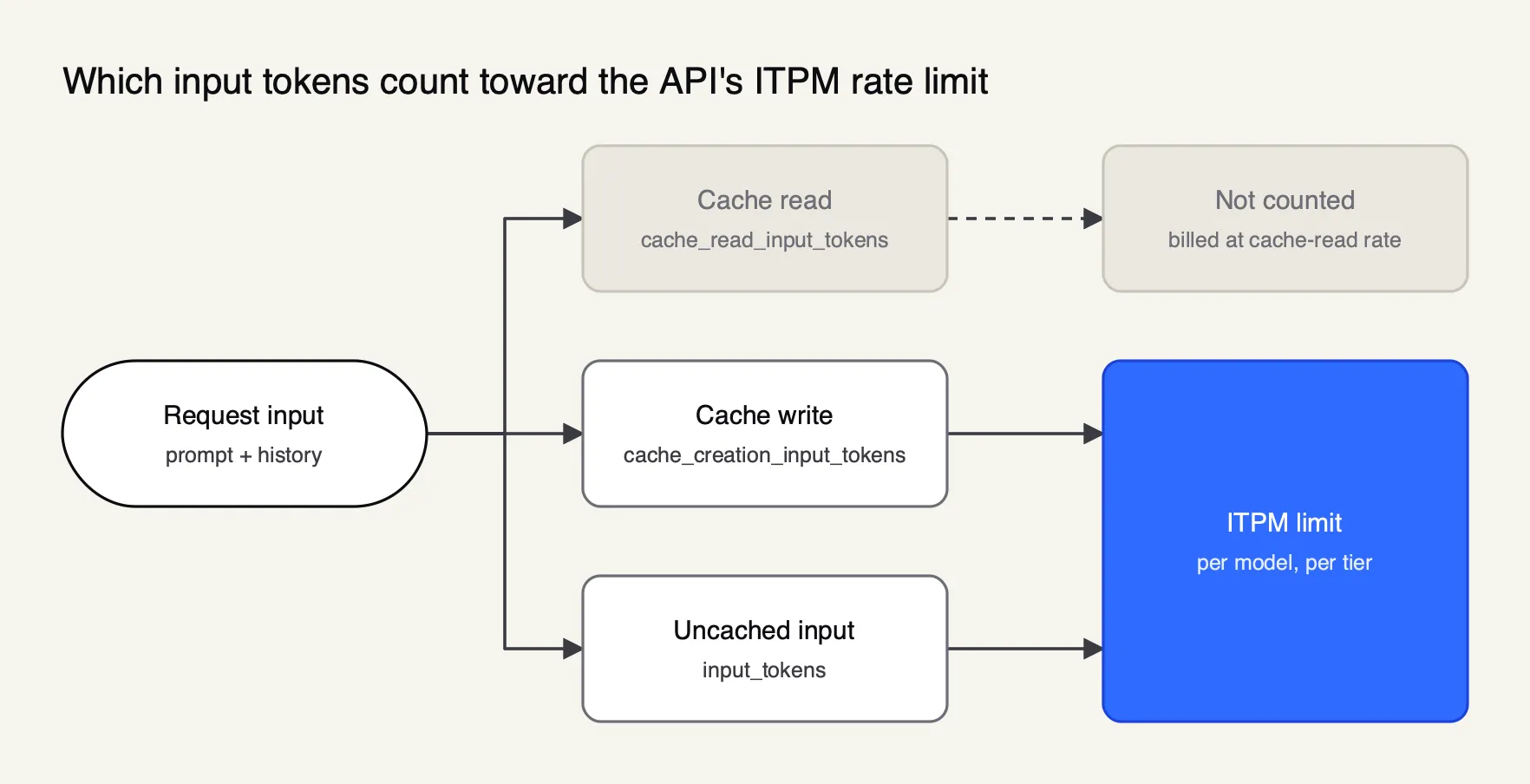 Figure 2: On most Claude models, tokens read from the prompt cache are billed at the cache-read rate and do not count toward ITPM.
The prompt caching documentation sets the price multipliers: five-minute cache writes cost 1.25 times the base input price, one-hour writes cost twice the base price, and cache reads cost 0.1 times the base price, with lower read rates stated for some newer models. The default lifetime is five minutes, refreshed at no cost each time the cache is used. That lifetime is why the first message after a break costs more: in the apps, the best practices article notes that a project revisited after a long break counts its content in full again, and in Claude Code the /usage Session block now reports cache hit share, misses and whether the cache is warm.
The Frontier Wire’s prompt caching guide covers breakpoints and cache invalidation, and its comparison of prompt caching and semantic caching explains when a gateway-level cache can remove calls entirely rather than discounting them.
Practical ways to stretch Claude usage
The habits that stretch Claude usage all reduce the tokens processed per turn: shorter conversations, fewer attachments, cheaper models for routine work, lower effort where reasoning is not needed, and reuse of cached content. Anthropic’s own help articles converge on the same short list for the apps, Claude Code and the API.
For the Claude apps, drawn from the best practices and length limits articles:
- Start a new conversation for a new topic instead of extending a long one.
- Put documents used more than once into a project, where they are cached.
- Batch related questions into one message and include context up front.
- Turn off extended thinking, lower the effort level, and disconnect unused connectors and web search when a task does not need them.
For Claude Code, from the cost guide:
- Run
/clearbetween unrelated tasks and/compactwith focus instructions mid-task. - Use Sonnet by default, Haiku for subagents doing simple work, and Opus for planning only.
- Move workflow-specific instructions from CLAUDE.md into skills, which load on demand.
- Prefer CLI tools over MCP servers where both exist, and disable unused servers with
/mcp. - Use hooks to filter long test or log output before Claude reads it.
For the API, cache stable prefixes such as system prompts and tool definitions, route asynchronous work to the Message Batches API, which Anthropic prices at a 50% discount, and choose the smallest model that passes evaluation. The Frontier Wire’s LLM API pricing comparison lists current per-token rates for that choice.
Tracking Claude usage across an organization
An organization using Claude through several routes has no single usage view. Subscription seats report in claude.ai admin settings, Console keys in the Console, and cloud-provider traffic in each cloud’s billing console. Anthropic’s documentation names three ways to unify per-user attribution: OpenTelemetry export from Claude Code, its self-hosted Claude apps gateway, and a general LLM gateway.
The cost guide’s section on cloud providers describes each. OpenTelemetry export streams per-user token and cost metrics from every developer’s machine into an existing observability stack. The Claude apps gateway gives per-user attribution and spend limits for Claude clients on Bedrock, Google Cloud’s Agent Platform and Microsoft Foundry. An LLM gateway tracks spend per key across all traffic; Anthropic notes that several large enterprises reported using LiteLLM for this, while flagging that it is unaffiliated with Anthropic. The Frontier Wire’s guide to LLM cost control at the gateway compares budget hierarchies across these approaches.
A gateway example: Bifrost
Bifrost, an open-source AI gateway written in Go by Maxim AI (source on GitHub), is a useful worked example because its documentation covers a case the others leave open: keeping subscription billing while adding gateway attribution. Its Claude Code guide describes a mode in which a developer signs in with /login on a Pro, Max, Team or Enterprise plan and sends a Bifrost virtual key in an x-bf-vk header through ANTHROPIC_CUSTOM_HEADERS. Bifrost forwards the subscription token to Anthropic and uses the virtual key for governance and logging. The guide is explicit that subscription usage limits still apply.
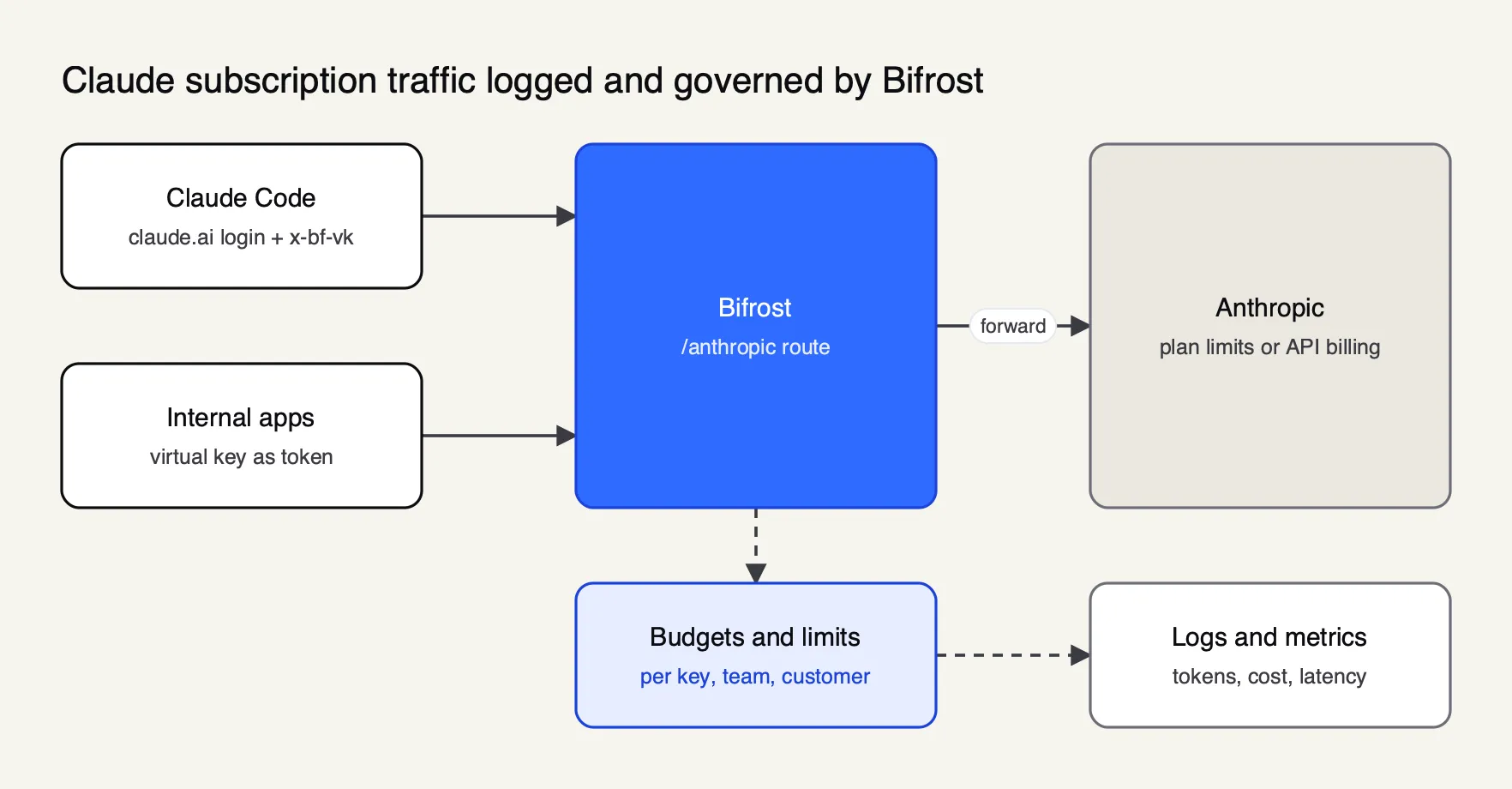 Figure 3: In subscription mode the gateway adds per-key attribution and logs, while Anthropic’s plan limits still decide when a developer is paused.
For API-key traffic, the budget and limits documentation describes request and token rate limits at the provider-config, virtual-key, team and customer levels, with budgets that reset daily, weekly, monthly, quarterly or yearly and can align to calendar boundaries in UTC.
Every request is logged with inputs, outputs, tokens, cost and latency by the built-in observability plugin, and the Prometheus exporter publishes bifrost_input_tokens_total, bifrost_output_tokens_total and bifrost_cost_total for dashboards. The same guide’s verification step uses Claude Code’s /status to confirm the base URL points at the gateway.
The gateway covers 25+ providers and 10,000+ models through one OpenAI-compatible API, so one budget hierarchy can span Claude and other models. Its published benchmark reports 11 µs of overhead at 5,000 RPS on an AWS t3.xlarge. Enterprise tier. Enterprise SSO sign-in through the Bifrost CLI, which attributes each request to the signed-in user, is part of Bifrost Enterprise; virtual keys work in both the open-source and Enterprise editions.
Comparisons of gateways for monitoring Claude Code token usage and of approaches to tracking LLM spend by team cover the alternatives side by side, and The Frontier Wire’s ranking of gateways for Claude Code, Codex and Cursor scores five of them.
Limits of this guide
Every figure here comes from Anthropic’s help center, pricing page and documentation as read on 21 October 2026, and Anthropic revises plan limits often. It publishes ratios and window lengths, not message or token allowances, so the absolute size of a Pro session cannot be stated from public information. The Free plan’s weekly limit is not documented separately, and how limit resets are granted is not described. Pricing excludes tax and varies by region and app store. Anthropic’s per-developer cost averages are its own figures and were not reproduced.
The practical conclusion is to treat Claude usage as three meters and read each at its source. Subscribers should watch Settings, Usage and /usage, and check /status before assuming a session is on the plan. API teams should read the rate-limit headers, separate spend-cap 429s from rate-limit 429s, cache stable prefixes and pull the Usage and Cost API into their own reporting. Organizations running several routes at once need a layer that sees all of them, whether that is OpenTelemetry, Anthropic’s Claude apps gateway or an LLM gateway in front of every call.
Sources
- Claude Help Center: How do usage and length limits work?
- Claude Help Center: Usage limit best practices
- Claude Help Center: What is the Pro plan?
- Claude Help Center: What is the Max plan?
- Claude Help Center: What is the Team plan?
- Claude Help Center: What is the Enterprise plan?
- Claude Help Center: How am I billed for my Enterprise plan?
- Claude Help Center: Use Claude Code with your Pro or Max plan
- Claude Help Center: Models, usage, and limits in Claude Code
- Claude Help Center: Manage usage credits for paid Claude plans
- Claude Help Center: Buy usage bundles
- Claude Help Center: Monthly API credits for Max and Team plans
- Claude Help Center: How do I pay for my Claude API usage?
- Anthropic: Claude plans and pricing
- Claude Code docs: Manage costs effectively
- Claude Code docs: Commands
- Claude API docs: Rate limits
- Claude API docs: Usage and Cost API
- Claude API docs: Workspaces
- Claude API docs: Prompt caching
- Claude API docs: Token counting
- Claude API docs: Claude Code Analytics API
- Bifrost source repository (GitHub)
- Bifrost docs: Claude Code
- Bifrost docs: Budget and limits
- Bifrost docs: Built-in observability
- Bifrost docs: Prometheus metrics
- Bifrost docs: Benchmarks on t3.xlarge
Questions readers ask
How do I track my usage on Claude?
On a Pro, Max, Team or seat-based Enterprise plan, open Settings, then Usage, in Claude. It shows progress bars for the current five-hour session and the weekly limits, when each resets, and any usage-credit spend. In Claude Code, the /usage command shows the same plan bars plus a breakdown of what consumed them. API usage appears on the Usage and Cost pages of the Claude Console and through the Usage and Cost Admin API.
Are Claude's usage limits changing?
They can. Anthropic's plan pages state that, to manage capacity, it may limit usage in other ways, such as weekly and monthly caps or model and feature usage, at its discretion, and that prices and plans are subject to change. Anthropic does not publish a fixed message count for any plan, so the reliable source for an individual account is the Settings, Usage page.
Do Claude chat and Claude Code share the same usage limit?
Yes. Anthropic's help center states that usage of claude.ai, Claude Code and Claude Desktop counts toward the same usage limit, and that Claude Code in supported IDEs draws from the same pool. A long chat session can therefore leave less room for coding in the same five-hour window, and the reverse.
Can I use the monthly API credits from Max or Team in Claude Code?
No. Anthropic's help center states that the monthly API credits included with Max and Team plans cover the Claude API, the Console playground, Claude Managed Agents and the Agent SDK, and do not cover interactive Claude Code or extra usage in Claude apps. Usage past plan limits in Claude Code draws on separately purchased usage credits.
Do cached tokens count toward Claude API rate limits?
For most current Claude models, no. Anthropic's rate limit documentation states that only uncached input tokens and cache-write tokens count toward the input tokens per minute limit, while cache reads are billed at the cache-read rate and do not count. Claude Haiku 3.5 is the stated exception.